Namecheap

Friday, 28 November 2014

4 Reasons Micro Niches Are Perfect For Newbies


In the previous article of this series, we covered what a “micro niche” is.

There are MANY reasons why micro niches are the perfect place for newbies to get started making money online.

If you’re struggling to make money online, consider these four solid reasons why you should be starting with a micro niche:

Most Micro Niches Have Little Competition

Tell me if you’ve heard this piece of “wisdom” from the internet marketing gurus: only enter markets where there’s competition – because if there’s competition, then you know there’s money to be made in that market.

There’s one word that describes how I feel about that advice:

Garbage!

(Or “Rubbish!” as our friends in the UK would say. I love that word.)

I currently advertise in one micro niche where there’s NO competition. For many keywords I’m the only advertiser on the search results page. And I pay an extremely low cost-per-click – around $0.15, which is unheard of for paid search advertising.

I started in that micro niche several years ago, and I still make between $500 and $1,000 a month on autopilot – and I only need to work on it about an hour a month.

(I’ll be revealing that micro niche to you in a future post. But here’s a hint in the meantime: have you heard the song “Old MacDonald”?)

Here’s the #1 reason why less competition is important for you, if you’re a newbie internet marketer: because it means you can taste success quicker.

And when you taste success by making your first sale (or achieving your first $1,000 month, or first $10,000 month), you’ll feel a wonderful sense of accomplishment, and have the motivation to keep building.

Micro Niches Are Easier to Rank in the Organic Search Results

Unlike paid search results, you can’t buy placement in the organic search results – you have to follow the rules of the search engines (i.e. Google) and hope that they will “rank” your site on the first page when a person types in your target keyword.

The higher your site shows up on the page, the better, because most people don’t look (or click) below the first few websites on the page.

As you might expect, it can be easier to get a micro niche website to rank higher in the organic search results – because the site has less competition. That’s especially the case if you build a micro niche site that has lots of useful, original content that other site owners find valuable and link to.

Paid Advertising Costs Are Lower in Micro Niches

As I mentioned about one of my own micro niche sites, it can cost much less to buy clicks to a micro niche website.

This is a simply a case of supply-and-demand. With fewer advertisers, you’re going to be paying less per click.

And when your ad does show up on the search results page (or on a display network website), it will be surrounded by fewer competing advertisers.

You might not be thinking about paid advertising at this point. But once you’ve identified your micro niche and found a quality affiliate product to promote (or better yet, created your own product), you’ll want to scale your traffic fast – and that can only be done with paid advertising.

It’s Easier to Find Out Your Audience’s Needs in a Micro Niche

I really should have mentioned this one at the beginning – because it’s crucial to every aspect of an online business (or offline business, for that matter).

Deeply understanding the needs, pain points, desires, and aspirations of your micro niche audience is absolutely critical to your success.

If you’re like most marketers, you’ve heard that before someone will buy from you, they need to “know, like, and trust” you.

You can only get your prospects to do that by talking to them in their own language and showing you understand where they’re coming from. In other words, you need to do some niche research.
And researching one small, targeted micro niche is a heck of a lot easier than trying to get an understanding of a large, diverse market.

Stay tuned for the next article in this series – I’ll be describing the step-by-step niche research process I use to find a niche for profit AND passion!

http://www.clickbank.com/blog-posts/strategies-for-success/micro-niches-4-reasons-theyre-perfect-for-newbie-affiliates-and-vendors-part-2/

Are You Struggling with Affiliate Marketing?

This article is for you if:
  • You’ve been struggling to make money online
  • You feel like you’re suffering from “information overload”
  • You’re starting to get a sinking feeling that this whole “make money online” thing is a scam
In this article I’m going to introduce you to a new approach to making money online – an approach that involves less competition and less stress than what you’ve seen before.

The approach I’m talking about is focusing on “micro niches”.

What the heck is a “micro niche”, you say? Well I’m glad you asked…

What Exactly is a “Micro Niche”?

Let’s start out with what a “niche” is. Simply put, a niche is a segment or piece of a market.

A “micro niche” is an even smaller piece, or segment, of a niche.

Confused yet?

Let’s jump into an example to make things clearer:

A Concrete Example of a Micro Niche

Have you heard of this thing called “physical fitness”? It’s pretty popular these days. The physical fitness market is huge.

But if you started a blog on “physical fitness”, you wouldn’t get very far.

Why?

Because the topic is so general, you’d have a hard time figuring out who your target audience is, and what to write articles about. You’d be like a ship without a rudder.

But say you decided to start a blog on one angle of physical fitness: yoga exercises.

Now we’re talking! But that’s still a pretty big niche. If you chose to start a website on yoga exercises, you might face pretty stiff competition.  When I type the term “yoga exercises” into Google, I get over 16 million results.

Yikes! It would be pretty hard to rank a website in Google with that many competitors.

Now this is where the “micro niche” concept comes in handy. When considering whether or not to get into the yoga exercises market, we want to get even more granular. Are there any smaller “pieces” of the yoga exercises niche?

There certainly are. A quick search in the Google Keyword Planner will show you a bunch of micro niches within the larger “yoga exercises” niche:
  • Yoga for weight (50,060 searches per month)
  • Kids yoga (29,620 searches per month)
  • Yoga for back (12,580 search per month)
  • Yoga for veterans (now there’s a micro niche!)
But it gets even better. As you can see above, the term “yoga for weight” gets over 50,000 searches per month. That’s a lot of people who want to lose weight by doing yoga. But you can “niche it down” even further.

When I type “yoga for weight” into the Google Keyword Planner, I see that there are dozens more niches that are even more “micro”: yoga for weight loss at home, yoga for weight loss for women, bikram yoga for weight loss, yoga to lose weight fast.

So what would happen if you were to choose one of these even smaller micro niches and focus only on serving that market?

You’d be doing much better than other newbie affiliates and vendors, that’s what.


http://www.clickbank.com/blog-posts/strategies-for-success/micro-niches-the-solution-for-struggling-affiliates-and-vendors/

Wednesday, 26 November 2014

35 Tools You Can't Blog Without


Don’t you wish there was an easier way to blog? From coming up with ideas to writing and promoting, there is a lot that goes into content marketing.

So, how can you facilitate the whole process?


You can use a number of tools that can help you generate ideas, make the writing process easier, and even market your content for you.

Here are 35 of them:

Tools for Content Discovery

Before you can start writing, you need to come up with ideas, ideally ones that will be popular.
  1. Quick Sprout – if you put in a competitor URL on the home page of Quick Sprout and then click on the “social media” tab, you will see a breakdown of the most popular content your competitor has written. This should help you generate some ideas.
  2. Buzzsumo – type in a word or a phrase, and Buzzsumo will show you the most popular posts around the web that contain that phrase.
  3. Portent – if you are struggling to come up with a cool idea or title, just type in a keyword on Portent, and it will generate catchy titles for you.
  4. Quora – this is a great place to look if you need some inspiration. People ask questions in every industry, and Quora will help you spot the hot ones.
  5. Google Trends – the last thing you want to do is blog on a topic that isn’t popular. Google Trends will point you in the right direction as it shows search volume for different keywords and phrases.
  6. Alltop – not every blog is worth following. Alltop ranks and organizes the top blogs around the web so you can see what others are writing about.
  7. Twitter – most people use Twitter for distribution, but I also use it to see what’s trending.
  8. Pulse – LinkedIn created a product that is like an RSS feed. It allows you to subscribe to specific topics and interests so that you know what is being discussed.
  9. Evernote – as a blogger, you’ll eventually have more ideas than time. With Evernote, you can keep track of all your ideas.
  10. Trello – the more organized you are, the smoother the content marketing process will be. Trello is a great place to organize all of your ideas.
Once you have figured out what to blog on, the next step is for you to start writing.

Tools for Writing

If you use the tools below, you’ll find that not only will you write better but you’ll also be able to create content faster.
  1. Google Docs – instead of blogging in WordPress, consider writing your content first in Google Docs. It will help you spot grammar and spelling issues, plus you can collaborate with others when you need help.
  2. Wunderlist – if you want to write list-based posts, check out Wunderlist. It makes it easy for you to create lists on everything.
  3. Meme Generator – who said creating funny images is hard? With a few mouse clicks and keyboard strokes, you can start generating memes in minutes on Meme Generator.
  4. Visual.ly – infographics don’t have to be expensive. Visual.ly will help you create your own.
  5. Infogr.am – graphs and pie charts don’t have to be ugly anymore. You can now create pretty ones that generate social shares.
  6. Skitch – from screen captures to quick photo edits, Skitch is a simple photo editing tool. It may not have as many features as Photoshop, but it is much easier to use.
  7. Uberflip – sometimes you’ll want to create ebooks or PDFs on your blog. Uberflip is a simple tool that will allow you to do so, plus it gives you stats that show you how popular your content is.
  8. TinyMCE – if you prefer blogging within WordPress, this tool will ensure you are using correct grammar and spelling.
  9. Text Broker – ideally, you should be writing your own content, but if you don’t have the time, Text Broker can take care of the writing process for you.
  10. Problogger Job Board – similarly to finding help on Text Broker, you can find freelance writers on Problogger.
  11. Shareist – from capturing content around the web to embedding links and videos, Shareist helps with the whole content marketing cycle. It’s a platform made for small and medium businesses.
  12. Kapost – if you want a tool that does everything, Kapost is worth checking out. It’s worth using if you need help with scheduling and writing, but it can do much more than that.
  13. Editorial calendar – once you get the hang of blogging, you’ll want to use a content calendar to organize publishing of your posts. This will help you spot holes and figure out how often and when you should be blogging.
Now that you’ve nailed down the writing process, it’s time to focus on distribution.

Tools for Distribution

Promoting your content doesn’t have to be hard. There are a lot of tools you can use to help you out.
  1. Yoast – search engines are a great source of traffic. Yoast will optimize your blog for you so that you can maximize your rankings.
  2. Buffer – pushing out your content to all of the social sites can be a pain. But with Buffer, you can do so with just one click.
  3. Click to tweet – by making quotes and phrases within your content tweetable, you will get more social traffic. When I tested this out on Quick Sprout, I was able to generate 26% more tweets.
  4. Tweroid – your followers may not be online when you are tweeting. Tweroid will help you determine the optimal twitting time to get the most exposure.
  5. Slideshare – why not turn your content into a presentation? Submitting your content to Slideshare in a presentation format is a great way to get extra traffic and more branding.
  6. Outbrain – if you want to generate more traffic, Outbrain is a good source for cheap traffic. For a few cents a click, you can get more people reading your blog.
  7. Flare – social sharing buttons don’t have to be ugly. Flare lets you take control of the way your sharing buttons look, plus it tells you the number of clicks they get.
  8. GetResponse – email is the best way to generate traffic to your blog. Through GetResponse, you can start collecting emails on your blog and then do an email blast to your list every time you publish a new piece of content.
  9. Google Webmaster Tools – if you want to know where you rank in the search engine results, this is the only tool you need. You can then take the keywords that rank on page one, build some links to them, and increase your rankings.
  10. LinkedIn Groups – one of the simplest ways to get more traffic is to submit your content to LinkedIn groups. Join groups that have over 100,000 members and are in spaces related to yours. Submit your content, and watch your social traffic grow.
  11. Audience Bloom – these guys have an internal tool that helps companies get guest posts. They only charge you when their tool helps you land a guest post from relevant sites. It’s a great way to increase your referral traffic and gain new readers to your blog.
  12. Google Blog Search – through Google’s blog search, you can find relevant blogs within your industry. Once you find a handful of blogs, read their content, and start commenting, providing great information. This will help drive people back to your blog, which will increase your readership.

Conclusion

Content marketing isn’t rocket science. The tools I mentioned above will make it easier for you to generate ideas, write articles, and promote your content.

I’ve tested all of them, and they’ve helped me with the whole content marketing process. Best of all, they help me save hours each week, which allows me to either focus on other marketing initiatives or write more content.

Thursday, 20 November 2014

6 Reasons Why Social Media Isn't Working For Your Business


Are you struggling to make social media work for your small business?

Still not convinced it’s the right place to be?

Although most small businesses believe social media can be an effective marketing tool, very few understand how to master it.

This translates into an ineffective strategy that ends up hurting rather than helping business growth.
So where are you falling down within your use of social media?

Below are six reasons social media isn’t working for small business and solutions to help you build meaningful connections and gain new customers.

Why Social Media Isn’t Working (and how to fix it)


1. You’re a Number Collector


As much as many companies would like to believe that social media is just a numbers game, the truth is the complete opposite.

While chasing fan and follower count might seem logical — the larger the number the bigger your reach — it’s counter-intuitive to the true value within social media.

If you want to establish meaningful connections, you must get into the conversation and stop worrying about the numbers.

Whether you’re looking to connect with peers, influencers or consumers, the fastest way I know how to establish rapport is through relationship building.

And guess what? There’s no magic in it. You don’t need special tools or fancy skills. All you need is the willingness to get to know people.

I challenge you to find five people each day that you can reach out to.

Here are a few ways to do that:

  • Ask a question
  • Share a story
  • Talk about a shared interest
  • See how you can lend a helping hand
  • Be kind and encouraging
The key is to not only learn more about your audience, but also gain valuable insight into what makes them tick. Your goal is to be a relationship builder, not just a number collector.

As Dale Carnegie said,
“You can make more friends in two months by becoming interested in other people than you can in two years by trying to get other people interested in you.”

2. No System to Keep in Touch


If I asked you how you were monitoring your social media mentions, would you have an answer? And if so, could you tell me how to quickly respond in real-time?

With 70 percent of U.S. households now using the Internet to shop for local products and services, can your business afford to be absent on social media? The obvious answer is no.

Not having a system in place to stay in touch across your social channels can (and most likely will) adversely affect the very relationships you are working to build.

Sound complicated? It doesn’t have to be.

Use a tool like Sprout Social and their Smart Inbox to monitor what’s being said in and around your business. A quick reply goes a long way when looking to establish camaraderie.


sprout social smart inbox


3. No Value Proposition


Your social media connections are looking to learn more about you. They want to know what you have to offer. They want to know your value proposition.

So, what is a value proposition? As explained by Wikipedia,
“A value proposition is a promise of value to be delivered and acknowledged and a belief from the customer that value will be appealed and experienced.”
Now knowing that, could you tell me what you do or how you help people? And if so, would  your answer be short, clear and concise?

Not only should you be able to articulate your value easily, but also in a way that makes sense to your audience.

A Quick Way to Identify Your Compelling Value Proposition

Take a look at your business through the eyes of your consumer and answer a few questions.
  • What are you offering your audience that changes their lives for the better?
  • What does your product or service do to enhance or improve their current situation?
  • What key problem(s) are you solving?
  • Is your product or service unique and compelling?
I guarantee that if you can clearly communicate your value, you will inspire engagement and ultimately encourage sales.

4. Lack of a Unique Personality


When was the last time you looked at your social media accounts? If your answer was never, then it’s time for a review.

Analyze your bio, tweets and posts. How would you view this content if you were a potential client?

Are the mission, vision and values of your business clearly stated? Have you taken the opportunity to create your own unique persona or are you a cookie-cutter clone of your competition?

Whether you’re shy or concerned about taking a stand, don’t be afraid to put yourself out there. 

People bond with people, not businesses. In order to create better connections, you need to humanize your business.

You do this by injecting personality into the online life of your business. Take all of the offline goodness that makes your business special and translate it into a vibrant online persona.

As Guy Kawasaki says,
“The goal is to provide inspiring information that moves people to action.”
To better understand what differentiates you from the competition and encourage your audience to take action, answer a few questions.

KEYS TO DIFFERENTIATION

  • What are you passionate about and what could you talk about all day long?
  • What’s your specialty?
  • What is your top skill or unique ability?
  • What do you excel at?
  • What makes you stand out from the competition?
  • What pain, need or concern can you solve for potential clients?


5. No Commitment to Consistency


Want to create better connections? Stop posting sporadically.

Commit to showing up when and where your customers are spending their time online. That commitment builds trust. It also establishes a professional, reliable and credible online presence.

It’s no secret that small businesses rely on repeat customers and referrals. In fact, according to Constant Contact,
82% of small business owners say their main source of new business is referrals.
Based on that, doesn’t it make sense to commit to a consistent social media strategy that raises business awareness and allows for improved customer perception?

Put a plan in place that makes posting, commenting and connecting quick and easy.

Here’s where to get started:


6. Following a One-Size Fits All Strategy


Before you even begin to market you small business using social media, you need to do two things. 

First, figure out where your target audience is hanging out and secondly, determine what content they’re looking for on each social network?

Since all social media platforms have distinct cultures of their own, your small business needs to optimize content and conversation for each.

For example, if you’re a local bakery, your Facebook following might appreciate special offers they’ll only find on your page. On the other hand,  your Instagram and Pinterest followers might want pictures of your delicious treats along with recipes and a glimpse into your kitchen.

To determine how you’ll share content across each social network, look at the who, what, when, where, why and how.

How can you do that?

Here’s how to break it down in your business:


  • Who: Who’s problem are you solving on each social network and who will be connecting with your content?
  • What: What’s your best content that will solve that unique challenge?
  • When: When are your fans and followers spending their time on each of your social channels?
  • Where: Where will all of the content you share come from? Is it pre-existing or will you need to create it?
  • Why: Why does solving this problem(s) make a difference in the life of your potential client?
  • How: How is your product or service a benefit and how will you translate that across each specific social network?


Final Thoughts


If you want to build a reputable business through the power of social media and lend credence to your claim as an authority figure, you must commit to staying at the forefront of your consumers mind.

Just know that establishing a solid social media presence won’t happen overnight. It also won’t provide instant results. It takes time, practice and consistency.

While there’s no one-size fits all solution to social media, there are proven strategies that can help you embrace its benefits.

Potential clients are actively looking for what your business has to offer. If you’re not leveraging social media to put your product or service in the palm of their hand,  your competition is.

http://rebekahradice.com/reasons-social-media-isnt-working-small-business/

Tuesday, 18 November 2014

10 Socal Media Tools Every Small Business Needs

social media tools

As a busy small business owner, keeping up with social media can feel like a never-ending battle.
From content creation to the curation of relevant articles, maintaining a consistent presence takes more time than you have in your day. So, how can you remain interactive while still running your business?
That’s where the right tools come in!  While there’s a plethora of tools available, I have found a handful to be invaluable.
If you’re eager to add a few hours to your day while improving your productivity, read on for my top ten must-have social media tools!

Social Media Management


1. Sprout Social

Sprout Social is my daily go-to management tool. With Sprout, you can monitor, track and update your social media presence in one location.
This tool has the ability to automatically schedule updates across multiple social platforms and acts as a curation tool, pulling content from your Twitter lists or favorite RSS feeds.


sprout social smart inbox


2. Buffer

Buffer is my other daily tool that I couldn’t live without. Buffer allows you to schedule your social network posts easily, creating queues of content in the leading social media platforms.
As you read content you’d like to share, add it to your Buffer account from your browser or mobile device where it will automatically post based on your pre-determined schedule.

Data Analysis


3. Followerwonk

Have you wondered when your community is spending their time online? Would you like to know when your tweets will receive maximum exposure?
Followerwonk takes the mystery out of your best time to tweet. Not only will it analyze your followers, but will then determine your best time to tweet and then automatically sync that schedule to your Buffer account.

4. Simply Measured

Whether you’re looking to increase exposure on Twitter, Instagram, Facebook, Google Plus, LinkedIn or Vine, Simply Measured has you covered.
Simply Measured offers multiple free reports that will analyze your accounts, helping you put your content in front of the right people at the exact right time.


simply measured

Research


5. BuzzSumo

BuzzSumo is an amazing search tool that allows you to get inside the head of your consumer, research current content or identify top competitors.

Whether you’re researching content for your latest blog post or tracking your competitors, BuzzSumo will give you insight into popular content and the shared sentiment.

6. SEMRush

Another incredibly helpful tool is SEMRush. Want to better understand what keywords you’re ranking for or how consumers are finding your competitions website? Use SEMRush to gain insight into competitors, both real and perceived, and the opportunities around them.

Content Curation


7. PostPlanner

Have you ever found yourself struggling to find content to share? No matter the social platform, finding meaningful content that’s interesting to your audience can be a challenge.

That’s where PostPlanner comes in! Integrated directly within Facebook, PostPlanner does the heavy lifting for you. They identify popular content across Facebook and curate it right into your PostPlanner account where you can quickly and easily schedule across any of your managed Facebook Pages.


post planner


8. Swayy

I’ve used Swayy for quite some time and truly appreciate the personalized content it delivers. By linking your Facebook, Twitter and LinkedIn pages, you will be able to see top trending content within your community.

This is content your audience is interacting with, as well as suggested content that you can post directly to your social profiles.


Graphic Design


9. Canva

Nowadays, social networks are becoming more visual, but how can you come up with visual content without Photoshop skills?  There are two tools that solve this problem.

Canva is an ideal solution for any businesses in need of making their social media posts more visual; without the need of a graphic designer or spending too many hours trying to create a design of your own.

10. PicMonkey

Like Canva, PicMonkey will help you ensure that your images are professional and branded to your business. Upload your graphic and then turn an otherwise boring picture into your masterpiece.

http://curatti.com/social-media-tools

Friday, 14 November 2014

14 Ways to Make Your Twitter Updates More Creative

Are you looking for creative ways to improve your Twitter updates?

Do you want to spark better conversations with your followers?

Coming up with interesting content ideas for tweets can be challenging for social media marketers.

In this article I share 14 ways you can achieve more engagement with your Twitter audience.


Find 14 ways to publish more creative Twitter updates.

#1: Questions


Tweet out a straightforward question that’s easy to answer and you’ll likely see a jump in engagement.

When questions are short and simple, it’s easy for followers to respond because they don’t need to spend a lot of time thinking about their answer or trying to fit a longer reply into 140 characters (or fewer if there’s a hashtag).


Fill-in-the-blank tweets encourage engagement.


Fill-in-the-blank tweets get your followers thinking and challenge to them to show their creative side.

The key to making fill-in-the-blank tweets work for your company is to make them relatable to your followers’ interests.

Another option is to ask followers to choose between two things. For example, ask Instagram or Pinterest? Cookies or chips? Coffee or tea? You get the idea.


Asking fans to pick one or the other is a quick way to get retweets.

To reach an even wider audience—and gain more engagement—ask your fans to retweet if they like the first choice or favorite the tweet if they like the second choice.


#2: Product Photos


While you want to mix things up, it’s definitely OK to tweet about your products. It’s one of the main reasons you registered a Twitter account, right? The problem is that people see products everywhere!

To break through the noise, stay away from simply posting a corporate photo of your product.

Instead, think about how you can include your product in different scenarios. Imagine what your product looks like in real life, how people use it, where they put it, etc.


Be creative and add different perspectives of your product on Twitter.

Take the opportunity to be creative and add perspective to your product. Twitter is a very human platform, so you will need to adapt your product photos.


#3: Videos


Did you know Twitter allows you to tweet rich media? People sometimes forget they can share video on Twitter.

What I love about video on Twitter is that followers can watch without leaving the platform.


Users can watch videos without leaving Twitter.

Videos are a good way to share your thoughts on a topic, give followers a behind-the-scenes look at your company or present a short product tutorial. They’re also a great way to launch a new product.


#4: Slide Decks


It can be hard to convey meaty content in 140 characters. Sharing slides solves that problem. Now you can tackle just about any topic and spur conversation.

And since your followers don’t have to leave Twitter to view your slides, it’s easy for them to comment or retweet after they’ve gone through your deck. Deeper conversations are a great way to build relationships.


Your followers can go through your SlideShares without leaving Twitter.


What kind of slides should you share? The options are endless. Let’s say you’re a new cafe that takes pride in how you make your coffee. You could create a beautiful slide deck about how to brew that perfect latte, what beans you use and why you heat your milk to 140° instead of that tongue-burning 158°.


How did I come up with that example? I’m pretty sure I read a slide about it!


#5: Reviews and Testimonials


Retweeting public accolades from real customers provides social proof for you. Those reviews and testimonials help you build trust and help prospects overcome any skepticism they may have.


Retweeting your followers’ testimonial tweets helps build trust.


One thing I like about retweeting testimonials is that it shows that you’re paying attention to your customers and appreciate their compliments and contributions.


#6: Other People’s Content


Sharing is caring! Retweeting is one of the easiest ways to update and it benefits both parties involved: You create relationships and they’re exposed to a wider audience.

I like to say, “Retweet someone once, they will notice you. Retweet someone a few times, they will remember you.”

#7: News


Twitter has become a major source for staying current with news and trends. In fact, many people rely on Twitter for their news updates (including me).

If you’re the one providing that news or retweeting it, people begin to view you as an important resource.


Sharing useful content helps you build credibility.


There’s no Twitter algorithm to control how links and news appear in your Twitter stream, so the faster you can provide news or event updates, the better.


#8: Your Thoughts


Do you have recurring thoughts about a topic? Do you have ideas about your industry? Share them with your followers. You’ll be surprised how many of your followers have the same thoughts as well.


Sharing your thoughts is an effective way to spark conversations with your followers and build a connection with them.

#9: Peek Behind the Scenes


More brands are adopting the trend of giving fans a behind-the-scenes look at their company. It provides transparency and gives an authentic voice to your business.


Behind-the-scenes is a great way to humanize your business.


You can easily use this idea yourself, and if you’re launching a new product, this tactic can be especially useful. Giving your followers a sneak peek of a new product or event that’s coming up keeps followers on their toes and makes them feel like they’re a part of your inner circle.


#10: Live Tweets


Have you live-tweeted before? It’s fast-paced and fun. It allows your followers to be a part of what’s happening in real time.

You can live-tweet anything that would interest your followers. It can be a niche-related conference or even a popular show or event (e.g., the Grammy Awards or the Super Bowl). Just be sure to use the appropriate hashtag (check that sidebar again to see what people are using).

If you’re live-tweeting something like the Super Bowl, there’s a good chance your fans are tweeting it too, so you’ll be sure to be part of the conversation. In fact, if the event hashtag is trending, you’ll be reaching an even larger audience. Not bad.


#11: Quotes


Quotes are always popular no matter what social media platform you’re on. The reason people like them so much is that they’re often general enough to relate to a wide audience.


Quotes are popular on most social media platforms.


You may have noticed quite a few people posting motivational quotes. Fans definitely respond to those, but you don’t have to limit yourself. Try posting quotes from your favorite books, TV shows or blog posts.

#12: Memes


A meme is a popular image paired with a funny phrase. They’re great to share because readers respond well to visual content and like a little humor in their Twitter stream. It’s not unheard of for a funny meme to go viral.


A fun meme can easily spread on Twitter.


It’s fairly easy to find popular memes, but it’s even better to create an original meme that fits with your company or product. That way you can entertain your followers while subtly promoting your product or service.

#13: Tips


Consistently posting helpful daily or weekly tips keeps your audience coming back, and the tips aren’t too hard to come up with.

Consider these questions as a starting place: What is a little-known feature of your product or service? How can using your product add value to followers’ lives? What problems does your product or service solve and how?

Use those answers to come up with a tip that can fit into about 100 characters (so you can include a hashtag and leave room for any commentary a fan wants to add to a retweet). Since your tips are short, they’re digestible and easy to retweet.


#14: Trending Hashtags


Hashjacking (also known as trendjacking) is when you use popular hashtags within your own tweets in order to gain extra exposure. You can find trending hashtags on the left side of your profile. Pay particular attention to those that are trending in your area or country.

Knowing which topics are hot allows you to tailor your content to match both your company message and the hashtag so you can jump into the conversation.


Using trending hashtags can get your tweets extra exposure.


But before you use this tactic, there are two things you need to know. First, research the hashtag and the conversation around it. Second, make sure the hashtag (and conversation) matches your brand image.

These tips are important because some brands jump the gun and use hashtags that are inappropriate. That mistake can create an extremely embarrassing moment for your brand and you may end up with damaging backlash.


Over to You


All of your tweets should fall into one of three categories:

Personal
Promotional
Purpose

Personal tweets are about your business, while promotional tweets are about your products or services. Tweets that fall under purpose are those that add value for your fans.

Each of the ideas I’ve shared here falls under one of those categories. Use them as stepping-stones to grow your tweet catalog and increase your follower count and engagement.


http://www.socialmediaexaminer.com/14-ideas-twitter-updates/

Thursday, 13 November 2014

Just Another Brick In The Wall

Facebook’s news feed is the most important part of one of the key sites on the internet. Almost everyone who has ever owned a computer is able to at least recognise it (particularly as so many other websites have emulated it in so many ways), and most of these people regularly access their own walls and news feeds via their personal Facebook accounts. It's the private little plot of land in which only content people actually care about filters through to them.

At least, that’s how our news feeds work in theory.


facebook wall
source: likefruit.pl

But the company seems to have spent the last few years tarnishing them. Hyperbole? Perhaps, but it cannot be argued that some of the recent Facebook updates have transformed people's precious, personal spaces into little more than spam. Nowadays, we can't go two scrolls of a mouse wheel without coming across an inexplicably viral photograph or an auto-playing video of the latest Vine celebrity sneezing - or whatever it is they do that people actually find entertaining.
Our feeds have become yet another spam-hole, and instead of seeing pictures of our smiling, happy family members, we're becoming inundated with whatever Facebook and its army of sponsors want us to see. 

facebook spam
source: mehditihani.com

But, amidst even more reports of various Facebook updates with questionable morals, good news is beginning to filter through. Following the announcement that the company has begun officially supporting the Tor Web Browser in an effort to help those in countries with regulated internet, Facebook have now released a small update to their news feeds which will have positive effects a little closer to home.

Yesterday, they gave some power back.
While we have always been able to block a page or person from appearing on our feeds, we will now be given more control. The change occurs after we remove an individual post from our home page. After choosing to unfollow, we will be asked whether we would prefer to never see posts from this individual/company again or whether we'd rather just see fewer of their posts. This information is then stored, and users can look back on whose posts they have completely blocked and who they have merely chosen to see less of. It is even possible to alter whose posts are most likely to appear on your news feed. 

facebook update
source: buzzfeed.com


In an interview with Buzzfeed, Facebook product manager Greg Marra said, "We’ve been thinking a lot about how we can better get at the qualitative aspects about what you love about your News Feed. That’s fallen out in a few ways — one is a lot of talking to people and surveying what you actually like versus seeing how you interact with News Feed. We’re doing more and more of that to understand what are the great experiences and what are the not-great experiences, and how do we help shift the not-great experiences to the great experiences."
It’s a minor change, and a relatively small offering when considering what they have altered that negatively impacts their users. But at least it's something. And with Facebook as powerful as it is, we pretty much have to take what we can get.

Tuesday, 4 November 2014

How to Write Email Subject Lines That Will Increase Your Open Rate By 203%


open rate

What’s the benefit of having thousands of people on your email list, if very few of them actually open your emails?

Have you ever sent an important email to your list and wondered why the open rate was poor? If so, you’re not alone. It’s an issue that a lot of Internet marketers struggle with.

In 2012, Epsilon’s fourth quarter email analysis revealed that out of 7.3 billion emails sent across several industries, the average open rate was 27.4% and the average click through was 4.5%.
That means almost 75% of people don’t open emails and about 95% of those who do open them don’t bother to follow any of the links.

That’s a problem if you’re trying to get your customers’ attention, but there is a solution. In this post, I’ll highlight the factors that affect email open rates and show you the best ways to write email subject lines that will increase your emails open rates by 203% and even more. Here’s what I’m going to teach you:

  1. What determines email open rates
  2. Why you need to nurture your subscribers
  3. Case studies: winning email subject lines
  4. How to write clickable email subject lines
  5. How timing increases email open rates


What determines email open rates


If you had to explain email open rates to a two year old, how would you do it? Don’t worry; you don’t have to. Echogravity has an excellent graphic that explains it:
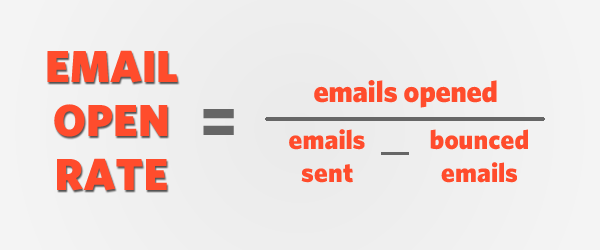

image24


In a nutshell, your email open rate is the number you get when you subtract bounced emails from emails sent and divide the opened emails by that number.

If you’re marketing with email, you need to know this number. All email marketing providers track email open rates and give you statistics on them, as well as click, bounce and complaint rates.

But before you get into increasing your open rate, there are 3 factors you need to know to make email marketing much smoother.


1. Have a clear business objective: To be successful at anything you need to know why you are doing it. Most people build an email list for one main reason – to make money, but there are other possible reasons too.

Michael Massie outlined five reasons why you should build a list for your business. Two of my favorites from his list are automation (making it easier to follow up with your contacts) and relationship marketing (something I’ll discuss more in a while).

You may also start an email marketing campaign to solve a problem for your customers. If they understand that you care about their problems, they are more likely to open your emails.

Having clear goals will affect your decision-making, your motivation, your actions – and your open rate. See this detailed e-book on goal setting for help with this.


2. Develop a unique selling proposition: To be an exceptional Internet marketer and to make your customers want to open your emails, you have to have an edge. That’s what your unique selling proposition (USP) is all about.

Ask yourself these three questions:
  • What can you do that other marketers can’t do?
  • What makes your product unique and better than your competitors’ products?
  • How can you present your service to inspire people to want to click, open or buy?
Here’s an example from the travel industry.

Let’s compare two top hotel comparison sites: Trivago and Agoda. Which one inspires you to click?
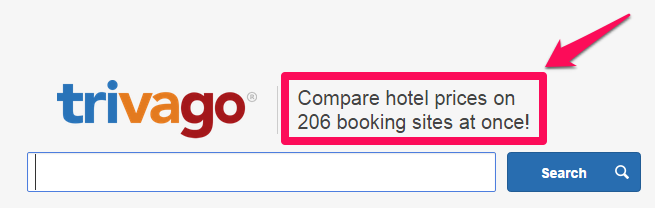

image01

Trivago lets you compare hotel prices on 206 booking sites at once, but there’s no information on check in/check out dates, available rooms and length of stay.

What about agoda.com? This site goes beyond price comparisons:

image00

Most people would prefer Agoda because:
  • You can easily search for a city, hotel, landmark or destination.
  • You can set check-in/check-out dates.
  • You can choose how long you want to stay
In other words, the second site (agoda.com) offers a user-friendly platform and solves a problem for its customers. That’s its USP.

Do that with your emails and you will be successful too.

If you need help with developing your own USP, check out this article from Convince & Convert.


3. Figure out your lead capture system: Your own site isn’t the only place you will capture leads. Choosing the right places to capture leads will affect whether people see your emails as relevant and how they respond to them, and that has an impact on email open rates.

For example, guest blogging on authority sites and relevant blogs will help generate more emails and build relationships which could result in sales.

When you know your business goal, your USP and how you will capture leads, that is when you need to make the most out of your subscribers. That’s why you need to nurture your email list.

Why you need to nurture your subscribers


Did you know that 85% of global web users use the web for email? That means there’s a huge opportunity to connect with people via your email newsletter. The hard part is, you have to figure out what makes people want to open them…

Here’s the truth. People you build relationships with are more likely to open and read your emails. 

I’ve got the stats to prove it:
  • Companies that make lead nurturing a priority generate 50% more sales from their leads at a 33% reduction in cost.
  • And HelpScout found that taking time to nurture leads resulted in a 21% increase open rate for their email marketing campaigns.
That’s why relationship marketing is fundamental to a winning email campaign. To increase your email open rate, you must be committed to strengthening the rapport between you and your email subscribers. You need to nurture them: connect, share, communicate and relate to them like a true friend.

This can also make you stand out (and be part of your USP). A study from econsultancy shows that around a quarter of businesses don’t invest in relationship marketing at all and half of businesses don’t make it a huge priority. If you do, then you will definitely have an edge.


image05

One of the best ways to nurture your leads is by providing helpful, interesting and actionable content.
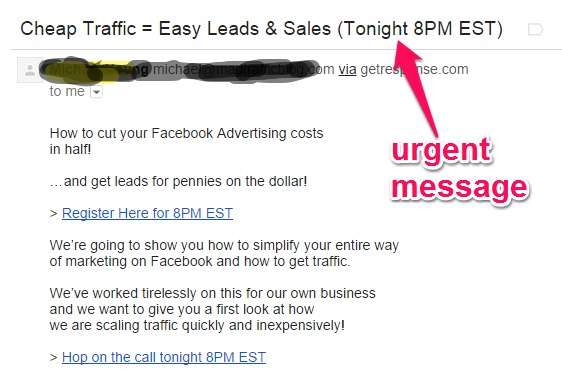
A few days ago, I got an email that sparked my interest. Have a look and see why.


image19

It was the urgency of the event of the message that made it interesting. If people feel they have to act immediately, they are more inclined to open your emails.

Case studies: winning email subject lines

Do you know the most important part of your email? It’s the subject line.

The email subject line determines the open rate, especially the ones with 4 – 15 characters.


image22


That’s the reason that people have written thousands of posts and articles on the topic of improving email subject lines. HelpScout implemented just a few of the tips I’m sharing with you in this post and achieved an open rate of almost 60% for their email campaigns.

Not everyone can achieve those open rates, but some have done even better, like Glen Allsopp. Here’s what happened when he sent a niche idea to his subscribers.

Subject line: Profitable Niche #2 (cloud niche)

image23


Of the 1056 recipients, 879 opened the email (83.2%). That’s a phenomenal email open rate by any standards.

Here’s what you can learn from Glen’s example:
  • Short and descriptive subject lines work better
  • An element of curiosity can increase your open rate
  • You can always tweak your subject line and resend the email to subscribers if the first send doesn’t deliver great results
Use the K.I.S.S. principle: In other words, don’t overcomplicate your email subject lines. Get straight to the point and your subscribers will immediately decide what action to take.


The chart below from Content Marketing Up shows that short subject lines get more opens.


image25

Here’s another example of how short subject lines and curiosity worked to get emails opened.


image03

Did you know that most of the $690 million President Obama raised online was because of emails sent to subscribers and supporters? Like the examples above, these subject lines are short and nudge you to take action:


image21


You can use President Obama’s subject lines as inspiration for your own email marketing, and there’s more good advice in this slide presentation from Hubspot.

Now when you are crafting your subject line there are 5 key elements that you need to know about:
  • C = curiosity
  • U = urgency
  • R = relevancy
  • V = value
  • E = emotion
Curiosity: wanting to know something. Do you think you have a wonderful message for your subscribers? Then make them think they’re missing out on something essential if they don’t click. This email subject line from Buffer generated a huge response.

image11


Urgency: As I mentioned earlier, email marketing will produce better results for your business if you call for immediate action from your subscribers.

image18


Relevancy: this is the #1 reason people subscribe to your list. Each time you send emails, make sure it’s relevant to them and your open rate will continue to improve. This example from JetBlue really delivers.

image17


Value: Relevant information must always be valuable and deliver what you promised your recipients. The subject line is the best place to show this, like this example from Quicksprout.


image20


Emotion: This is a major aspect of creating winning email subject lines.  Here are examples from wordstream.com:

  • Everyone Is Gay: Social Media As Social Action
  • Why Your 5-Year-Old Is More Digital Than Most CMOs
  • Your Marketing Sucks: Why You Need to Think Local

Research from Fuel Design shows that customers’ buying decisions are based on emotion 80% of the time. When you buy a car, logic tells you it’s to make it easier to get around; emotion makes you feel good about a fancy new possession you can show off to your friends.

Speak to people’s emotions to get them to open your emails.

This chart from Ignition Marketing Group  also shows that crafting email subject lines to speak to the emotions of your audience will produce better results:


image02


And research from CoSchedule also supports this: emotional headlines get more social shares.
Here’s how you could change some email subject lines so they have more emotional appeal.

Existing headline: Tips To Help Keep Your Taxes Organized All Year Round
Fresh headline: 5 Smart Tips To Keep Your Taxes Organized Easily
Why is it better? The new subject line is more concise and appeals to the reader’s vanity with the word “smart”.
 
Existing headline: How Your Organization Can Improve Conversion Rate
Fresh headline: How You Will Improve Sales Conversion By 110%
Why is it better? A specific outcome is more believable and the use of “will” instead of “can” makes the reader believe s/he can take action.
 
So the next time you write an email subject line, make sure it’s on the CURVE.
For more help with crafting subject lines with emotional appeal, read these 30 magical words you can use from  Vertical Response.

Writing clickable email subject lines

So far, you have learnt the importance of using clickable subject lines for your emails. The problem is, most people don’t know how to write one.

When Mailchimp analyzed 200 million emails, they discovered that personal emails had the highest open rate, followed by affiliation and timely news.

To write an email that people want to open, follow this simple two-step strategy (and make sure you don’t use these 50 SPAM words and phrases):

1. Personalize your emails: Using people’s name gets their attention and immediately makes your email seem more useful and relevant.

Mailchimp advises that you avoid the use of “Dear” in the subject line – instead, use their first name, full name or last name for effective personalization.

Personalization settings differ depending on the email marketing provider you’re using, but here’s how to use Getresponse to send subscribers an email with their first name in the subject line.

Step #1: Go to getresponse.com and log in. If you’re not a member yet, sign up for a 30-day free trial.


image13


Step #2: Hover on the “messages” tab. From the drop-down options, click “create newsletter.” This is what you will see:


image16


Note: Click the New Email Creator on the left, which is user-friendly and great for personalization.


image12

Once you hover on “Personalize”, the next action is to click “[[firstname]] from the drop-down options.

As you click it, it will automatically appear in the subject field:

image14


Note: After clicking [[firstname]], don’t forget to use a hyphen (-) or colon (:) to put some space between the recipient’s first name and your subject line.


Step #3: Activate automatic social sharing so you’re not just relying on the inbox for traffic.


image26


Step #4: Scroll down and click “next step” to continue writing your email message.
image10

When you’re done, your email will have the subscriber’s first name in the subject line.


2. Ask the right questions: We live by asking and answering questions. Dr. John V. Richardson, UCLA Professor of Information Studies says there are two forms of questions:

The first is a close-ended question which limits the answers/options the recipient can give to a specific question. The answer is usually a single word or definite phrase. Such as:
  • Do you enjoy connecting with friends on social media networks
  • Possible answers: Yes/No
  • Is your favorite color red?
  • Possible answer: Yes or No, my favorite color is……
  • Have you read Rich Dad Poor Dad by Robert Kiyosaki?
  • Possible answer: Yes I’ve read it/No I haven’t.
When writing email subject lines, avoid close-ended questions. If people can answer the question, they have no incentive to open your email.

And the second type of question is open-ended questions. One of the the best ways to connect with loyal subscribers on a personal level and get them to speak their minds is by asking open-ended questions.

image04


Open-ended questions make the recipient think before giving an answer. The answer is usually long and more detailed, compared to answers to close-ended answers.

Here are some examples of open-ended questions:
  • In what area of Internet marketing do you need urgent help?
  • What do you want to know about real estate investing?
  • Can you tell me what you’re struggling with in your startup business?
Even though some of these questions are specific to a particular industry, they still encourage recipients to think and respond.

When someone joins your email list and you send them a welcome message, ask questions in this manner:
  • Tell me what you’ve been struggling with.
  • What kind of traffic do you want to drive to your blog?
  • Tell me everything you’ve tried so far to get traffic that worked/failed.
As a rule of thumb, giving rooms for open-ended email subject lines can really be helpful.

PeoplePulse, a survey software shared some examples of open-ended subject lines and their click-through rates:
  • Subject Line #1: “FIRSTNAME, November Client Attraction Newsletter out now” – click through rate of 20.3%
  • Subject Line 2:“FIRSTNAME, here’s a new 7 Marketing Trends report for you” - click through rate of 28.0%
  • Subject Line 3: “FIRSTNAME, 7 Marketing Trends I think you should know about” – click through rate of 45.6%

How timing increases email open rates

There’s one more thing you can do to get more people to open your emails and achieve a 203% increase in open rates: get the timing of your emails right.

Nathan Williams recorded a 60% open rate when he sent an email with a welcome kit to new signups within 24 hours.

image15


Can you be 100% sure of the right time to send emails? Absolutely not.

Industries differ and individual prospects/subscribers respond to emails at their own pace.

But there are plenty of insights from industry experts and email marketing companies who manage and track billions of sent emails per day to get you started:

  • This KISSmetrics infographic on timing email marketing is a must read.
  • Rick Stamberger says the best time of day depends on when your target market is most likely to read emails. He got an open rate of more than 70% when sending emails to restaurateurs after the lunch hour rush.
  • Kevin Gao, founder of comm100 stated that Mondays are the worst days to send emails. Open rates also slip at weekends when people focus more on family time. He says midweek days are the best bet for a healthy email open and click rate.

When it comes to email timing, you are going to have to test it. For example, with my Quick Sprout list, I get the most opens when I send them out on Monday, Wednesday and Thursday at 8am PST. You can use the articles above as a starting point, but you still need to test it out.

Conclusion

Implement the tips in this post and you will not only increase your email open rates, but you will have a more loyal subscriber base who will anticipate every email.

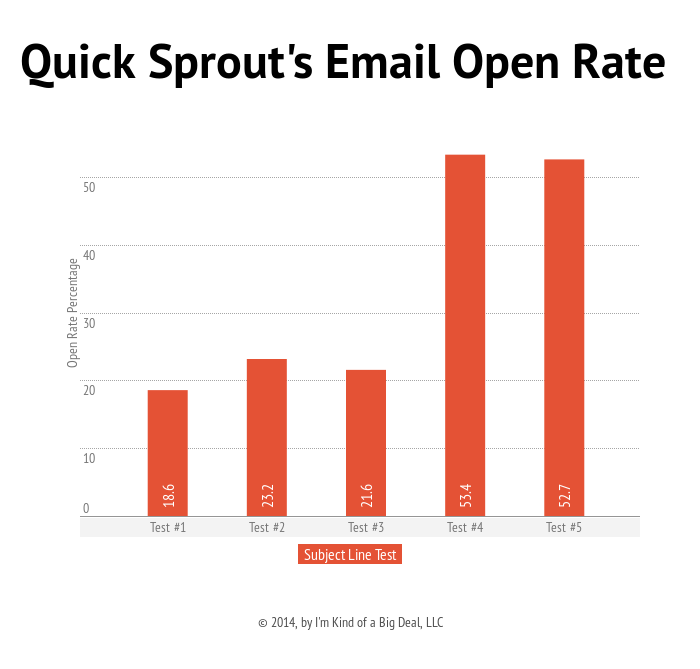
You have to keep testing your email subject lines as they may not go up right away, but eventually they will as long as you follow the tips above. When I tested email subject lines, the first 3 tests failed, but I was able to get an increase of 203% with the 4th test.

http://neilpatel.com/2014/10/23/how-to-write-email-subject-lines-that-will-increase-your-open-rate-by-203/