Tuesday, 8 March 2016

Want More Followers on Pinterest? Here Are 5 Easy Tips To Help You!

unmetric.com
As one of the youngest social media platforms, Pinterest is notoriously more difficult to crack. Since its inception in 2010 the way Pinterest works has changed again and again. But there are some things that remain difficult. Finding a following is one of them.

Gaining followers on Pinterest is a slow process, especially if you don't know what you're doing. I find more often that not, people go on to Pinterest, find their Facebook friends and leave it at that.

In order to get the most out of Pinterest and reach the biggest audiences, follow these steps.

Once your account is filled out completely and you've verified it, you may begin.


1. Pin Original & Beautiful


80% of posts on Pinterest are repins. That means that a lot of the same stuff is floating around. Posting some original content can work in your favour.

Remember the more visually stunning a pin is, the more likely it is going to catch somebody's eye and start getting repinned.

When it comes to giving your pin a description, try to include up to 4 hashtags and make the description long and interesting. The more key words you can include in a description, the more likely it will be found.

Top Tip: When posting original content, even the file name (as it is saved on your phone/desktop) can have an effect. Change the name from IMG_97248 and you will be found by more pinners. 


2. Pin Socially


Not every pin has to be your own. In order to gain followers on Pinterest you want to be pinning all the time, and that wouldn't be possible if we expected you to do all the hard work yourself. For that reason, we say you should always try to repin content from others too.


http://cdn.purepinterest.com/


We recommend 25 repins a day. But try to split up your repinning sessions in to two lots.This way you don't clog up your followers news feeds and you will be more likely to reach followers from different walks of life.

As you repin, follow the suggested board that comes up at the bottom of the screen.

Get your pinning presence known too. I mean, try to like a few pins as you go through and comment on the popular pins that are at the top of a search. This way, when people view them, they might see your profile and visit you too. It helps to come across like you're passionate and knowledgeable about a certain subject and that will always increase your following.


3. Pin on Trend


Just like with Twitter, if you hashtag or, in this case, pin on trend and with the seasons, your potential audience is a lot larger. 

Whether it's a Christmas Crafts board or a Best Dressed at the Golden Globes board, it is all about finding that healthy balance between what interests you and what everyone is talking about.

Top Tip: Don't be afraid of making too many boards. We recommend you make 2-3 new boards PER WEEK. So you have no excuse not to be bang on trend.

Coming up we have Spring, Easter, Mother's Day & Father's Day to think about....


4. Follow Fellow Pinners


As I mentioned in point number 2, you should get into the habit of following the boards that come up as suggested when you repin. If you do this for all 25 of your repins, I'd suggest only following a further 50-75 boards a day.

Currently, following boards seems more effective than following actual users.

Top Tip: You mustn't follow too many, or your account will get temporarily frozen. 


http://www.adweek.com/


5. Share Pinterest


Share a link to your Pinterest profile on other social networks and to your email contacts. You can share individual boards or your entire profile, so if you have one board in particular that is on trend, try sharing that to gather interest.

The first 1,000 followers are the hardest to get, so don't feel ashamed for relying on those nearest and dearest to you to bump you up there.

You can also add a Pinterest button or a 'Most Recent Pins' tab to your blog or website to keep fresh faces discovering your profile.

Wednesday, 2 March 2016

How To Gain Followers On Twitter Using These 8 Engagement Ideas


The crushing pace of new social network launches has slowed down a bit now. Most networks have consolidated their user base and each one has carved a niche for itself. Twitter for timely, short updates; Facebook to share precious, fun moments with friends and family, Instagram and Pinterest to share what wows visually and so on. This means that you need to employ different engagement ideas for different networks.


With multiple networks and thousands of messages rolling off the screens, capturing users’ attention has become increasingly difficult.

Twitter recently announced that it is thinking of going the Facebook way. If it does tweak its simple first-come-first-serve model with a complex algorithm, you may not see a lot of diversity in the messages on your Twitter screen.

Going the Facebook way will mean that you will see more messages from people you RT or Favorite. Frequency of Tweets, which is currently the Twitter engagement strategy for many, will soon be rendered useless.

What it also means is engaging other tweeps will become all the more important. If you do not get your Followers to engage with your Tweets, your Tweets will soon be invisible to the users.

How to reach more people on Twitter?


Although Twitter works as a broadcast channel, we rarely go the the Home screen on Twitter. Even when you do, you only see a handful of messages from your followers. Check out how you can engage your Twitter followers and get new followers with these simple tweaks to your Twitter engagement strategy.


1. Craft Engaging Messages


Duh! this is what you thought of first, isn’t it? If you are reading this post, I am sure you know this already. The question is what is engaging and how do you define engaging?

Think back, when was the last time you felt compelled to respond to a Tweet? I am sure it was one of these things:

The topic was related to what you were thinking at that time
It was a cause that you cared about
The opinion or statement was inciting enough to warrant a response, or
You strongly agreed to what was in the Tweet


Craft Tweets that would invoke similar reaction in your target audience. Say the right things at the right time. But remember, Twitter needs you to say this multiple times.


2. Use Images when they can add to your message


Another mundane point? The question again is what kind of images? Writing a bunch of text on your images to add to the 140 character limit is a cheeky way to go around the limit. But will it get you any engagement? Images are worth a thousand words and that is what they should be – a thousand words without a word.

Use images that can make your followers and other tweeps go Wow! or even confuse them. Anything that the viewers can’t place in a certain box within seconds raises curiosity.


3. Mention peers and people you know. Don’t Spam


You want your followers to have loads of followers. The problem is the more followers they have, the less likely they are to come across your Tweets.

Tagging your messages with @ mentions helps you involve your audience in a conversation. Another way to grab their attention is to tag them in your images.

Just make sure that you are indeed interested in and want a conversation. Mentioning people in Tweets and telling them to check out your new service or product is Spamming. Instead, ask them a meaningful question and make sure you respond to their answers. That is conversation.


4. Research and use Hashtags


If Facebook is for Friends and Family, Twitter is a place where you have conversations with the world. The idea is to talk about and discuss things with new people everyday. People who are interested in subjects you are passionate about. About topics that you like to talk about.


The only way you can reach these diverse set of people who share your interest is through social media hashtags. Research relevant hashtags and then use tools like Hashtagify.me to find other contextual hashtags to reach more people on Twitter.

Other than the hashtags, these tools also show you tweeps who influence conversations around these hashtags. You can then engage these users and develop long-term relationships with new tweeps.


5. Post at the right times


Just as the right message is important, so is the time. Each time zone peaks and falls at a different time. There is an overlap, but local peak times do vary. Find out what is the best time talk to your target audience.

Messages Tweeted with the right hashtags and at the right time garner higher engagement and increase the reach of your Twitter messages.


6. Monitor Trends


Why? Not to Spam these hashtags and Tweet completely irrelevant messages.


Monitor these hashtags and whenever contextual, use them to Tweet something relevant. This will give you more exposure and start some new meaningful conversations.


7. Use Promoted Tweets


Digital advertising is a necessity. With promoted Tweets, your message can reach new audiences. Audiences that you may not reach even with using the right hashtags.


Not all people monitor hashtags. Promoted Tweets appear in your timeline based on your Tweets and how you engage with other Tweets. These people may not monitor hashtags, but they will still see promoted messages if they are relevant to their Twitter profile.

Using promotedTweets is surely a much better option than buying fake followers that will not benefit you in any way.


8. Monitor Your Twitter Stats


Right hashtags, generic times, and images -these are the tools of your trade on Twitter. But don’t forget to monitor your performance once you start employing these tools and methods.


Twitter provides impressive stats about your Tweets and how they have performed over the week or month. Check these stats every week and month and fine tune your Twitter strategy. Find out when your Tweets got most impressions, which ones got most RTs and likes and use more of the one that work.

Sunday, 21 February 2016

14 Instagram Tools For Busy Marketers


Are you a busy marketer?

Wondering which tools and apps will help you stand out on Instagram?

Using the right Instagram tools can improve your images, sell products, and save you time.

In this article you’ll discover 14 Instagram tools to help busy marketers use Instagram for business.


#1: Photo Apps


Not long after Instagram started gaining popularity, new apps began popping up with features like photo editing, new filters, and options to make your images more dynamic. These apps allow you to make your posts more diverse and interesting, increasing views and engagement in the process.

Layout


Layout from Instagram is a free app available for both iOS and Android that makes it easy to create multi-image collages to post on Instagram.

The collages can be visually dynamic and you can feature multiple images (and products) within a single post. Choose from various formats that differ in layout and number of images.


Layout allows you to choose from multiple formats and feature up to four images.

This app was created by Instagram, so integration is easy and the quality is high.

Quick


Quick makes it easy to add text to an image, allowing you to adjust the placement, size,color, and font.


Quick makes it easy to place text and edit its font, color, and location.

You can share the edited image on multiple social network sites in addition to Instagram, including Facebook and WhatsApp.

The app is free, but you can make in-app purchases to access more features.

Afterlight


If you feel limited by the extent of Instagram’s photo editing options and filters, look no further than Afterlight. This app makes photo editing fast and easy.


Afterlight offers a ton of great photo editing features, including filters and light effects.

Currently you get access to 15 adjustment tools, 74 filters, 78 textures, 128 frames, and 15 preset cropping tools. It’s $0.99, and available for both iOS and Android.


Superimpose


Superimpose allows you to take an image in the foreground, remove it from its background, and place it on another.

This app offers features like allowing you to rotate an image on the foreground and blend two images or their textures. The masking capabilities of this app are amazing.


Superimpose makes it easy to edit and blend images.

Superimpose is surprisingly easy to use, and comes with all of the necessary features to accomplish your editing goals. It’s $0.99 and available for both iOS and Android.


#2: Video Apps


Videos are an important part of social media marketing and are available for both regular Instagram posts and Instagram ads. It’s good to have a few apps on hand that can enhance and improve your Instagram videos.


Vintagio


Vintagio allows you to edit both photos and videos and apply filters to give them a retro or vintage look. You can apply different effects and filters, including sepia and black-and-white tones, along with filters that offer color effects from the 60s, 70s, and 80s.


Vintagio adds a vintage tint to your videos.

Choose from a number of built-in songs or a projector sound effect, or import songs from your library.

Currently available only for iOS, Vintagio costs $3.99.

PicPlayPost


PicPlayPost offers features to make your posts more dynamic and engaging. You can create video collages using a combination of photos, videos, GIFs, and sound. You have the option to put an image (or multiple images) next to a video and have music play in the background.


PicPlayPost is free and updated frequently. It’s available for both iOS and Android and supports Live Photos for iPhone users.


Lapse It


Lapse It allows you to make time-lapse videos, which give an accelerated version of slowly changing events (like seeing a flower go from bud to bloom in seconds). You can import videos and add a time-lapse effect or capture videos within the app.

The app allows you to speed up and slow down videos, and add any song from your library to the background of the video. The interface is easy to use and it comes with 50 filters, including the tilt-shift effect.


Lapse It has an easy-to-use interface, but doesn’t sacrifice editing options and additional features.

Available for both iOS and Android, the app is frequently updated and has great support. The standard version is free, and you can purchase the pro version in-app for extra features for $1.99.

Boomerang


If you want to catch the attention of users as they’re scrolling through the news feed,Boomerang from Instagram is an app you should be using. It’s both a photo and video app, and allows you to shoot brief videos.

Once you post your video, Boomerang will play it forward and backward on a never-ending loop. The repetitive motion is dynamic and eye-catching.


In this boomerang, the handstand will play forward and back on an endless loop.

Boomerang from Instagram is free. It’s available for both iOS and Android.


#3: Scheduling Tools


Social media marketers know that there are peak times to post. This can vary based on industry, audience, and time zone, but there’s a best time to post for your specific audience.

Scheduling apps and tools make it much easier to post at these peak times to maximize engagement. Here are three handy scheduling apps to consider.


Latergramme


Latergramme is a great tool for businesses that want to improve their Instagram marketing. It has an easy-to-navigate interface and you can use it on multiple devices (including desktop, mobile, iOS, and Android).

The app lets you schedule new posts and monitor current scheduled posts, and you can manage two Instagram accounts with it.


Latergramme makes it easy to upload and schedule your posts.

The only downside is that Latergramme doesn’t actually post the content. You’ll receive a reminder, and then you need to go into the app and post the content.

These features come with the free package (you can upgrade for additional features), which would meet the needs of many small- and medium-sized businesses.


ScheduGram


ScheduGram is a great scheduling tool that allows you to upload single or multiple images at once (you choose Bulk Upload if uploading a video). You can then edit the images and post them either immediately or schedule them for a later time.

You also have the option to receive an email notification once your content has been posted.


ScheduGram offers a wide array of filters and editing tools for your images.

This tool allows you to manage multiple Instagram accounts and give access to team members.


ScheduGram allows you to schedule posts and can email you when they go live.

Schedugram offers a 7-day free trial, and plans start at $20.


Hootsuite


Many businesses and marketers are already using Hootsuite to manage their social media activity. Hootsuite’s Instagram account management options allow you to schedule posts via the Hootsuite mobile app.

If you choose, you can cross-post the same content on other social media sites like Facebook or Twitter.


Hootsuite allows you to upload content and schedule it for multiple platforms at once.

It’s a good tool to consider if you’re looking for a more inclusive, all-in-one management dashboard for multiple social media sites. If you’re only looking to schedule posts for Instagram, the interface may be a bit complicated.

After a 30-day free trial, the advanced plans (which include scheduling) start at $14.99 per month.


#4: Selling Tools


Unlike most social media sites, you can’t add links to each post on Instagram, which has frustrated a lot of marketers. Fortunately, there are tools you can use to turn Instagram into a platform for selling.

With selling tools available for several approaches, choose what will work best for your audience and business.


Have2Have.It


Have2Have.It uses one of the most popular approaches to selling on Instagram. It willencourage users to click the link in the business’s profile (the only active link account owners can utilize), which sends users to a virtual storefront. Users can purchase directly from that storefront, increasing your sales and revenue.

You can tag multiple products in an image, making it easier for users to buy a complete set of products.


Nylon Magazine’s profile link sends users to a virtual storefront of content.

Have2Have.It offers a free 30-day trial. After that, pricing depends on how many clicks you’re getting a month. (It’s free for 0-49 clicks, but goes up to $300 for 3,000 clicks or more a month.)

Shopseen


If you already have virtual storefronts in multiple places, Shopseen could be the selling tool that works best for you. It allows you to sell on Instagram by creating a storefront through your profile link.

Shopseen will link this storefront with your stores on Shopify, eBay, Etsy, and Woo, making it easier to manage and monitor your inventory and your sales.


Shopseen creates storefront links to post on your profile and syncs your products across multiple storefronts.

After linking your Instagram account with Shopseen, all you have to do is upload images of your products to Instagram and add a price to the description. Shopseen uploads the product to your inventory page.

You encourage users to click to this virtual storefront, and you can collect payment by credit card. Buyers don’t have to download an app.

Pricing is based on the amount of sales and the number of stores you’re running, starting with a free plan for one store and a 10% commission fee.


Soldsie


Soldsie promotes sales on Instagram by allowing users to purchase by commenting on a shoppable post. Both sellers and buyers install the app (which easily integrates with Instagram) to enable comment selling.


Soldsie makes purchasing easy, which can increase impulse purchases.

Soldsie comes with an easy-to-use selling dashboard, where you can turn product images into sellable posts on Instagram. You can include specific product details like color or size choices and product materials.

In the same caption, ask users to purchase by commenting “sold” on the image,along with any necessary selection (size/color) information. Once they do, Soldsie emails them an invoice that they can pay via credit card or PayPal.

Soldsie has a variety of pricing plans, starting with a basic plan that costs $49 per month and a 5.9% commission fee on all sales.


Final Thoughts


Instagram is a major player in social media marketing, and it’s got the complementary tools and apps to prove it. Every business is different, and some tools and apps will work better for you than others will. Test them out and see what works best for you.


#Twitter Is More #Business Friendly Now


TreceBits


Social media is being used for all sorts of businesses now, and Facebook have been especially taking advantage of this. However a lot of the time, it still seems easier to talk to businesses on Twitter and now it’s set to be an even easier experience.


How many of you have had bad service and have then gone and complained about it on Twitter? How many of you have then had a positive response such as a refund or a free product just so you'll withdraw that complaint? I'm betting that a lot of you have experienced something like this. That is because the beauty of Twitter is that it's quick, mobile and easy to access.

Once your tweet is out there and you've @ mentioned them, it'll be a lot easier for anyone else on the service to see it. It's not like Facebook where it's merely comments on a page that you have to worry about people seeing, on Twitter everyone and anyone can easily stumble across the complaint. But for them to be able to deal with your message privately or to ask for details then they have to ask you to DM them. In the past that meant going out of your way to message them and sometimes people wouldn't see the point.


Businesses will now be able to give you the option to privately message them from their tweets. A little link will appear above the re-tweet and reply buttons and a box will open up in the same screen. It makes messaging them quicker and smoother. Businesses will now also be able to ask for feedback in private messages. If they ask you to provide feedback then you'll get numbers pop up from which you can choose a rating. You can then provide a reason as to why you rated the company that number. This should be good customer service in the long run as it means that they can improve how they respond to things on social media by finding out what people expect using the services.


Twitter Blog


This is still nothing compared to what businesses can do on Facebook but it's a really good step. On a scale of 1 to 10 of how likely I'd be to recommend this to a business; I'd give it a 7. And next time I have a complaint to make, I'll be looking forward to testing it out.


http://www.socialsongbird.com/2016/02/twitter-is-now-more-business-friendly.html

Monday, 8 February 2016

11 Ways To Increase Facebook Followers


Increasing your Facebook followers is a definite ‘must’ when it comes to marketing. Why? it is easy to distribute new content, recommend products and most importantly a way for readers to share your content with others. If you have a large amount of Facebook followers it also provides social proof that you are the person to learn from, meaning more and more people will want to follow you.

If you came across a Facebook page with tens of thousands of followers what would your first thought be?

Most likely ‘this person knows what their on about if this many people are following them’. You have probably read the best ways to increase your followers is to join lots of groups and spend weeks discussing topics and creating relationships etc.

While this is a method that works, it’s not going to knock those numbers up at a very fast rate. Below Jays blogging have revealed 11 effective ways that will teach you after a few little ‘tweaks’ how you can increase your Facebook followers dramatically. Please also see the Infographic at the bottom of this post.


1. Side Bar Widget


The Facebook side bar widget on your site gives you social proof as visitors can see the faces of your current followers. As new readers can see that REAL people are following you it indicates that not only is your page worth following but that your site is trustworthy as well.

2. Change Your Contact Method


Changing your contact method is a great way to increase Facebook followers as readers are automatically directed to your Facebook page whenever they have a question. The beauty of having of having questions on your FB page is that it can initiate discussions with other followers which will help to create stronger relationships. As an added bonus when a follower comments on these discussions it will appear on their news feed, making your page viewable to their friends.


3. Comment Close Down


Closing your comments box and having readers write on your FB page is another great way to increase the amount of discussions on your wall, giving the same benefits as stated in the previous point. Furthermore you will not have to put up with all those spammy comments that appear on a regular basis.


4. Call To Action With Your Posts


This is something not a lot of people realise to do in general.


It’s important to spell out what you would like from your readers to do.


…whether it’s liking your FB page to increase your Facebook followers or clicking the Buy-button to purchase a product. I know it seems like this is a straight forward thing but your readers may not think to follow you otherwise.


5. Author Byline


Adding in an author by-line gives you another way to show your link in case the reader has missed it previously. A lot of readers will want to find out more about you if your content is really good so this area is a great place to re direct them.


6. Facebook Paid Ads


Facebook ads are a great way to reach a lot of people. Believe it or not the cost isn’t very expensive, so it can be a good method to get the ball rolling and reach out to a decently sized audience with just a few clicks. As I say to everyone about paying for marketing: don’t just pay a lot of money and hope for the best; pay small amounts and experiment to find out what works and doesn’t work.


7. Convert Unknown Friend Requests


Keep your Facebook account and page separate as you mostly likely don’t want your readers as a friend as there is no benefit. Any reader that sends you a friend request is to be redirected to your FB page. Not only does it increase your Facebook followers for social proof, it also gives to a platform to communicate with your readers all at once instead of one at a time.


8. Facebook Comment Box


Facebook comment boxes work like the normal comment box on your blog except the additional benefit is that when a reader writes a comment on your post it appears on their FB news feed. This gives you the chance to promote your page for more followers as all the readers’ friends will see the comment. You can see one below created for this post. Give it a go will ya?


9. Like Facebook Pages


Ever thought to yourself Haven’t I seen you somewhere before? If you like as many Facebook pages within your niche there is a higher chance your face will appear on these websites Facebook side bar widgets (if they have one). When visitors visit several websites they may recognise your face and may have a nose.


10. Mingle


This method was mentioned in the introduction. Even though it can take weeks to create relationships it’s a great way to network and meet some influential people as well as to increase your Facebook followers.


11. Facebook Like & Share Buttons


Whenever you write a post make sure you add social media ‘Like’ and ‘Share’ buttons to make your content easy to share with others in just one click. The easier you make it for visitors the more chance your content will be shared through Facebook.


11 Ways To Increase Your Facebook Followers – Infographic


Here is a shareable Infographic explaining the 11 things you can do in order to increase your Facebook follower count.


TIP: You get a handy Facebook/Twitter/Pinterest share button when you roll over the image with your mouse.


[Infographic by James Brookes]


http://socialmediarevolver.com/11-ways-increase-your-facebook-followers/?

Facebook Changes Algorithm


The days of people asking for likes to get their content seen easier are over. Facebook are changing the algorithm they use to decide the order of posts in your news feed. They're claiming they want it to be more human so people will see more of the posts they want to read and interact with rather than the most popular posts.


Of course you still won't personally get to say what posts you'd like to see which, all in all, does make it a little less personal. But Facebook are at least trying to get our news feed to provide a better experience for us. They've had a test group of users rating the posts that pop up on their time line since 2014 in America and that number has slowly grown to more than one thousand people. Now they appear to have all the data they think they need and are planning on rolling out this update sometime in the near future.


What Facebook discovered is that people will want to see posts like a friend mourning a family member's death, a family member having a baby and so on. Like many other social media services Facebook want to make the big events more accessible but in their case it's sharing the big events in an individual's life. Of course this might mean that posts of memes and how much exercise someone has done etc will disappear somewhere below, until something gets big again, which will be an unpopular change in some people's eyes. 


The algorithm is going to be constantly changing so this does mean that the types of post we see less and more of will shift regularly as well.Part of the reasoning for this change is to encourage more interaction, it was only last week that they announced the new like options and now this is something that they hope will encourage users to actually use them. This change has been a long time coming but at the same time, some of us are going to be asking ourselves, why bother? If you can't tell the system what's important to you or your values on social media are different to the American values then you'll still likely see lots of posts you don't care about. Hopefully over time the algorithm will cause the news feed to show you only things you want to look at, but I expect it's still a long time coming.

Wednesday, 27 January 2016

How To Research And Locate Your Audience Using Social Media


Are you struggling to connect with your customers on social networks?

Do you know where they hang out online?

To optimize your social media marketing efforts, it’s important to know who your customers are and which social networks they spend their time on.

In this article you’ll discover how to connect with your target audience on social media.


Discover ways to find and connect with your target audience on social media.


#1: Identify Your Ideal Customer


One of the first questions I ask is, “Who is your ideal customer?”


Some of the answers I’ve received include women, people who have to eat to survive, bosses, employees and people looking for work. While these answers may be true for you, too, they won’t help you find your audience because they don’t help you prioritize where to spend your time.

John Lee Dumas has famously talked about identifying your business avatar. This means you’ll want to create a fictional persona of your ideal customer, to the point of naming it, knowing how many kids it has or what it does on the weekends. The clearer your avatar is, the easier it is to find people on social media who resemble the persona.

#2: Determine Your Audience Size


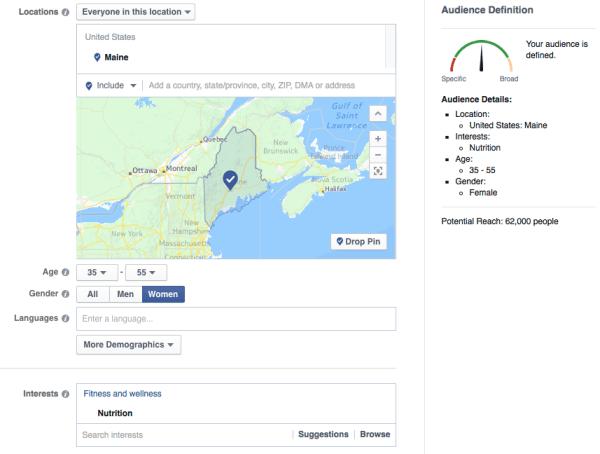
Once you have a good sense of what your audience looks like, you can use Facebook Ads Manager to estimate the size of your audience.

For example, if you want to reach women in Maine who are interested in nutrition, you can find out that 62,000 people on Facebook match that audience.


Some quick market research will tell you if your audience is big enough.

This is also good business information, because if your audience is too small, you may need to change your offering to expand your audience. On the flipside, if your audience is too large, you might want to target a narrower niche to start.

Of course, not everyone is on Facebook. According to recent research, almost 60% of Americans are on Facebook. That number may be more (or less) depending on where your audience lives, their age, gender and household income, but it’s a good starting point.

#3: Survey Your Customers


If you’ve been in business for any length of time, you have customers you can survey.


For the purposes of optimizing your social media campaigns, wisely spending your ad dollars and targeting guest blogging opportunities, you need to know where your audience hangs out online. As part of your survey, ask your current customers the following questions:
What social media sites do you regularly use?
What websites do you visit for information on _______ (for example, remodeling ideas, pricing strategies or whatever is appropriate for your business)?
Do you listen to podcasts? If so, which ones?
Do you regularly read blogs? If so, which ones?
What people do you follow or pay attention to online?

You can also use free tools like SurveyMonkey or Google Forms to collect your answers. In this video, Steve Dotto walks you through how to create your own forms with Google Forms.


Google Forms is a great way to collect feedback on live events, for example, because it graphically displays your audience’s feedback. Go to your form results and select Form > Show Summary of Responses from the drop-down menu.


Generate pie charts of your customers’ interests.


#4: Research Online Behavior


What do you do if you’re just starting out, your customer base is too small for meaningful results or you’re expanding into a new category? In cases like these, or simply to supplement your surveys, you can research online behavior.


The Pew Research Center has an excellent breakdown of where your audience spends their time online. It’s not difficult to find studies and infographics that provide information on specific platforms or other countries. For example, check out this chart from MarketingCharts to see a makeup of the top social media channels based on gender, age, education and more.


#5: Find and Connect With Your Customer


Once you get the results from your survey and have reviewed the demographics of the available research, it’s time to put that knowledge to work across different social media and digital marketing platforms.

It’s important to note that you can upload your email database to almost all social media platforms to find your customers there.


Upload your email list to find out which prospects and customers are on different social platforms.


Connect with this core group on any platform to jumpstart your online networking there and provide social proof that you’re well connected and someone worth knowing.

Here are some tips for connecting with your ideal customers on the platforms that will work best for many businesses and entrepreneurs.


Facebook


Most social media marketers will tell you that the organic reach of businesses on Facebook has tanked. Google’s image search does too when you ask it about “organic reach on Facebook.”


Facebook’s organic reach is trending downward.

If you’re trying to find your audience on Facebook, the easiest path is to target your ideal demographic with Facebook Ads Manager.

If you return to your survey, you may find that your current customer base likes Golf Magazine or watching UFC (Ultimate Fighting Championship). Armed with this information, you can target your ads for your Facebook prospects, whether they like a round of golf or a roundhouse kick.

Facebook Ads Manager gives you other options to find your audience. You can upload your customers’ email addresses to Facebook Ads Manager to create a custom audience.


Once you’ve created a custom audience, you can then ask Facebook to create alookalike audience. Lookalike audiences are similar to your most valuable audiences. That means Facebook can put you in front of more people who are like your current audience.


However, you’ll still want to apply filters to this lookalike audience to improve your results. For example, the customer database for your vegan delivery food service may be limited to just your home state. “Lookalike” people may live anywhere in the world. Add a filter to your lookalike audience for your home state or even your hometown, depending on how big your delivery area is.

To engage with these targeted Facebook users, advertise your business page, a free webinar or a link to your online store, anything to begin the process of a deeper relationship.

If you’re using Facebook as a person and you want to find your audience, use Facebook’s search bar to find groups that match your ideal customer’s interests.


This search also uncovered some beer influencers.


The search results will show you groups that are populated with your audience. Join the conversation and start networking!

Twitter


While Twitter’s reach is smaller than Facebook’s, it offers other opportunities to find your ideal customers.

Let’s start with the ad platform at ads.twitter.com. It doesn’t have the granular targeting tools of Facebook, but you can still find and reach your audience based on geography, gender, keywords, interests, influencers (called “followers” here) and more. You can also target Twitter users by their TV-watching habits.


People love to tweet while watching their favorite shows.

Within Twitter’s advertising platform, you can focus on getting more followers, driving people to your website or squeeze page or engaging them with other actions.

Beyond the ad platform, you can also use Twitter’s advanced search tool for finding your audience. If you run a local comic book shop, you can target nearby customers and prospects based on their location and what they’re tweeting about.


Your audience is tweeting. Are you listening?


Once you’ve identified these people, follow anyone who seems like a good audience member. Many of these people will follow you back out of habit.

Even if they don’t follow you back, you can create a new Twitter list called Favorite Local Comic Geeks. Twitter will then notify these users that they’ve been added to your list, increasing your visibility to them. In addition, it allows you to pay more attention to what your audience is talking about and engage them in conversation.

LinkedIn


While there is an advertising platform on LinkedIn, the real power is in the prospecting tools and making one-on-one connections with your audience.


Suppose you want to reach HR professionals in San Francisco. Simply search for people with a relevant term in their profile. For example, search for “human resources” andlimit the location to a geographic area, such as “San Francisco Bay Area.”

You can further narrow your search to those working for top tech companies by selecting Google, Apple and IBM under the Current Company filter.


It’s easy to find your audience by job title.


Work your way down the search results. Decide whom you want to connect with, and which people you might want to send an InMail to. If you’re in popular HR groups on LinkedIn, you’ll find it easier to connect with this audience, as it often removes a barrier LinkedIn sets up to reduce aggressive networking.

Guest Blogging

Most digital marketers recognize the benefits of blogging for SEO and social media. However, you can also find more of your ideal customers through guest blogging.

When you guest blog, you get immediate access to an existing audience. The blog owner gets your valuable content, while you establish your expertise to their audience. If you’ve done your homework, this is also your audience.

You may already have a list of potential blogs to approach based on your survey results. But even if you don’t, it’s easy to find blogs that are actively looking for content.

Simply Google your targeted keyword along with “guest blog” (or “guest post”) to find blogs that are actively searching for guest writers.


Here’s how to find blogs focused on adventure travel.

You can also download the free SEO toolbar MozBar, available for Chrome or Firefox, to get additional information about the page authority (PA) and domain authority (DA) for each result. The DA tells you how much trust this site has built up on a scale of 1 to 100, where the higher numbers reflect more authority.


Summer Tomato has great domain authority, so start there.


Each site will have its own guidelines and requirements for submitting a guest post.

Pro tip: To get the most of your guest blogging opportunity, try to drive people back to your website or squeeze page for additional, value-added content that’s related to the original post.

Wrapping Up


Start by identifying your ideal customer through surveys and research. Find them with guest blogging opportunities, targeted ads on social platforms and engagement with powerful search tools on social networking sites. Finally, incentivize them to visit your website and get to know you and your business better.