

Are you struggling to connect with your customers on social networks?
Do you know where they hang out online?
To optimize your social media marketing efforts, it’s important to know who your customers are and which social networks they spend their time on.
In this article you’ll discover how to connect with your target audience on social media.
Discover ways to find and connect with your target audience on social media.
#1: Identify Your Ideal Customer
One of the first questions I ask is, “Who is your ideal customer?”
Some of the answers I’ve received include women, people who have to eat to survive, bosses, employees and people looking for work. While these answers may be true for you, too, they won’t help you find your audience because they don’t help you prioritize where to spend your time.
John Lee Dumas has famously talked about identifying your business avatar. This means you’ll want to create a fictional persona of your ideal customer, to the point of naming it, knowing how many kids it has or what it does on the weekends. The clearer your avatar is, the easier it is to find people on social media who resemble the persona.
#2: Determine Your Audience Size
Once you have a good sense of what your audience looks like, you can use Facebook Ads Manager to estimate the size of your audience.
For example, if you want to reach women in Maine who are interested in nutrition, you can find out that 62,000 people on Facebook match that audience.
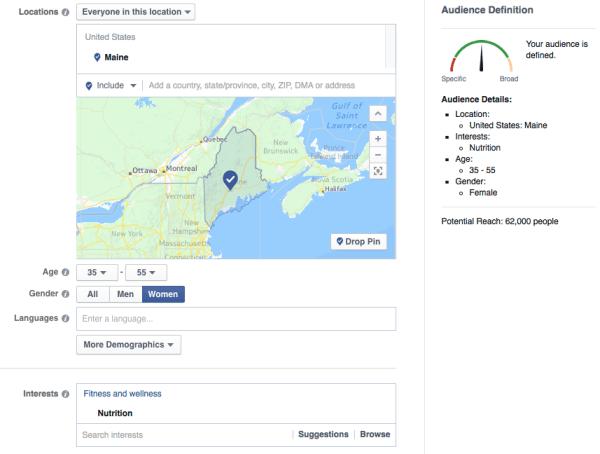
Some quick market research will tell you if your audience is big enough.
This is also good business information, because if your audience is too small, you may need to change your offering to expand your audience. On the flipside, if your audience is too large, you might want to target a narrower niche to start.
Of course, not everyone is on Facebook. According to recent research, almost 60% of Americans are on Facebook. That number may be more (or less) depending on where your audience lives, their age, gender and household income, but it’s a good starting point.
#3: Survey Your Customers
If you’ve been in business for any length of time, you have customers you can survey.
For the purposes of optimizing your social media campaigns, wisely spending your ad dollars and targeting guest blogging opportunities, you need to know where your audience hangs out online. As part of your survey, ask your current customers the following questions:
What social media sites do you regularly use?
What websites do you visit for information on _______ (for example, remodeling ideas, pricing strategies or whatever is appropriate for your business)?
Do you listen to podcasts? If so, which ones?
Do you regularly read blogs? If so, which ones?
What people do you follow or pay attention to online?
You can also use free tools like SurveyMonkey or Google Forms to collect your answers. In this video, Steve Dotto walks you through how to create your own forms with Google Forms.
Google Forms is a great way to collect feedback on live events, for example, because it graphically displays your audience’s feedback. Go to your form results and select Form > Show Summary of Responses from the drop-down menu.

Generate pie charts of your customers’ interests.
#4: Research Online Behavior
What do you do if you’re just starting out, your customer base is too small for meaningful results or you’re expanding into a new category? In cases like these, or simply to supplement your surveys, you can research online behavior.
The Pew Research Center has an excellent breakdown of where your audience spends their time online. It’s not difficult to find studies and infographics that provide information on specific platforms or other countries. For example, check out this chart from MarketingCharts to see a makeup of the top social media channels based on gender, age, education and more.
#5: Find and Connect With Your Customer
Once you get the results from your survey and have reviewed the demographics of the available research, it’s time to put that knowledge to work across different social media and digital marketing platforms.
It’s important to note that you can upload your email database to almost all social media platforms to find your customers there.

Upload your email list to find out which prospects and customers are on different social platforms.
Connect with this core group on any platform to jumpstart your online networking there and provide social proof that you’re well connected and someone worth knowing.
Here are some tips for connecting with your ideal customers on the platforms that will work best for many businesses and entrepreneurs.
Most social media marketers will tell you that the organic reach of businesses on Facebook has tanked. Google’s image search does too when you ask it about “organic reach on Facebook.”

Facebook’s organic reach is trending downward.
If you’re trying to find your audience on Facebook, the easiest path is to target your ideal demographic with Facebook Ads Manager.
If you return to your survey, you may find that your current customer base likes Golf Magazine or watching UFC (Ultimate Fighting Championship). Armed with this information, you can target your ads for your Facebook prospects, whether they like a round of golf or a roundhouse kick.
Facebook Ads Manager gives you other options to find your audience. You can upload your customers’ email addresses to Facebook Ads Manager to create a custom audience.

Once you’ve created a custom audience, you can then ask Facebook to create alookalike audience. Lookalike audiences are similar to your most valuable audiences. That means Facebook can put you in front of more people who are like your current audience.
However, you’ll still want to apply filters to this lookalike audience to improve your results. For example, the customer database for your vegan delivery food service may be limited to just your home state. “Lookalike” people may live anywhere in the world. Add a filter to your lookalike audience for your home state or even your hometown, depending on how big your delivery area is.
To engage with these targeted Facebook users, advertise your business page, a free webinar or a link to your online store, anything to begin the process of a deeper relationship.
If you’re using Facebook as a person and you want to find your audience, use Facebook’s search bar to find groups that match your ideal customer’s interests.

This search also uncovered some beer influencers.
The search results will show you groups that are populated with your audience. Join the conversation and start networking!
While Twitter’s reach is smaller than Facebook’s, it offers other opportunities to find your ideal customers.
Let’s start with the ad platform at ads.twitter.com. It doesn’t have the granular targeting tools of Facebook, but you can still find and reach your audience based on geography, gender, keywords, interests, influencers (called “followers” here) and more. You can also target Twitter users by their TV-watching habits.

People love to tweet while watching their favorite shows.
Within Twitter’s advertising platform, you can focus on getting more followers, driving people to your website or squeeze page or engaging them with other actions.
Beyond the ad platform, you can also use Twitter’s advanced search tool for finding your audience. If you run a local comic book shop, you can target nearby customers and prospects based on their location and what they’re tweeting about.
Within Twitter’s advertising platform, you can focus on getting more followers, driving people to your website or squeeze page or engaging them with other actions.
Beyond the ad platform, you can also use Twitter’s advanced search tool for finding your audience. If you run a local comic book shop, you can target nearby customers and prospects based on their location and what they’re tweeting about.

Your audience is tweeting. Are you listening?
Once you’ve identified these people, follow anyone who seems like a good audience member. Many of these people will follow you back out of habit.
Even if they don’t follow you back, you can create a new Twitter list called Favorite Local Comic Geeks. Twitter will then notify these users that they’ve been added to your list, increasing your visibility to them. In addition, it allows you to pay more attention to what your audience is talking about and engage them in conversation.
While there is an advertising platform on LinkedIn, the real power is in the prospecting tools and making one-on-one connections with your audience.
Suppose you want to reach HR professionals in San Francisco. Simply search for people with a relevant term in their profile. For example, search for “human resources” andlimit the location to a geographic area, such as “San Francisco Bay Area.”
You can further narrow your search to those working for top tech companies by selecting Google, Apple and IBM under the Current Company filter.

It’s easy to find your audience by job title.
Work your way down the search results. Decide whom you want to connect with, and which people you might want to send an InMail to. If you’re in popular HR groups on LinkedIn, you’ll find it easier to connect with this audience, as it often removes a barrier LinkedIn sets up to reduce aggressive networking.
Guest Blogging
Most digital marketers recognize the benefits of blogging for SEO and social media. However, you can also find more of your ideal customers through guest blogging.
When you guest blog, you get immediate access to an existing audience. The blog owner gets your valuable content, while you establish your expertise to their audience. If you’ve done your homework, this is also your audience.
You may already have a list of potential blogs to approach based on your survey results. But even if you don’t, it’s easy to find blogs that are actively looking for content.
Simply Google your targeted keyword along with “guest blog” (or “guest post”) to find blogs that are actively searching for guest writers.

Here’s how to find blogs focused on adventure travel.
You can also download the free SEO toolbar MozBar, available for Chrome or Firefox, to get additional information about the page authority (PA) and domain authority (DA) for each result. The DA tells you how much trust this site has built up on a scale of 1 to 100, where the higher numbers reflect more authority.

Summer Tomato has great domain authority, so start there.
Each site will have its own guidelines and requirements for submitting a guest post.
Pro tip: To get the most of your guest blogging opportunity, try to drive people back to your website or squeeze page for additional, value-added content that’s related to the original post.
Wrapping Up
Start by identifying your ideal customer through surveys and research. Find them with guest blogging opportunities, targeted ads on social platforms and engagement with powerful search tools on social networking sites. Finally, incentivize them to visit your website and get to know you and your business better.


