Namecheap

Sunday, 31 May 2015

How You Make Money With Facebook #2

MONEY ON FACEBOOK
Welcome to part 2 of my 3-part Facebook blog series. The goal of this series is simple. I am making money on Facebook and I want to show YOU how to make money on Facebook too.

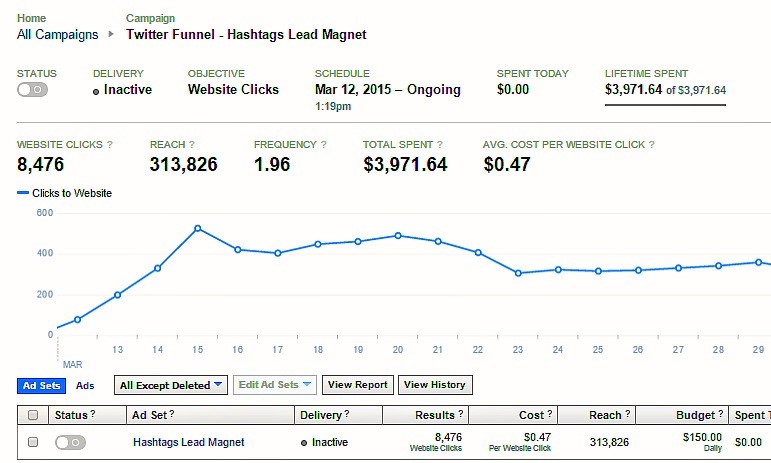
In Part 1 of the series I told you about the importance of building a large, targeted and highly engaged Facebook community, introduced my Facebook success formula and promised to tell you exactly how I made $64,287 on a Facebook advertising spend of just $3,971.

Let’s get into the nuts and bolts of exactly how you you make money on Facebook, starting with…
How YOU get $109,500/year worth of Facebook Fan Page Likes for FREE!

At the end of the last post in this series I introduced my Facebook Selling Formula. Here it is again:
Be Useful + Be Authentic + Sell Occasionally = Big Facebook Sales

Yes, I am going to tell you EXACTLY what the selling part is, I promise. I am also promising you that if you skip parts 1 and 2 (“be useful” and “be authentic”) that you will either fail altogether or have, at best, marginal results. Being useful and authentic helps me average 300+ FREE Facebook Fan Page Likes every day!


300 New Fans Per Day x 365 Days Per Year x $1.00 = $109,500 I NEVER pay a penny to advertise for Facebook Fan Page “Likes” any longer. When I used to, I got pretty good at it and could get highly targeted “LIKES” for between .30-.60 each. Most people pay around $1.00 – $1.50 per “Like” in advertising fees to Facebook. At $1.00 per “Like” the math looks like this: 300 New Fans Per Day x 365 Days Per Year x $1.00 = $109,500 In Facebook advertising costs saved! Let us assume that you are going to be on Facebook anyway. The Return on Investment (ROI) looks like this:


(ROI) = $109,500/0 = INFINITY!


My Content “Buckets” and Posting Strategy


I post on my Facebook Fan Page 8 -10 times per day between 6:00 AM – 10:00 PM seven days a week (yes, I use a scheduler!). I typically have posts in 6-8 different categories that I call content “buckets”. That means each category gets 1-2 posts per day and I rotate content buckets to keep things fresh. Why categories/buckets? First, it helps me stay organized and well-rounded. I do not want to exhaust my community with too much of the same type of content. Also, the different buckets allow me to show my personality consistently. Finally, the buckets help me make sure that I am promoting my business on a regular basis. 


The categories change based on what I have going on in my personal life as well as my business. If I am on vacation you will likely see more personal posts. If I am at an event, you will most likely see event related photos. If I am working on a new product launch I may have a slightly higher percentage of business-related posts. Here are my some of my current Facebook content “buckets 


  • Business – Product based 
  • Blogs (my own as well as my Huffington Post and Entrepreneur.com posts) 
  • Humor/Questions/Puzzles 
  • Mindset/Motivational 
  • Business/Social Media Tips 
  • Community Value/Cause 
  • Personal 
  • Business – Non-Sales 


I have 8 categories of Facebook posts and only 1 of them is business-related. Remember Jab, Jab, Jab…RIGHT HOOK! (thanks Gary Vee!) from Part 1 of this series?


I have found out that if I sell on my Facebook page about 20% of the time my conversions are higher, my community stays engaged and I make more money than if I try selling to my community all day every day.


8-10 post and 8 categories may seem like a lot to you, but it is perfect for me for a lot of reasons. 

Three are: 

I have A LOT of content I create other places (like on my blog and I want to get it seen.
I want people to see my personality and my business from all angles.
Finally, unlike Twitter, Facebook only shows my posts to a small amount of my fans organically so I need to create more posts to reach a greater number of them.


I can usually find all of the content I am going to use, build the graphics and post a day’s worth of content in under 1 hour! Note: Be sure to check back in a couple of days for Part 3 of this series where I tell you what is inside my Facebook tool chest and how I find content and create high-quality graphics at such an amazing speed.


My “Jab” Facebook Posts


These posts are designed to show my personality, make you laugh, get you to think, provide you guidance or give you a business or social media tips. I am not trying to sell you anything! These typically get the most free traffic on my page and build my Facebook community faster than anything else I do.


Question or Puzzle Post


(Yep…that is a FREE reach of 54 MILLION with 3.6 MILLION Likes, Comments and Shares!)


Personal Post


(Look at the engagement this post got in the first hour after posting!)


Personal Post


(I try to say good morning or goodnight a few times a week…to 163,584 people!)


Community Value Post


(I am helping community members join together to grow THEIR Facebook communities…not just mine!)


Humor Post


(I keep it clean :-))


Business Tip Post


(Kitties and business tips together…purrrfect!)


Motivational Post


(That also happens to be good business advice!)


Business-Related Non-Product Post


(Use trending topics – idea spun off from Super Bowl Commercial #LikeAGirl)


Blog Post


(I get hundreds of thousands of blog post reads every year from Facebook)


Cause/Date Post


(This post appealed to only HALF of the people on the planet!)


“Right Hook” Posts


Okay, the time has come! It is time to use Facebook to make money. These are my “right hook” posts, the ones that drive bottom-line business results. I deliver them sparingly but consistently, typically with awesome results.


Business-Related (Webinar Sign-up) This was a free webinar I ran last week.


This post, part of a larger campaign, had a reach of 28,656 people with about half of that reach coming from a very small Facebook ads spend. 131 people clicked the link directly from the ad (about 90 of them actually registered) and another 50 people shared the post with their communities. Sure the webinar was free, but I did take the opportunity to invite people to join my Social Selling Made Simple Inner Circle, a paid subscription group where I train and work with small business owners. That product has a Lifetime Customer Value (LCV) of $1,269 ($47/month times an average 27 month retention). I sold 139 memberships for $176,391 in LCV on a total Facebook Ad spend of $1,472.15.


Business-Related (Free Offer) This post offered a free eBook I created showing people how to use Hashtags on Twitter to increase sales:


Get your free copy here!


I spent $200 on Facebook advertising for this post, reached nearly 40,000 people (half of those for free) and had 543 people claim the offer from this one ad. Inside the eBook is a link to a paid product, a $9 mini-course called Twitter Growth Domination 2.0. For the entire campaign, 19.2% of the people who downloaded the free eBook bought the $9 upsell. 20.4% of those who bought the upsell bought the second upsell, a $47 Twitter Sales Shortcuts Course. Finally, 11.0% of the people who bought the second upsell bought the Social Selling Made Simple monthly membership for $47/month. So, yes, I did pay $200 to GIVE something away for free (at a cost of only.36 each!). Not smart? 


Well, let’s look at the numbers…


Here is the math and ROI calculation on the results.


Mini-Course: $9 x 104 = $936


Full-Course: $47 x 21 = $987


Subscription Product: $47/month x 2 x 27 months (average retention) = $2,538


ROI = $4,461/$200 x 100 = 2,230%


Still not Convinced?


Well, I have gone and done it. I have told and shown you my Facebook marketing strategy in great detail as well as the results of my efforts. I have built a good portion of the multiple seven-figure value of my social media marketing company, Boom! Social, on the back of Facebook and this exact strategy. This, however, is not a post about me. It is about YOU and how YOU make money on Facebook.


Read more here: http://kimgarst.com/how-you-make-money-on-facebook-part-ii

Sunday, 24 May 2015

How You Make Money With Facebook #1


In this blog series, I am going to show you, not only how I make money on Facebook, but how YOU can as well!


Why I Am Writing This Series About How to Make Money On Facebook


I decided to write this blog series for several reasons. First, there are a lot of “experts” who constantly give advice on how to sell on Facebook when in reality, they aren’t selling on Facebook. Personally, I want to learn from those doing the work, don’t you?

Second, over the past couple of years Facebook has systematically reduced their organic reach levels (the amount of traffic that Facebook shows to your Fans for free) from 16% to very low single digits (reportedly as low as 1% now). My organic reach levels have never been higher and I want to share with you how I do it.


My DAILY Organic (a.k.a. – Free!) Facebook Post Reach
February 14 – May 10, 2015

Finally, over 2 MILLION people now use Facebook advertising, most of them very poorly, wasting billions of dollars in the process and not selling very much in the process. I do Facebook advertising very well and I know I can help you save money and get better results all at the same time.


I Sold $64,287 on a Facebook Ad Spend of $3,971!

A couple of notes of caution before we begin. This blog series is NOT for those looking to set-up a Facebook Store. There are hundreds of blog posts, reviews and tutorials out there and some darn good Facebook e-commerce apps such as Shopify, Ecwid and BigCommerce.


Who Should NOT Read This Blog Series


This series is also NOT for those looking to make a “quick hit” and move on. I see it all of the time. These are marketers who throw up a lousy Facebook Fan Page, make no effort to build an audience or engage with their fans (if they even bother taking the time to get any Fans), build an ad to push a product, throw a bunch of money at it, fail and conclude that you cannot sell on Facebook.

For the rest of you…let’s do this!

Hint…you can grab all 3 parts of this series in PDF format, right now :-)!


Here is how I sell on Facebook…

Selling on Facebook: People Buy from People they Know, Like and Trust.


I have a value based relationship with 143,782 people on Facebook. That is the number of Facebook Fans I have that “Like” my Facebook Fan Page.


I Get 10,000 New Facebook Fans for FREE Every Month!

I am also courting 17,056,041 new future customers at the same time! That is the number of people who saw a post I wrote on Facebook last week.

A whopping 2,069 said “Very cool! We should get to know each other a little!”

That is the number of people who “Liked” my page after seeing a post of mine they enjoyed.


THESE are my future customers!


You see, I realize that before anybody is going to buy something from me, they have to know, like and trust me! That is not any “genius-level” revelation. That is Sales and Marketing 101. It applies in the social world just as it does in the real world.

Think about the stuff you buy and why you buy it. Want to take the family to dinner? Where you go is not a random decision. It is based on the impressions placed in your mind created by the ads you have seen for the restaurant combined with reviews you may have read online, reinforced by word of mouth from your friends and people whose opinion you trust and perhaps several other factors.

The goal of my Facebook Fan Page is to provide a safe place where people can get to know me a little. Hopefully after knowing me a little they will like me (and not just the Facebook kinda’ like). Sure, occasionally I am going to sell them something, but only after they trust that I am only going to sell them high-quality products that they need and want.

So do you see how it all fits together? I use my Facebook Fan Page as a place where people can get to know, like and trust me so I can sell them products that actually want and need.


The power of Facebook, and social media in general, is that I can prospect to MILLIONS of people at one time.

Facebook Selling Epiphany #1:


To sell on Facebook you need to stop treating fans like a commodity and start treating them like your friends.

My Facebook Community-Building Process


If you look at my Fan Page you are much more likely to see a motivational quote or a business tip than a post trying to sell you something.

Why is that?

Because people do not want to be beat over the head with non-stop sales pitches. Again, let us use a real-life example. Let’s say you met a new friend who invited you to lunch. At that lunch date she talked about what a fabulous business (multi-level marketing…think Amway) opportunity she found and that you should join too. You go on second lunch date, same thing. A third, same thing! Now, don’t get me wrong, I am not against network marketing but the scenario is what I want you to picture.

How long do you think you guys will stay friends if you simply aren’t interested in constantly being sold?

What if instead you got together for lunch and talked about things that interested both of you? Maybe you both have children, or love dogs, or are fitness fanatics. Or best yet, you love to shop and you talk about all your latest shopping “finds”! Would you not enjoy your lunch dates more and be more likely to go on another?

After a few of these dates maybe you mention to your friend that you would really like to find a way to make a little additional cash from home with flexible hours. NOW she tells you about her business. Are you now not MUCH more likely to be receptive to taking a peek at her business opportunity?

How This All Fits Together and The Three Social Media Books You MUST Read


My friend Gary Vaynerchuk wrote a fabulous, #1 best-selling book on the above relationship-building strategy called Jab Jab Jab Right Hook. If you are only going to buy and read 3 social media books ever, this should be one of them.

The second book you should also read is called YOUtility: Why Smart Marketing is About help Not Hype. It is by my good friend Jay Baer. Jay’s premise, and he is totally right, is that before people will buy from you, you must first be useful to them. Please do not miss the main point here. Most of the time they will determine if you can be useful PRIOR to spending any money with you. In short, be consistently useful for free and they may actually buy your products if they think that product will be especially useful.

Finally, you might want to read my book Will the Real You Please Stand up: Show up, Be Authentic and Prosper in Social Media. In my book, I share how to consistently be yourself on social media and you will grow a huge targeted community that you can sell your products and services to.

So how does it all fit together?


I believe (and the results have proven this out) that I have developed a formula for selling on Facebook that is a combination of all three philosophies.


Kim Garst’s Facebook Selling Formula:


Be Useful + Be Authentic + Sell Occasionally = Big Facebook Sales

My Facebook Posting Strategy Appears to Be Perfectly Random


….but it is NOT! In fact, it is the farthest thing from random you can get. I have defined, developed, tested and re-defined it dozens of times over years of trial and error (lots of errors!) and it flat out works!

Read more here: http://kimgarst.com/how-you-make-money-on-facebook

Wednesday, 20 May 2015

A Realistic Review of Google Sniper 3 And How the System Works!

How To Make Marketing Videos People Will Really Love & Share!


Frequently posting great quality video content is arguably the single most effective organic SEO strategy currently available. That means a drastic increase in targeted website traffic, significant increases in social media sharing and, most importantly, more paying customers for your business!
In this post I share the latest stats and insights into why video is absolutely critical to your content marketing success in 2015.

I then share some of the most effective tools, tips and techniques for producing your own great animated video content for free.

So, why is video marketing so effective?

Well, to put it simply, humans are extremely visual by design. If you have any doubt, consider these figures:

60,000 times to be precise! That’s how much faster our brains process visuals vs. regular online text. 

Not only that but:

70% of the body’s sensory receptors are in the eyes!

That makes strong visual story telling critical to effective digital marketing and branding through the search engines and social media.

What are the concrete results of sharing strong visual content? To start off with, having great visual content on your blog and in your social media posts will significantly improve your objective engagement measures:

On average, online brands who communicate through strong visual content increase their:

Page Views by 94% and their:
Objective Engagement metrics by 37%
Twitter Retweets by 35+%

The key question here becomes: How can you sell anything through digital marketing and online branding efforts if people don’t even know your business exists?

It’s time to start frequently creating and socially sharing great videos! Here’s why video is so incredibly effective as an online marketing tool:

Video content is arguably the most effective form of visual content for getting more business and customers.

To put it simply, video is the best of the best when it comes to visual content marketing.

With video you are far more likely to get:

Noticed- Your web page is 53X more likely to end up on the first page of a Google Search if you have videoon it. And that’s serious organic SEO value! Not only that but:

Video is the most powerful way to clearly convey the unique value you have to offer your ideal customers. There’s no better way to realize the #1 goal of online marketing: to show potential customers you’re the top choice for solving their immediate real world challenges and pain points.

Ideal customers are all those folks out there who are looking to pay for your product or service right now. But they can’t find you in all the noise (yet) when they search Google, Twitter or Facebook.

With great video you:

Get Lots More Traffic- 75% of visitors go to a website after seeing a video about a company who has products or services they’re looking for.

Put ‘Visitor Bounce’ in Reverse: One of the biggest challenges faced by online marketers is keeping their visitors truly engaged so they stay long enough on their blog, website or landing page to really share their value proposition and make sales.

Visitors stay a full 2 minutes on a site with great video as opposed to 8 seconds on a site with only text. As any leading content marketing expert will tell you: That extra 1 minute and 52 seconds is sales window that’s potentially worth its weight in diamonds!

Stronger Social Shares – You get 12X more shares with videos than via text and links combined!

Deep Follower Engagement – 70% of people have very strong recall for audiovisual information after 3 days!

The more great video content people see and hear about your business: the more likely they’ll remember you when it’s time to make their purchase.

Most importantly, the use of video directly translates into Increased Sales and ROI!!!!

What do the actual video marketing stats say? Well, great video content increases:

√ Conversions up to 24%

√ ROI up to 300%

When businesses put video at the center of their content marketing strategy, they increase the likelihood of a purchase by:

64% for visitors!
85% for online shoppers!

Animated Video Inspires Strong Positive Emotions and Connects those Emotions with Your Business Message:

Most buying decisions are strongly rooted in the emotional experience an online brand inspires. It’s not just about the facts and figures.

Although, as we’ll explore shortly, telling your business story effectively with strong, easy to understand infographic data is also extremely important.

Visual content designed to bring out strong bursts of excitement and/or delight are 200% more effective than the usual text-only sales or blog copy.

It turns out that great animated video content, including: animated explainer, “How to..” and video infographics, are particularly effective for both inspiring positive emotions and for communicating your business “value-story” through data.

Animated video content empowers you to easily communicate your business message through visually combing powerful emotional and informational content through the use of:

Fun and emotionally expressive animated characters;
Strong, emotionally expressive colors;
Easy to understand and deeply engaging charts,
Animated text display and transition effects; and,
Really cool infographics
And PowToon puts all of these tools right at your fingertips!

Ok, so now you know why video is critical to your online marketing success. You’ve also learned a few general tips for creating great video content.

You’ve also seen that using powerful video animation elements in your digital marketing content will give you serious competitive advantage over competing businesses. This increased engagement comes from effectively inspiring strong positive emotions while at the same time communicating and energizing your business message.

So now that you know why video is so critical to the success of your digital marketing campaign in 2015,let’s explore some of the most effective tools, tips, and techniques for producing your own animated videos:


The Top 8 Tips for Creating Amazing Animated Video Content:


So what are the 3 biggest challenges you face if you want to frequently create and share great animated video content from scratch?

Simple: It’s usually incredibly -
Expensive,
Extremely technical; and
Extraordinarily time consuming.

Outsourcing the production of animated explainer, “how to” and demonstration videos can cost a fortune, – literally hundreds and very often thousands of dollars each!

And that’s right where my first high-value video creation tip comes in to play:

1. Make Your Animated Videos with The PowToon Platform (It’s Free!)


PowToon is the #1 free animated video and slide presentation creation tool for 2015 – period.

PowToon empowers you to frequently craft and share rich visual content on your blog and social media accounts.

With PowToon you can you significantly increase your chances of getting more views, stronger social signals and more real paying customers.

Powtoon makes creating great animated video content fast, fun and easy. And what’s really great is that you can start making and sharing videos right now – and it’s FREE !

2. How to Tell Your Business Story in 7 Simple Steps:


When you’re making an explainer or teaching video with The PowToon platform make sure to start by creating a short written script that:

Tells your story through the experience of a main character. This allows your ideal customer (external or internal) to really connect in the first person. The Powtoon platform has so many characters and time saving theme-based templates for you to choose from.

Next, clearly and simply state your ideal customer’s top 1-3 pain points. For example, what real world problems or business challenges will you solve with the information you’re going to share next? How will what you’re teaching them in your video directly benefit them in real life?

Next clearly explain or communicate your top tips, tools or strategies for solving your ideal customers main problems or pain points.

Give them your best action steps and strategies for free every time. These are things your viewers and followers can start doing right now to create genuine and immediate value in their lives.

Treat your viewers like high paying customers and that’s what they’re more likely to become!

Describe the solution state: Simply and clearly describe what it’s like for your main character now that he or she has implemented the solution or strategy you’ve outlined in your video. You want to clearly convey what it looks like and feels like now that they’ve started implementing your tips or suggestions. Don’t forget to use language, characters and images that inspire those positive emotions we discussed!

Finally, clearly state your call to action. This is where you invite your viewers to take a specific action step that further connects them with your business.

For example, many successful digital marketing campaigns offer additional high value tips and strategies via an animated video series, a free Ebook or white paper, in exchange for a viewer’s email address.

You can then send them the free Ebook and at the same time add their email to your growing email marketing list.

You can then send them fresh, high quality video marketing content which has a much higher ROI then the usual text and static image based email marketing copy by the way.

Quick Tip: Put an explainer video at the top of your blog or business website. Just like you notice a headline when it’s at the top of an online article or newspaper, you want to put the video where it immediately catches people’s attention.

3. Write an Attention Grabbing Video Title Based on Fast Keyword Research


When it comes to optimizing your content for the search engines and generating high levels of follower engagement, keyword research for your video titles is incredibly important. So is writing an emotionally inspiring title for each new video once you’ve selected your keywords.

But how do you do effective keyword research? Now that both Google and YouTube no longer offer their free keyword research tools?

That’s easy! Try: Ubersuggest an amazing free tool that lets you do quick and effective keyword research.

Just type in your keywords and the tool will generate several suggestions based on what people are actually searching for right now in your business or personal branding niche.

Buzzsumo is another powerful free tool you can use to see what content and content titles are receiving the highest number of social shares and engagement.

Buzzsumo is great for curating and integrating the hottest online content for your niche and for brain storming your own unique video and blog title ideas.

Once you have a good idea of what your next animated video or PowToon slide show is going to be about, it’s time to write an emotionally magnetic title that will actually grab and hold peoples’ attention.

You need to check out Coschedule’s amazing new headline analyzer tool. And it’s completely free!

Just type in your rough video title idea. The app then analyses and grades your title. For example, the title of this blog post scored an A+ after I made a few changes based on the apps suggestions.

The Coshedule title tuning app provides easy to understand feedback and suggestions you can follow to make your titles more emotionally appealing, stickier and ultimately: more socially shareable.

Keep typing in each new title refinement you come up with with based on the feedback you get until your title scores and A+ as well.

And remember: A shorter title is a much more effective title.

4. Keep Your Videos Short


One of the most important tips for video content creation is to keep the length of your videos at or around 60-90 seconds maximum. That’s the optimal length for keeping the average viewer’s sustained attention on YouTube.

There’s always an exception to the rule. Some “How to..” videos or business presentations can be longer. Just be sure to keep your longer videos super-fresh and super-valuable.

So how do you keep most of your animated videos short and to the point?

5. Use an Audio Story Board to Save Time and Hundreds of Dollars


One of the main reasons hiring a company to create animated videos is so expensive is that they actually draw up an animated story board for each video from scratch. That can take several dozens of hours of work on the part of a professional animator or team of animators.

So what’s the solution? Simple: when creating your animated video content with PowToon use your audio voice over as a kind of audio story board to construct your video around.

How do you start?

Well, first you need to write your script for the video based on the basic story telling principles we talked about earlier in step 2. Remember to keep it short (usually around 200 words) because you want your video to be no more than 90 second long in most cases.

You can then do your own “voiceover” by reading and recording your 60-90 second script.

You can also hire one of the amazing and surprisingly affordable voiceover artists Powtoon recommends via VoiceBunny or Fiverr.com.

Once you have a 60-90 second voiceover of your written script recorded, just downloaded it directly to your new Powtoon video as an audio file and select the background music of your choice.

You can then use the voiceover you’ve recorded to create your new animated video frame by frame! You can actually add great animated video characters, graphics and whiteboard-style text and other effects.


Oh and don’t worry! PowToon walks you through a fun and fast set of short animated tutorials right from square one. You’ll honestly become a Powtoon video creation expert in no time!

6. Tell Your Business Story with Infographics


Infographics are arguably the most powerful way to visually communicate bottom line business value.

Not only that: but Infographics are among the most shared form of content on social media next to great videos. That makes combining the incredible power of animated video with infographics a complete no brainer!

How do you add infographics to your Powtoon videos and Slide Presentations?

Powtoon offers some great animated video infographic templates. This lets you build your own infographics as part of your animated video or slide presentation process from scratch.

You can also create amazing infographics using powerful, free data visualization tools like:

Canva
Infogr. am
Piktochart

Once you you’ve created your infographics you can save them and download them as images directly into your animated video or PowToon Slides presentation.

Quick Tip: The best place to add your infographic content is when you get to the part of your audio script where you outline the key business and personal benefits of the strategy, tips or tools you’re suggesting in your video.

7. Unleash the Incredible Organic SEO Value of YouTube


Once you’ve finished creating each great new animated video, you want to share it across all of your most important social media channels.

When it comes to video content marketing, posting your videos to YouTube is the first place to start.

Why? Because YouTube is the second largest search engine after Google, and of course it’s actually owned by Google. Not only that, but the Google search engine ranks YouTube as a high authority website.

So, when you post a live link to your blog, website or landing page directly at the beginning of your YouTube video description, you’re actually creating a very powerful backlink for your blog or website. This is a little known yet very powerful organic SEO strategy you need to be taking advantage of as often as possible.

PowToon makes downloading each new animated video you create to your YouTube channel fast and easy. And you can download to YouTube right from your PowToon dashboard.

Once your new video goes live on YouTube, it’s as simple as clicking the social share buttons under your video and sharing them across all of your most important social media accounts!

8. Simple but Powerful OnPage SEO Tips for YouTube:


Always fill out your Title, Description and Tags Sections Under the Video Before Publishing

Make Sure That Your Main Keywords are at the Front of Your Title and at the Beginning of Your Video’s Description

Place a Live Link to Your Blog, Website or Landing Page Right at The Front of Your Video Description

Make Sure to Write a Great Video Description of the Value It Offers Your Viewers in the Video 
Description Section. Tip: Use Your Written Video Script as the Basis for Your YouTube Video Description.

Think of Your Video Description as a Kind of Mini Blog Post. Videos with a few hundred words of description outperform similar videos with a very small or poorly written description.

Add 4 or 5 of Your Most Important and Relevant Keywords to The Tags Section of Your New Video Page.

Important Take Aways:


Ok! So now that you know having great animated video is:

53X more likely to get you on the first page of a Google Search, and that it gets:

12X more shares than text and links combined! That:

Visitors stay a full 2 minutes on a site with a video as opposed to just 8 seconds without great video; that:

70% of people have very strong recall for audiovisual information after 3 days compared to just articles or text! and, most importantly:

Great Video has been shown to improve ROI up to 300%

So what’s your next best step?

Sign up now for your Free PowToon Account! In just a few minutes you’ll be making animated marketing and explainer videos that people will love to watch and share! It’s really fun, it’s really easy and it’s really good for business!


Saturday, 16 May 2015

10 Expert Tips on Making Your Business Blog a Success

If your business doesn’t already have its own blog, it’s about time you started one.

Blogging on a regular basis can massively boost your chances of acquiring new leads, increase social following, improve your visibility on the map, and comes out as a brand in the respective niche.
 
When you have a unique voice that strikes the right chords in the heart and minds of readers who are hungry for credible and helpful information, you have not only found your voice but your audience as well, who will eventually become a customer of yours. I’m sure you know the basics of starting a blog. 

Let’s discuss how you can make the most of it by incorporating these hand-picked, tried and true blogging strategies.


1. Join Communities

What kind of product or service do you specialize in? 

Look for communities within your industry and add value to your business by answering questions coming from community members. You can post relevant posts and participate in discussions. 

Position yourself as an expert source of information or authority.


For instance, if you’re a marketing agency you need to consider places like inbound.org, marketing subreddit on Reddit, Stumble Upon, Quora, and Form Spring. Other industries can also look into Quora and Reddit for communities that are conversing about your specific industry.


 2. Join a Group of Like-minded Individuals 


Often referred to as a mastermind group, like-minded trend setters and entrepreneurs in your industry can keep you motivated and even provide insights to help boost business. They can support your blog by sharing your content and commenting on your blog to increase its popularity and visibility. Look beyond groups like SEO, social media, PPC etc. Try looking into related areas such as entrepreneurs, SMBs, start-ups, local groups of your servicing area, and bloggers. 


Google + communities, LinkedIn groups, and internet forums are the ideal places to find these types of groups. If you’re a business owner, feel free to connect with people on LinkedIn. It’s professional and can help build your own personal network.


 3. Start Guest Posting 


In case you don’t have a very large number of followers for your blog, it’s a good idea to start guest posting on other blogs. But wait, guest posting can penalize your site, right? No, it’s not and it will never be if you’re doing it to flourish your brand, build relationships, discovering new online business ideas, increase your followership, and in the end, “building links”.


Before contacting any blog, study the blogger’s best posts, check out the topics, average social shares/ comments, word-count, and frequency of publishing. Then, design a personalized outreach email. Because most blog owners or manager go through many emails a day, you want to keep your email short and precise. Be direct with what you’re emailing them about and be available when they have questions for you.

For more tips about email outreaching, check out this post from Moosa Hemani.


4. Just Don’t Give up


Blogging is a game of patience and persistence. It will take time to grow. As you continue writing, you discover your own unique style, pace and tempo. Learning good blogging strategies takes time, there’s a fair amount of trial and error involved since you’ve got to encompass strategies like affiliate marketing, search engine optimization, email marketing, social media strategies and etc.


Credit: Moz


Here are some tips that you can implement: 

  • Your content should be SEO friendly
  • Analyze your Google Analytics on a regular basis.
  • Use Followerwonk to identify your audience on Twitter.
  • Search the best performing posts in your niche and look at who shared it. You can use BuzzSumo for this.
  • Make your content rich by adding illustrations, infographics, videos, and gifs. Always mention the original source with the link, as it will portray you as an honest blogger.
  • Personally email or tweet the original sources and let them know about your post to build strong relationships.
  • Always perform detailed keywords analysis before writing a post and identify a gap that you can fill. 
  • Link the credible information from others in your posts.
  • Incorporate social sharing menus at the right places.
  • Give it time to grow.

 5. Find Your Own Distinct Tone


Checking out a few blogs for inspiration’s sake is fine, though you need to find your own unique voice and stick to it. You might add contributors to your blog over time, so again, make sure they stay in line with the tone and style you’ve developed. This is what keeps audiences coming back – consistency.


 6. Write Frequently


It’s a good idea to post blogs at least twice a week, if not more. People will instinctively get in the habit of visiting your blog frequently when they know good, resourceful information is being published on a regular basis.

Launch bi-monthly and weekly series to keep the attention of your readers and develop it in a way that encourages them to contribute.

At Social Cubix, we have a bi-monthly series of best apps in which we pick only those that possess great design and unique idea. At the end of every post, we encourage our audience to email their own developed or favorite apps which they like to see in next edition. Every month, we received various emails for such requests from developers, companies, and readers.


7. Visualize Your Reader


Finding it difficult to maintain a consistent tone in your writing?

Consider this: do you prefer writing casually or formally?

Article-style, third-person writing, or concise first-person sentences?

Pick a friend or co-worker you’re really close to and imagine that you’re writing for them. Visualize them as you write – you’ll definitely be more consistent.


Remember who you’re writing for and what type of audience you’re trying to reach with your content.


8. Let Visitors Subscribe to an Emailing List


Your visitors should be able to subscribe to your email list and get notifications when new posts are published. Do this successfully and you’ll retain the most viewers. In fact, your email list will continue to grow, as does your blog. 


There are lots of easy to install plugins available, like Sumo Me, that does not requires the expertise of technical resource and you can easily integrate your favorite email-marketing CRMs.


 9. Be Authentic – Be Yourself


You’re blogging in the first place because you love doing it. You’re passionate about it and what you write about is probably due to the fact that you’re an expert at the subject. Blogging really is about people. Don’t hesitate, let your passion flow and let your personality shine. For sure, you can quote other bloggers or experts about specific ideas, but remember to put your own thoughts and twist onto the idea. It’s important to share your idea and thoughts too! This, among other things, is what makes your blog highly unique and compelling to read. 


10. Quote Influential Figures


Hand-pick influential figures from your industry and quote their comments and/or opinions in your blog, you can find them by using Follower Wonk and Buzz Sumo. This way your argument becomes a highly informed one and in the process, you’re widening your traffic and readership.

You could also target spokespeople representing local organizations or clients of your own. In fact, this is a great way to build relationship with these influential figures and generating a conversation with them and their fans.

Tuesday, 12 May 2015

Step-By-Step Guide On How To Launch A Pinterest Business Account

Strategy without tactics is the slowest route to victory. Tactics without strategy is the noise before defeat.
Sun Tzu told us that in “The Art of War” sometime around 500 BC.

And it’s still true today.

When you don’t pair tactics with strategy — regardless the type of campaign or goal — failure is imminent.

But when you do?

Get ready to succeed in a way that may blow your socks off!

In this article, I’ll show you the exact steps we took to launch the Post Planner Pinterest Channel  (and how you can do the same in your business).

C’mon. Let’s get started!


How to Launch a Pinterest Business Account: Step-by-Step Guide for Newbies

While Sun Tzu couldn’t foresee the emergence of social media or the explosion of a little visual marketing site called Pinterest (now tallying over 70 million registered users) his advice is absolutely relevant.

If you want to succeed, you have to work smart. That means putting a plan in place and taking an integrated, strategic approach.

That is EXACTLY what we did when we launched the Post Planner Pinterest channel.

We looked at our current presence on Facebook, Google Plus, Twitter and Instagram then determined how to best leverage our virtual assets.

We believed Pinterest could help us really make some noise — and the stats say we’ve done exactly that.

Here’s how YOU can do the same…

STEP 1 – Set up your business account the RIGHT WAY


As Mark Twain said,
The secret of getting ahead is getting started. The secret of getting started is breaking your complex overwhelming tasks into small manageable tasks, and starting on the first one.

And boy is he right — especially when it comes to setting up a Pinterest account properly.

The first task, account optimization, can MAKE OR BREAK the success of your Pinterest channel.

Do a little research. Look at your competitors across Pinterest. Are they ranking for your industry’s most important keywords? If your answer is “No,” then here’s where your opportunity begins.

Take the time to make sure you are search friendly. If you’ve already set up your account, go back through to ensure the most critical information (for your visibility) is added.

Here’s a checklist of what you’ll want to add and optimize:

  • Name of your company
  • Company logo or professional headshot with optimized image metadata
  • Keyword rich bio that’s short, catchy and speaks directly to your target audience
  • Location of your business
  • Verified website (add your website URL, then take appropriate steps to verify through Pinterest)

Here’s what that looks like:

pinterest optimization


If you’ve already set up a personal account and want to transition that to a business account, you can do that as well.

Either way, begin with the checklist above to properly position your Pinterest account for search.

STEP 2 – Get off to a good start by following the social media Golden Rule


As I shared in this article, your Pinterest board names play a major role in your content getting found.
While there are many factors to growing a solid Pinterest following, the top three in my opinion revolve around your boards.

Setting up your Pinterest boards:

  1. Begin by setting up your boards with optimized board names based on a keyword strategy. This goes back to the research we discussed above.
  2. Start pinning eye-catching images to each board. These are the eye candy that will draw followers in.
  3. Deliver WHAT YOU PROMISED. Make sure your content consistently offers value to your followers. NEVER USE bait and switch to point links at affiliate content (something Pinterest has just put the kibosh on) or headlines that grab attention — but there’s only fluff and no substance behind them.
Make your followers lives better by always asking, “How will this content help my audience?” (the Golden Rule of social media).
And one important note: As you begin to create your boards, make sure your Pinterest board names not only reflect your industry/niche, but are also specific to your company culture.

For example, are you fun and carefree or technical and serious?

Your Pinterest account is no different than any other social network. It should be an extension of who you are offline — giving followers a unique look into the visual aspect of your business.


STEP 3 – Make pinning something you do WITH others (not TO them!)


The idea behind pinning is simple: Pin content your target market is craving.

Pin it from your website, your YouTube channel, your Etsy store – wherever your branded content hangs out.

Then pin great content from OTHERS. If you want to grow a loyal following, you need to create reciprocal relationships.
Do you have favorite bloggers you follow or peers you respect? Hop over to their blog and start pinning. You enjoy their content, so I’ll bet your followers will too!
And don’t forget to follow your faves on Pinterest. You’ll find an immense amount of inspiration in the content pinned by them. You’ll also begin to make VALUABLE connections

Follow these tips to get your Pinterest network growing

  • Spend time researching your competition. What are they pinning and what’s receiving a significant number of repins? Study it, understand it, and then make it better.
  • Ask! Have a Facebook page? Let your fans know you’re getting ready to launch a new account on Pinterest. Then ask them what type of content they’d like to see.
  • Use your blog to test the waters. Write an article about Pinterest marketing, and mention the role it’s going to play in your online marketing. Ask for comments from those actively using Pinterest. What are they using it for – business, pleasure? – and what kind of content are they pinning and interested in repining? Again – ASK and then LISTEN. It’s amazing what you can learn when you take time to invest in your fans, followers and blog readers.

STEP 4 – Get the word out (you must escape obscurity if you are to succeed)


Once you’ve set up your account, created boards and begun to pin content – now it’s time to start promoting your new social channel.

Do this to draw more interest to your Pinterest boards:

  • Use a tool to help share content and identify top people and brands to follow. Right now, Tailwind is tops for scheduling pins, finding trending content, and tracking results. Word on the street, though, is that there will soon be a new sheriff in town :)
  • Add a Pinterest board or pin widget to your website or a “Follow me on Pinterest” button. If you’re a WordPress user, you can make that happen via the Pinterest widget (it just takes a little code) or a Pinterest plugin.
  • Cross-promote your Pinterest campaign across Facebook, Google +, and Twitter. Many businesses forget that each social network can be used as a promotional arm of another.
  • Be mindful of image sizing. For example, we create graphics that perform well on Pinterest and Google +. Our optimal size is 735 x 1200 pixels – a size we’ve tested repeatedly. We share our pins on Google + and encourage our followers to join us over on Pinterest.
  • Tweet the news that you’re now on Pinterest. Share one board you know will resonate with your followers.

STEP 5 – Be consistent on Pinterest… everything you do matters


Determine your posting frequency. How often will you post and how will you spread that content out over time?

Excessive pinning will be annoying to followers, while too little pinning might make your followers forget you exist.

Create a pinning schedule then gauge your follower’s reaction afterwards. Doing that before increasing or reducing your pinning frequency can DRAMATICALLY improve your engagement!

Add this information to your Google Analytics – a tool you should never overlook – and you can create a winning Pinterest posting strategy.


STEP 6 – Get comfortable with Pinterest analytics


Speaking of analytics, Pinterest offers a sizeable amount of information right within your business account.

Don’t forget to add this to your checklist: Review your analytics weekly. Keeping up with analytics will help you better understand what type of content your followers want. Take a look at your profile impressions, repins, audience data, and shares from your website.

Want to gauge your success as you get started? Here are a  few stats from Post Planner’s analytics over the last week:

  • Currently, Post Planner is receiving an average of 42 repins per day (up from 29 just 2 weeks ago)
  • Engagement (as measured by the # of our pins with at least 1 repin) is currently at 66.5% (continuing to push towards 100%!)
  • Profile views are up 50.65% and impressions are up 34.91% — over the past 2 weeks
  • Pinterest is now our 3rd most productive social traffic referral source!

Pinterest – Everything points to the Bottom Line


As you know, there’s no quick way to succeed in social media. It takes time, commitment, strategy… and consistent execution.

If you add Pinterest to your overall marketing strategy and commit to a SOLID schedule of pinning, liking, following and sharing — you will see results. I guarantee it!

Where can you find great content? Post Planner, of course! (And I expect a very special Post Planner announcement about Pinterest will be coming soon.)

Ready to start driving additional traffic to your blog through the power of Pinterest?

Follow this basic strategy for Pinterest — everything you need to grow your audience and your BOTTOM LINE!