Friday, 27 February 2015

How To Create Successful Marketing Content


How much spare time do you have on your hands? Are you running, or marketing, a small business, and haven’t eaten lunch anywhere other than your desk since 1994?

You’re not alone. There’s a huge amount to know and do in online marketing, and not everything is as simple as Tweeting a Tweet or Posting a Post.

You need to be creating content as well. And that’s something that, if you’re not careful, can take up your entire day.

I know I need to create content. But why, again?

Content marketing works. It costs 62% less than traditional marketing avenues (do you even remember the Yellow Pages?) and delivers three times the leads. It has officially been ranked as the most effective strategy for SEO and website conversion rates are 6x higher for content creating businesses than businesses without content.

Now that that’s out of the way, let’s get down to defining content.

For the purposes of this article, I’ll be focusing on blog content. I’ll be defining blog content as long-form, informative and business-focused content that educates your reader, provides actionable tips, and also entertains enough that your audience doesn’t fall asleep. I’ll also be (perhaps somewhat controversially) defining blog content as at least 1500 words, because that’s how I roll.

Anybody can write 1000 words in three hours. It’s those extra 500, for some reason, that can ruin your day.

Here’s how to do it.

5 Time-Saving Tips that You Can Actually Use


#1. Go in With a Plan:

 Provided you know what you’re writing and are armed with all the ammunition and tools you need, you can slam out a solid piece of content in three hours. Easy.

Well, not easy. But possible.

It requires you to stay focused (more on that later). It requires you to have done your research (more on that later as well). But mostly it requires you to know what you’re going to be creating and why.

Create and stick to a concrete content timeline. Whether you do this with a content calendar, as many people do, or your own system of widgets and funnels is entirely up to you. Whatever strategy works for you is the strategy you should employ.

There are a few things I can recommend, though, to get your plan on track and moving:

  • Write theme-based articles: Choose a single subject (landing page optimization, doing your taxes, fall fashion tips) and then create four or five individual pieces of content focused around that theme. You can also take all these theme-based articles and create an ebook that can be awesome for lead generation.

  • Structure your articles themselves: About twenty minutes ago, this article was made up of nine bolded sub-headers with nothing below them. This structure keeps my head on track, and helps me from becoming distracted within the article itself, ensuring I don’t go off on tangents or start adding sections that will have to be edited out at the end. If you’re so inclined, test creating four or five theme-based articles with their sub-headers already decided before you start writing.

  • Use a (rough) template: If you’re just starting out with blogging for business, I recommend you test a few blog formats to see what your readers respond to. Are they data-driven? Are they skim readers? Do they like images or paragraphs or bullet-points? Knowing how your readers read saves you time when writing.

While it’s important to keep these strategies in mind, it’s just as important to stay on your toes. If there’s a development in your sector that excites or inspires you (more on this later) you should write on that. It’s what your readers want to hear about and you’ll write it faster if you’re genuinely interested in it.

#2. Keep your Focus:

Three hours a day. Every day. You can do it. You can stick with it. You just need to focus.

Put your headphones in. Close the door (if you have one). If you’re in a cubicle, find a piece of paper and write “Do not bother me until I surface at 12:35” and stick it to the wall.

Distractions not only waste your time, they make your content suffer. It’s very easy to lose track of a paragraph and forget what you were talking about, requiring you to re-read the entire section and wasting valuable moments.

I’ll give some concrete strategies on how to keep your focus below, but the truth of the matter is, finding focus is up to you. For some people, focusing takes practice and concentration. For others it’s a simple matter. Either way you need to find a place (either mentally or physically in a corner with a towel over your head) where you can write for three hours every day.

You’d be amazed at what you can accomplish if you don’t let the world in for a while. Explain it to your boss, or yourself if you are the boss. Tell her that if she wants the best marketing ROI then everybody needs to leave you alone for three hours each day.

#3: Be interested:


It is incredibly difficult to write on a subject you couldn’t care less about (remember high school, for instance?). Luckily, in blogging, we get to write about the things that actually interest us. And we get to write in a way that our 11th grade English teachers would mark with a red pen (I mean, I just started a sentence with a conjunction and none of you stopped reading!)

What I’m trying to say is, don’t force it. If your planned subject isn’t interesting to you then don’t write on it. Forcing it takes forever, and the article ends up terrible (trust me, I’ve been there and done that).

If you have a concrete article plan that, when you created it, you thought would interest you all the way through but at the moment of creation nothing comes out, leave it. Go onto the next article in your theme. Do some more research. Decide that a different three hour time slot is going to be the three hour time slot today.

Whatever you do, don’t try to write the article if your fingers won’t let you.

And don’t let it fluster you. Remember that it’s far more important to your overarching content strategy that you stay interested in your content than it is that that article gets written at that specific moment.

#4: Ask for Help:


There are thousands of freelance bloggers just aching to contribute to your blog. The mass majority of them (in my experience) are mediocre at best. A few, however, will be able to save you time and energy and can be a huge boon for your business blog.

Freelance bloggers not only give you the opportunity to do the thing you need to do (or, maybe, even the thing you want to do!). They also provide a fresh outlook, a fresh insight and a fresh writing style.

Things to be aware of with guest contributors:

  • Make sure the content they’re giving you is unique: You’ll get penalized in SEO if you’re blog is the fourth place they’ve published that infographic in the past month.

  • Make sure their content is up-to-snuff: Matt Cutts (Google Guru) very publicly came out against guest blogging. I am still a huge fan of it, provided the content they’re contributing is of a quality you can be proud to publish. If not, remember that no content is better than bad content.

  • Develop solid relationships: If you genuinely like the content you’re getting from a guest contributor, don’t be afraid to ask for a monthly contribution. I can’t tell you how nice it can be to know that next Wednesday’s blog article is taken care of for me.

#5: Read and Research:


You may be wondering how reading can actually save you time. It’s a legitimate question.

Here’s how it works for me:

I spend about half an hour every morning reading my favorite blogs and generally scanning top sites for something that peaks my interest, inspires a response, or incites frustration.

I don’t do this just to stay on top of my game in this mad world of content marketing.

I do it because every blog article, infographic, slideshare or Facebook Post that you don’t have to come up with an idea for is a piece of content that saves you time.

Now, it’s tempting (especially when pressed) to see a piece of content on the web and say “What an awesome idea! I can rephrase that and publish it myself.”

Don’t do this.

Be inspired by an article. Don’t re-write it. Respond to an article. Don’t copy it.

Reading and writing in the moment also ensures you’re a part of the conversation in your sector, and your readers will reward you for it. Having an opinion (and backing it up) is one of the best ways to create engaging content. But in order to have an opinion (or at least an analysis) first you need to read what’s out there.

5 Apps that save you time, energy or provide focus


Evernote:

  • Evernote is pretty much the best thing for content creators since laptops enabled us to work in coffee shops. The app organizes your content world by allowing you to compile and share every article idea you have, record meetings organize and share images and text, dictate, and make an interactive checklist that can serve as an awesome content calendar.

Dictatroid (Android’sPlay Store only) & Dragon Dictation (Apple’s App Store only): 


  • Dictation apps are definitely the way of the future, and I know a lot of bloggers who absolutely swear by theirs. I recommend you experiment with your own dictation app to see if it saves you time (especially if typing 180 words-per-minute isn’t really your thing)

LucidChart & Google Drawings: 


  • Charts, diagrams and graphs are an excellent way to communicate a complex idea or message quickly and easily. They can also be beautiful and set you above your competitors. I write solely on Google Drive and love the drawing tool that comes with it, but I know many people who are enamored with the LucidChart app as well. Check it out for yourself.

SimplyNoise: 


  • Different people find focus with different background noise. One of Wishpond’s account managers, for instance, swears by Portuguese Metal. While that’s not my personal favorite, to each their own. SimplyNoise provides background noise which allows you to focus on the task at hand - just make sure it’s not also sending you to sleep...

Anti-Social & LeechBlock (Firefox plugin): 


  • Now this is taking it up a notch. Find focus to write or create content by blocking those sites which distract you (who of us hasn’t gotten caught in the quicksand of Wikipedia and found ourselves, somehow, reading about Franz Ferdinand?). Both plugins allow you to block those specific sites that distract you from the task at hand - whether it’s Facebook, Twitter, Wikipedia, Buzzfeed, or any other site.

A few more tips that can save you valuable seconds:


  • Use shortcuts: There are few things more valuable in my career than CTRL + C and CTRL + V.

  • Type faster: I type 110 word per minute (I just tested it because I’m a dork). This helps.

    Consider that if I write a 2000 word article it could, theoretically, take me about 18 minutes. Of course I’m not typing anywhere near that when I have to think about sentences, but still, it helps. I recommend Ratatype if you want to learn to type faster.

  • Edit later: It’s a bit counter-intuitive to prolong the editorial process, but it saves you time in the long run. Putting distance between yourself and what you’ve written will improve your editorial process, meaning you only have to do it once. Pushing out content that hasn’t been edited means pushing out low-quality content, so give yourself 15 minutes at the end of the day to do a look-over. Or, better yet, get a friend to edit for you!

Conclusion


Hopefully that’s enough bullet-points to get you started. To be fair this article took me more like four hours, but I took a lunch and it’s more than 2000 words. And I’m not actually using either of the social network blockers I’ve recommended so I was on Twitter for a while...

Hopefully, also, this article helped you to believe that it’s possible to create content well and quickly.
Content marketing is huge and growing every day. It works. But in order for it to work for your business in particular, you need to get the best ROI possible. Employ the tips above and you’ll spend less time staring at a screen and more time generating leads, spreading brand awareness, becoming a trusted source of information and creating inbound links.

Why not share your thoughts and frustrations on blogging for your enterprise!

http://www.thesocialmediahat.com/blog/how-find-content-marketing-success-15-hours-week-03242014?utm_content=buffer93182&utm_medium=social&utm_source=plus.google.com&utm_campaign=buffer
Thursday, 26 February 2015

Engage Social Followers To Your Facebook Page With The Call-To-Action Button

Using Facebook for your business is a great way to establish brand awareness and loyalty. But how can you keep your social followers engaged and encourage them to take action with your brand?

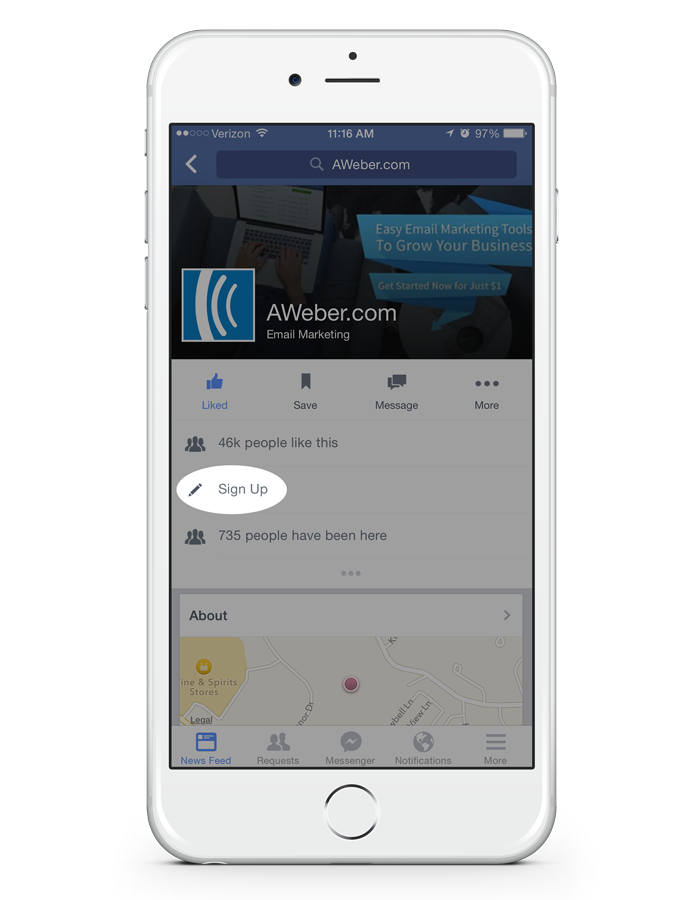
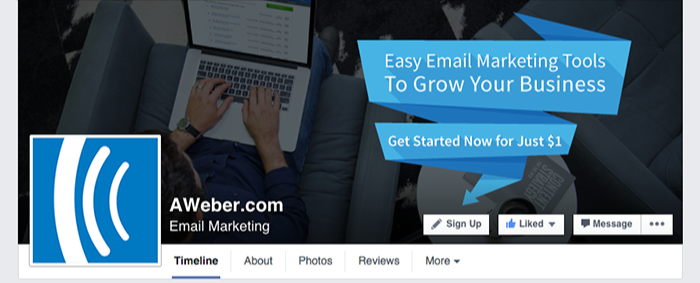
With Facebook’s new call-to-action (CTA) feature, it’s easier than ever for your followers to do things like sign up to your email list or start shopping with the click of a button:


fb-CTA-screenshot


Why You Should Use It

You may have noticed a decline in the organic reach of your Facebook posts. While it’s still important to continue posting valuable content, you might want to consider other ways to connect with your audience.

Adding the new call-to-action button to your page is a great way to highlight your objective, whether that’s getting your followers to make a purchase or sign up to your email list. Including an action allows you to not only connect with your audience, but also provides them with an opportunity to become a new or loyal customer.

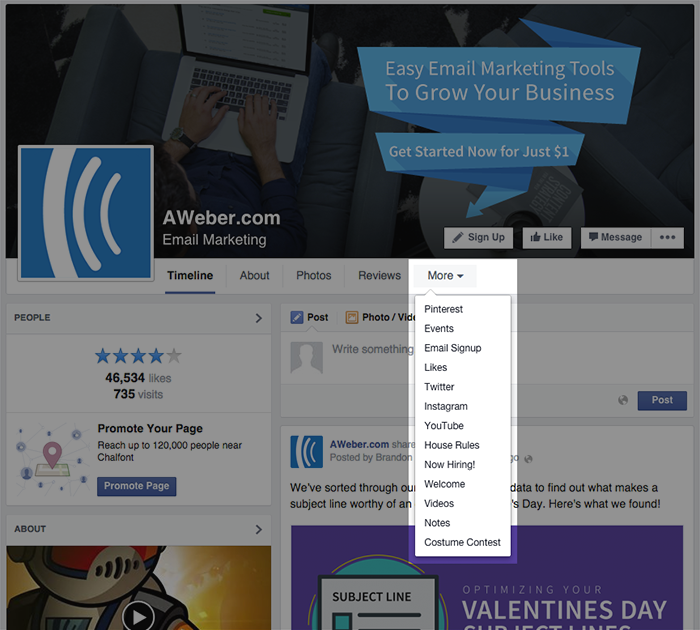
Previously, integrating a separate app with your Facebook page was the only way to encourage followers to take a specific action such as purchasing an item. The problem? Those apps are difficult to find when viewing from a desktop, and they don’t even display on mobile. (According to The Verge, about 30 percent of Facebook users only log in using their mobile devices.)

In the example below, the email sign up app is hidden among other features under the “More” tab.


fb-apps-screenshot


Facebook’s new call-to-action button, on the other hand, displays on both desktop and mobile, making it easy for anyone to take action.


mobile-CTA


Where to Redirect Your Audience

Ready to start using the new CTA button? Facebook allows you to select from the following buttons:


fb-dropdown
 
  • Shop Now: Looking to increase sales? Direct your followers to your online website or a featured product page. Don’t forget to integrate your shopping cart with your email service provider to continue collecting more subscribers!
  • Contact Us: Provide your audience with a way to ask you questions about your company or products.
  • Watch Video: Promote a company video or commercial right at the top of your Facebook business page.
  • Book Now: Have an upcoming event? Give your followers easy access to purchase tickets or reserve a spot.
  • Play Game: Create a fun experience for your social followers by sending them to a branded game you created.
  • Use App: Encourage your followers to use your Facebook app or mobile app.
 

How to Set It Up


Once you’ve determined how you want to use your call-to-action button, setting it up is easy! Simply select the button you want and enter the website URL where you would like to redirect your followers. If you need more help, here are some step-by-step instructions.

Bonus Tip: Get Your Call-To-Action Button Noticed


Let your creativity shine and consider ways to use your cover photo to draw attention to your call-to-action button. Try featuring an incentive your followers can get if they take action, or draw their attention with an arrow pointing towards the button.

You can use free image creation tools like PicMonkey or Canva to create a cover photo with text.
 
Facebook allows you to track the number of times your button was clicked each day, so try out different cover photos to see which one performs best.


Read more here:  http://blog.aweber.com/social-media-2/how-to-engage-social-followers-using-facebooks-new-call-to-action-button.htm

Thursday, 19 February 2015

New Features On Facebook For Buying And Selling


vulcanpost.com


Oh Facebook, I can’t help but wonder what new ventures you’ll have ready for us next month. It’s been an interesting year for you so far though. I’m sure you’ll keep us surprised.

Facebook have started to roll out a feature that will allow users to buy and sell through Facebook much akin to how it works on websites such as eBay and Craigslist.

Can you actually buy things on Craigslist? So far all I’ve seen from Craigslist is a long line of weird requests or people offering the strangest oddities and generally speaking gibberish. I don’t think I trust it too much.

Either way, Facebook is moving on from their normal way of handling all this stuff via groups and allowing users to access a more organised way to go through transactions via Facebook.


newsroom.fb.com


Facebook users can now click on a ‘Sell’ option rather than a ‘Post’ option when uploading content to their feed and groups. It looks quite swish, I’d love to take it out for a test run but unfortunately it’s only available to certain groups at the moment. Individual slots can also be filled out to specify price and product descriptions, instead of the typical single body of text you're used to when writing a Facebook post. Sellers can also mark the listing as either ‘available’ or ‘sold’ after it has been posted.


At the moment, the feature is present on this Rio based instrument group which is a group for people to buy and sell instruments. But you’ll have to join the group to take a proper look. It will be rolling out in force in the coming weeks and Facebook have promised that it’ll be available on the online client as well as iOS and Android platforms.

If you run a group where you buy or sell things, you can tell Facebook that you’re interested in getting a hold of this service here. Good luck!

Friday, 13 February 2015

Social Media Trends That Will Affect Your Marketing


When social media platforms like Facebook and Twitter first came onto the scene, there wasn’t a huge reason to use them for internet marketing beyond ads and some promotion. 

Throughout 2014, we saw the beginnings of some major changes and integrations of social media into other mediums of marketing and entertainment. 

It was a polar shift that caused plenty of marketers to switch their tactics. 

Of course, that’s something anyone with experience in that field is used to. 

Let’s find out how major players like Facebook and Twitter will be shifting the playing field once again in 2015. 


7 Ways Social Media is Evolving in 2015


The changes and trends we’ve seen from social media in recent years has been met with mixed reactions from the marketing community. Whether or not we agree with the decisions doesn’t matter though, what matters is how we adapt to the new conditions. 

Keep these trends in mind as 2015 rolls in and you’ll be ahead of the curve. For more blogging tips and SEO strategies, be sure to check out On Blast Blog


1. Mobile is Becoming a Priority


Mobile Trend

Technology has afforded us a wealth of new devices and mobile friendly methods of staying connected to social media. 

With so many screen sizes the need for websites that could respond to various devices became a major focus. 

This focus is now becoming a priority. Facebook’s mobile user base increased by 15% in 2014 and the number of mobile-only users increased by 34%. 

What used to be a secondary means of using social media is now the first choice moving into the New Year. 

Facebook isn’t alone in this trend, other social media platforms like Instagram and Twitter have been introducing and focusing on mobile branded apps for messaging and other services. 

The reaction here should be to take mobile up from an afterthought to a priority

2. Promoted Tweets and Posts 


Promoted Tweets and Posts


With social media becoming more competitive and crowded, organic posts on Facebook have dropped to 0.073% in 2014.

To combat this, and make some extra money on the side, the popular platform has been offering a “boost” feature to promote posts. 

This paid option stretches the reach of posts. Twitter has followed suit with their “promoted tweets.”
Social media will no longer be a place to promote and market for free. 

The reaction here should be to find the platform with the strongest demographic and invest solely into that with these new monetized options. 


3. The Rise of Social Commerce 


The Rise of Social Commerce


While many of us probably think that shopping on Facebook or Twitter is a no-brainer, it wasn’t until 2014 that the idea began to take form. 

With so many potential customers and potential for viral feedback, it just makes sense. 

Twitter was the pioneer for this new line of business. 

They introduced a “buy” button into tweets that makes shopping both fast and easy for the consumer. 

Facebook and Tumblr are also entering into this space. 

Right now all of them are in the testing phases but this has potential to become a major line of business and marketing. 


4. The Rise of Vlogging 


Vlogging

Video blogging or vlogging has become more popular with the rise of sites like YouTube garnering over a billion visitors each month. 

User reviews and real, human created impressions have always been a great way to promote a product without the need for a flashy commercial or marketing campaign. 

Short and concise videos are shared far more often than links and text every time which creates a growing trend and an opportunity for brands of all kinds. 

The reaction here should be to create a vlogging channel or reach out to an established vlogger and offer them free products in exchange for a review. 

5. Social Wallets


A Stanford student who was poking around in Facebook’s Messenger app in 2014 found and leaked a code in the programming that suggested there were plans for a payment and transfer service. 

While it hasn’t been implemented yet, a system like this one would allow people to send money to friends and purchase items without ever leaving the platform. 

This would be a huge change for social media as it would turn the platforms into one-stop solutions for customers and it would be a valuable means of reaching customers for all the brands and marketers out there.

6. More Focused Platforms 


Instagram  -Niche Focused


The demographic for Facebook and Twitter is huge and varied. 

New platforms are emerging though that suggest more options are on the horizon. 

Focusing on specific niches, these platforms are laser-focused and all the better for it. 

So far we’ve seen sites like Instagram, Foodie, Fitocracy, and more, but the list is growing by the day. 

These sites have a specific audience in mind and therefore make themselves perfect platforms for targeting specific niches of online users. 

The reaction here is to understand that 2015 will see social networks targeting specific hobbies and interests.


7. A Growing Focus on Internet Privacy 


Information leaks and hacked accounts have always been an issue among online users, but the problem has grown in scope which resulted in platforms promising additional security and privacy options for their users.

Promising not to sell user data is a common one for example. 

New platforms have added private chat rooms and the option to keep identities private. Every successful hack results in another push for privacy and 2015 will make that demand higher than ever. 


Managing Social Media in 2015 


While marketers are going to be increasing focus on major platforms, it’s also highly possible that they will spread to more niche oriented platforms. It’s a lot to manage for an entire team of people, let alone a single social media expert. 

A free online app called Buffer can help with that. This wonderful tool allows you to schedule and create posts up to a week in advance on multiple social media platforms. With a “set it and forget it” approach, you’ll be free to start planning the coming week’s posts. 

Final Thoughts

Staying ahead of the curve is easier said than done, but looking at upcoming trends can make an social marketer’s job a little easier. 

http://www.twelveskip.com/marketing/social-media/1388/social-media-trends-affect-internet-marketing

Friday, 6 February 2015

It's All About Mindset!


 Let's compare and try to guess which one is the winner.

Mr. Positive gets up every morning with a warrior attitude. He is out to conquer whatever he has to do to get through the day. He is confident in himself and in what he is doing. In this case he knows he has some work to do to promote his business. He has a little list of things that he does so that he can focus on the tasks at hand. With a list he knows he is less likely to get lost in space. Some of the tasks he is not crazy about doing, maybe wishes he could pay someone to do it, but since he can't he gets those out of the way first.

When he is done with his list then he is ever in search of more techniques that he can add to his strategy. He goes to a search engine and he starts to research - he has heard about various things that are popular right now. He reads the reviews and analyzes whether or not it is worth trying something new. He knows he will have to give it some time to work once he implements it; in the end if it doesn't produce results, he will just try something else.

If he finds that he really isn't getting the results he had hoped for, he may restructure everything. 

There are no 'sacred cows' so anything that is not working after a fair trial has to go and is replaced by something new. If it is something he has to learn how to use he gets the information he needs. He knows not to 'throw out the baby with the bathwater', and he doesn't dwell on what didn't perform satisfactorily or blame anybody. He knows if not today, then tomorrow. Always focusing on the 'light at the end of the tunnel' rather than on the darkness.

Mr. Negative wakes up 'on the wrong side of the bed' most days - He is not a happy fellow and he spends a lot of time being suspicious and skeptical about anything he doesn't fully understand. He never considers that maybe if he took the time to learn about it that he might then trust it at least enough to give it a try. He doesn't really like working and wanted so to believe that he could find some magic formula that would make him wealthy without investing any time, effort, or money.

He gives his usual half-hearted attempt to accomplish something and when he then doesn't see any direct results right away, he is sure that he has been scammed. He can go down the list of the people and things that have betrayed him. He is sure everybody has lied to him and that they want to steal his last dime. He never considers that it is him that didn't really want to work and that he just copped an attitude about everything from A to Z. However the good part for him is that now he has an excuse to quit (fail).

Not surprisingly he gives up way too soon without even giving himself or anything he is doing a fair chance. This likely depresses him on a certain level, although on the outside he is probably feeling relieved to be out from under such a tedious mess as trying to start a business online. He then becomes complacent and decides to just be 'satisfied' with whatever he has rather than to try to improve his lot.

Article Source: http://EzineArticles.com/?expert=Harry_V_Wijeh
Article Source:http://EzineArticles.com/8898110