Friday, 30 January 2015

Popular Social Media Platform Features You Should Start Using Now


buried-treasure


Social media networks are continuously adding cool little features here and there, and it can be tough to keep up -- especially if there's no big announcement.

For instance, did you know you can reorder the sections on your Facebook business Page? That you can embed a SlideShare presentation directly into a tweet? That you can add hidden relationship notes to your LinkedIn connections? (That one's my favorite.)

There are so many cool things our favorite social networks can do that may have fallen through the cracks. To help you discover these hidden treasures, we rounded up 20 of the lesser-known features on Facebook, Twitter, LinkedIn, and Pinterest. Check 'em out.


20 Little-Known Things You Can Do On ...


  Facebook


1) Save links for later.


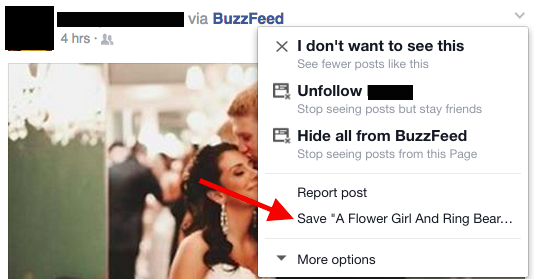
Ever seen articles in your News Feed you wished you could bookmark for later? Well, you can.

Facebook recently added a feature that allows users to save links to articles, events, TV shows, music, and more to read later. All you have to do is click that little downward arrow on the top right-hand corner of the article in your Feed, then choose the "Save" option.


save-facebook-post


To view the things you've saved, go to your home page and choose "Saved" in the left-hand column. (Or go straight to https://www.facebook.com/saved/.)


2) Replace ads with baby animals.



facebook-ad-puppies


3) Find targeted conversations.


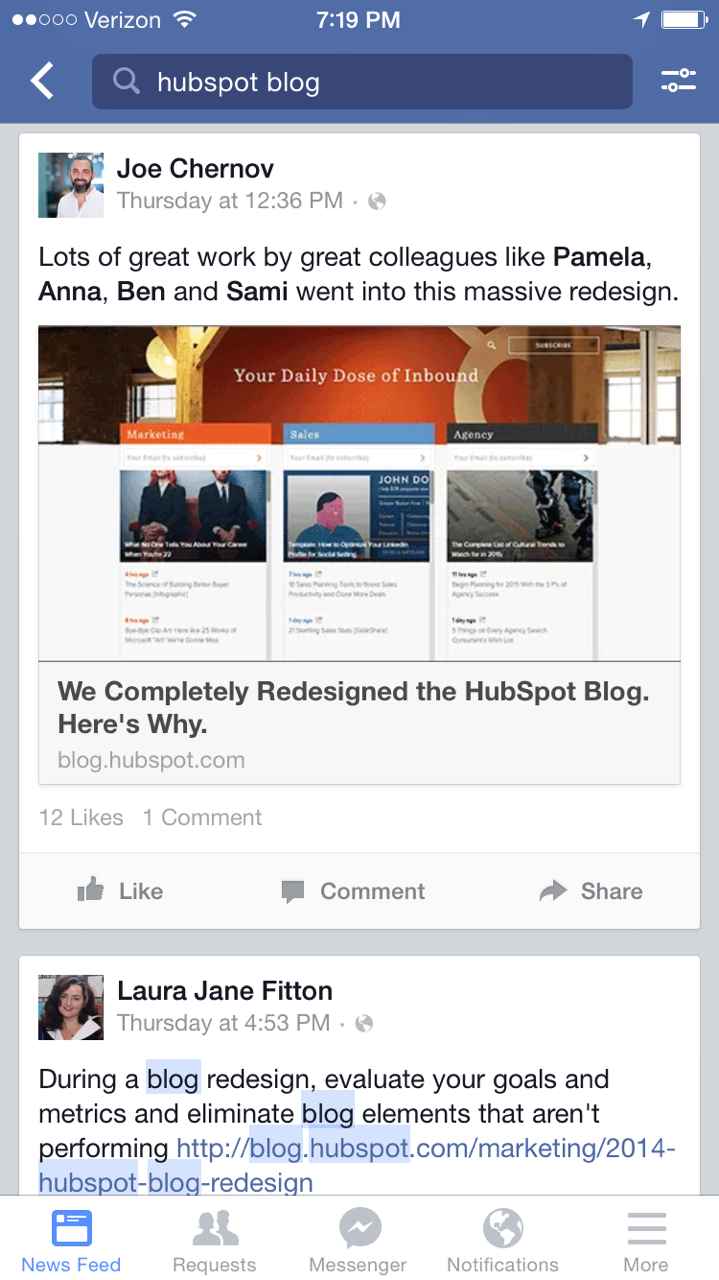
The search bar at the top of your Facebook Page isn't just for searching for names. (Or Pages, groups, events, and apps.) Now, you can type in a few keywords to search for old News Feed posts, both on desktop and mobile. (Learn more about the Facebook Graph Search update here.)


facebook-graph-search


4) Poll people in a group or event.


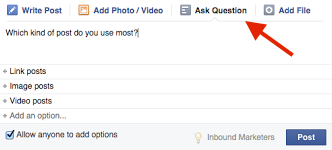
Although Facebook removed the polling feature from business Pages' status updates, you can still poll users in groups and events. Choose the "Ask a Question" tab inside the status update bar. Click "Add Poll Options" to enter multiple-choice options. Use this to ask your audience for feedback about event location or execution, content you've posted, and so on.


ask-a-question-1


5) Edit photos directly in the Facebook mobile app.


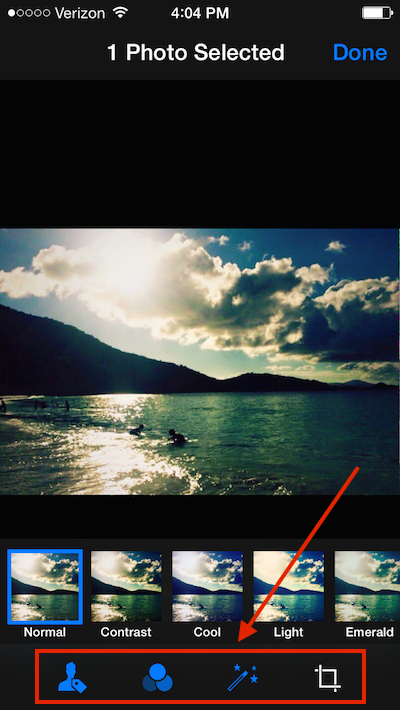
If you're looking for a quick photo fix on mobile, you can edit photos to some degree right in the Facebook app. Enhance the photo, apply a filter, or crop/rotate the photo.

How? Once you've uploaded a photo, simply give the photo a single tap to bring up these options on the bottom of your screen.


edit-facebook-photo


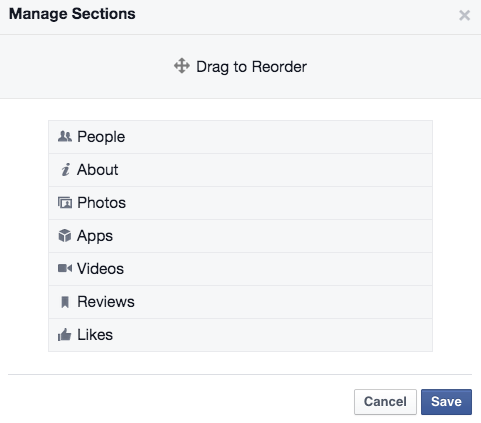
6) Reorder the sections on your business Page.


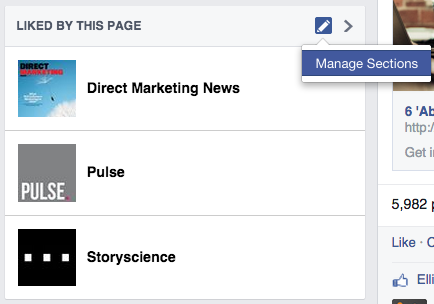
Want the "Photos" section to be above "About" on your business Page? No problem -- just hover your mouse over the section head of any one of your sections until a small pencil appears. Click the pencil and choose "Manage Sections."


facebook-reorder-sections


From there, you can drag to reorder.


facebook-reorder-sections2


Twitter


7) Embed SlideShare presentations directly into your tweets.


When you embed a SlideShare presentation directly into a tweet, your followers can flip through the presentation without ever having to leave Twitter (or the page a tweet is embedded on). Here, try flipping through this one from SlideShare Today:


To embed a SlideShare presentation into a tweet, all you have to do is link to the presentation and it will embed automatically. This is also true for documents and videos from SlideShare as well.


8) Find out who's unfollowed you.


Using unfollowers.com, you can actually find out who's unfollowed your Twitter account. This is especially useful for brands that are building their Twitter presence and experimenting with different approaches like voice, posting time, and so on. If you find a lot of important and relevant people are unfollowing you (such as influencers in your industry), then you know you need to change something in your Twitter strategy.


9) Pin your GIFs on Twitter so they autoplay.


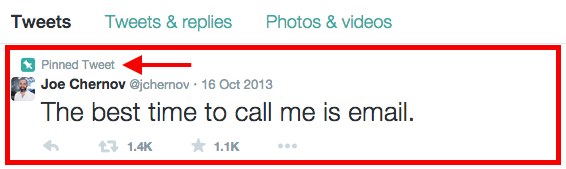
If you post a GIF on Twitter by adding it as you would a photo, it doesn't autoplay in your followers' Twitter feeds. But it does autoplay if you pin it to the top of your own Twitter feed. (See? I tried it out on my Twitter page. Go ahead and try it on yours!)


To pin a tweet, you'll first need to tweet out the tweet you want to pin. Then, click the ellipsis at the bottom of the tweet and choose "Pin Tweet." It'll show up at the top of your feed on your personal Twitter account until you unpin it (which you do by clicking the ellipsis again and choosing "Unpin Tweet").


pinned-tweet-example


10) Analyze your tweets for free.


Almost everyone with a Twitter account now has free access to data about their timeline activity and followers with Twitter Analytics. The dashboard gives you data on impressions, engagement, link clicks, retweets, favorites, and replies. You can even export this data into an Excel file. (Learn more about Twitter Analytics here.)


11) Research and analyze a hashtag.


Using Topsy.com, you can research different hashtags and see whether users are using it, how often it's being used over certain periods of time, and more. Robyn Showers, our social media manager here at HubSpot, uses it when she's choosing a hashtag for an upcoming event. For example, she was once choosing between #watchitwednesday and #webinarwednesday. Topsy.com told her #watchitwednesday has historically been used by sports brands and the hip hop community -- a very difference audience than HubSpot's. So she went with #webinarwednesday, which hadn't been used in years and historically had a more business-oriented audience.


12) Tag people in Twitter photos.


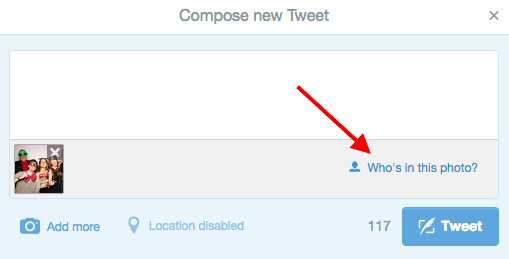
Just like on Facebook, you can tag your photos on Twitter -- and it doesn't count against your 140 characters. Once you've uploaded a photo to your tweet, click "Who's in this photo?" and tag up to 10 people.


twitter-photo-tagging-2


13) Create a Twitter photo collage.


Choosing between two, three, or even four photos to tweet? Turns out you don't really have to -- you can include up to four individual photos in one tweet that automatically create a collage. Here's an example from BuzzFeed:

This feature is available for both desktop and mobile, and it only involves a few, simple steps. Learn how to create Twitter photo collages here.


14) See all the tweets you've "favorited."


On your own Twitter page, you can see all the tweets you've ever "favorited." (Everyone else can see these tweets, too.) You can use this as a bookmarking tool, or as a place to look back on tweets you liked on a rainy day.



favorites-on-twitter


LinkedIn


15) Add hidden relationship notes.

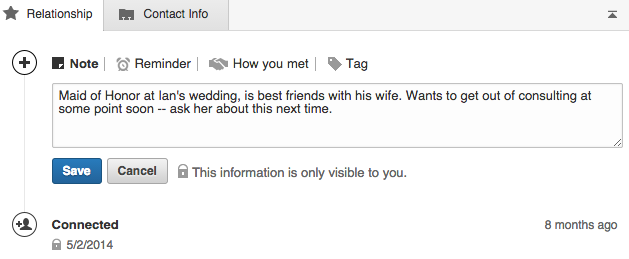
Like I said, this is my favorite little-known feature of LinkedIn. You can add relationship notes, reminders, and a note on how you met (and who introduced you) for any one of your connections. To get to this feature, click "Relationship" right under the person's profile picture. No one else can access the information you put in there.


linkedin-relationship-notes


16) Embed media files on your profile.


Break up your text-heavy profile and showcase your work by adding media like images, documents, links, SlideShares, videos, and audio to different sections on your profile. To add these media files, click "Edit Profile" and look for the media icon when you hover your mouse over each section.



media-file-button


17) Save a job search (or ten).


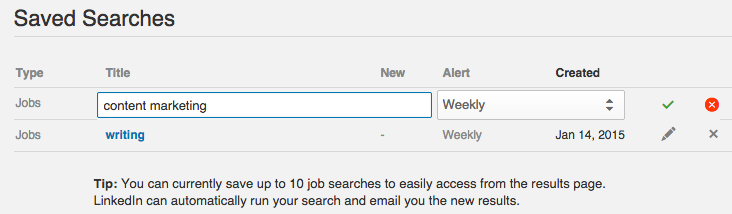
Searching for a job on LinkedIn usually takes more than one login session. Once you've performed a search, you can save the search by clicking the "Save Search" link in the top right-hand corner of the page. You can save up to 10 job searches at a time.


save-job-search


18) Create a Showcase Page.


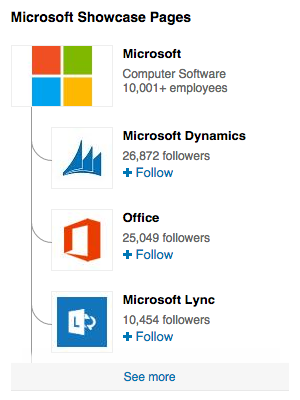
Showcase Pages are niche pages branched off of a main company page that allow that company to promote specific products or market to a specific buyer persona. Microsoft, for example, has showcase pages for Office, Dynamics, Lync, and other products:


microsoft-showcase-page


If your goal is to keep LinkedIn content relevant, personal, and interesting for specific buyer personas, Showcase Pages could be a great addition to your social media strategy. (If you want to learn more, here's a beginner's guide to Showcase Pages.)


Pinterest


19) Use trackable links that aren't marked as spam.


Pinterest tends to block shortened links, so if you've been adding tracking cookies to links and shortening them, then your pins are probably not linking anywhere. The good news is you don't actually need to shorten your trackable links on Pinterest. Unlike social networks like Twitter, the link itself isn't visible to users -- it's the pins themselves that are linked. So all you need to do is create that long trackable link, and you're done. (Learn how here.)


20) See who's pinning from your site.


Ever wondered which specific Pinterest users are pinning from your website? Here's how: Copy and paste this link into your address bar: http://www.pinterest.com/source/yourwebsite.com/. Then, change "yourwebsite.com" to your website's address and press Enter. (For example, to see who's pinning from HubSpot's blogs, we'd type in http://www.pinterest.com/source/blog.hubspot.com/.)


Wednesday, 28 January 2015

Need To Know Changes To Your Facebook Business Page

facebook-business-video


If you blinked you might have missed it. Just before the close of the year, Facebook quietly began to beta test two new features that may have the ability to impact your business in a big way. These new tools, a series of “call-to-action” buttons and a featured video for your business page have the potential to drive home business objectives like never before.

From funneling new leads to the capability of raising increased brand awareness, read on to find out how these two new changes to Facebook Pages can help your bottom line.

In this post, we will take a closer look at video.


Facebook Business Featured Videos

At the center of any great visually based marketing initiative is captivating videography, sound and motion. For years, YouTube has held the corner market on video content, but Facebook looks to change that with the addition of their new and improved video platform.

Currently in beta, all businesses will soon have the chance to select a featured video that will populate the left sidebar of their page. Social media guru Mari Smith is taking part in the beta and you can check out a prime example of featured video on her page.


marismith
Add caption


The idea behind this stems from navigating more users out of the news feeds and onto the actual pages of these businesses. 2014 saw some big changes to the way users interacted with visual media on Facebook. You may recall the addition of auto-play as you scrolled through updates (RIP mobile data) and the increased size video received in your newsfeed, and it wasn’t all for not. Video viewership rose more than 50% in the test months of May, June and July and Facebook itself boasted a billion views per day at the end of September.

However, as marketers, these changes introduce a whole new outlet for you to put yourself in front of new and existing customers. From “about us” to specific product videos, the ways in which this featured video section can be leveraged is nearly endless.

Mari Smith also suggest some great best practices to keep in mind when these changes to Pages go live:
  • Tutorial style videos are always proven winners as well as how-to’s, news, entertainment pieces and inspirational videos (Dove’s Real Beauty ads anyone?).
  • Keep it short! Anything over two minutes and you start to loose viewer attention.
  • Don’t be afraid to leverage existing video content that you already have created. Just make sure to edit it down to that two-minute mark.
  • Don’t neglect other video sharing channels! While this new feature is great, continue to upload your video content to both YouTube and any other video platforms you are currently using. 
  •  Achieving 100% viewership will never be possible unless you utilize every outlet your audience is interacting on.
  •  For Facebook’s official “how-to” on featured video click here.
Remember, this feature is still in beta and many business pages have yet to see it implemented. Take this opportunity to strategize and plan how you will utilize the featured video section on YOUR page.


Read more here:  http://www.clickbank.com/changes-to-your-facebook-business-page-part-1/

Friday, 23 January 2015

Social Media For Niche Research

Social-Media-Niche-Research 
Image credit: Soshable

That’s right, social media.

You know — that place where you virtually hang out with friends, family, and business associates?

Yeah, that thing.

Believe it or not, you can use social media to brainstorm niche ideas to kick-start your online business. Social networks are also fantastic tools to research your niche, i.e. learn about your target market, analyze your competition, and assess the profitability of a niche.


Wait … What’s a Niche Again?


Imagine you’re walking in a huge, sprawling, open-air grocery market/bazaar. Street vendors everywhere are peddling their goods, customers are haggling, money and groceries are trading owners. There are about 500 different vendors/sellers all told.

You’re browsing the vegetables section. Here, vendors stocks every vegetable imaginable — tomatoes, cucumbers, broccoli (ugh), asparagus, you name it. In this part of the market, there are about 50 sellers.


1
Image credit: Bert Knot via Flickr


You walk past the veggies, and you are hit with the aroma of freshly-baked bread. Long, crispy batons, flavorful pumpernickels, fluffy buns and more at 25 different bread-selling stalls.

Right now, you might be thinking — Why am I reading this? What does an open-air food market and internet marketing even have in common?

A lot, actually.

You’re browsing a market (more specifically, a food market). Just as there is a food market in “real life”, there is also a food market that exists virtually on the Internet. On the Internet, however, there are thousands of other vendors selling groceries, but they all sell within the same market (in this scenario, groceries).

There are also “sections” of markets on the Internet called niches. All the internet vendors who sell bread are grouped together in a single niche (the bread niche). The ones that stock veggies are grouped in the vegetable niche. Fruit vendors — fruit niche.

See the pattern?

First, there’s the whole gigantic internet. Then, it’s divided into chunks of markets (which are still of considerable size). That’s further divvied down into niches, and ultimately, micro niches (which, for instance, would be a specific food, like bananas, potatoes, or tomatoes).

As you go down each level, there’s a lot less competition (a lot more people compete to be worldwide vegetable sellers than just worldwide cucumber sellers).

That’s the basic idea of the internet, markets, and niches.


The Importance of Selecting the Right Niche


Internet marketing, and the whole “make money online” thing can be summarized into three ultra-basic steps:

  1. Find a problem. (niche brainstorming followed by niche research to discover the needs in a niche)
  2. Solve it. (product creation and/or selecting an affiliate product to promote)
  3. Connect the people who have the problem with the solution.

The success of your online business depends on that very first step — identify a problem that people need solved in a specific niche. The other two steps, solving and promotion, are hinged on the first one.


Whatever niche you go into, you should ensure that it is:


  • Profitable. If people just don’t buy digital products in XYZ niche, don’t try to make your living in XYZ niche. You’ll fail.
  • Something you’re interested in. Down the road, you will need motivation. It’s a lot easier to be motivated to promote something you’re already interested in.

Small digression: don’t let anyone tell you that you have to be passionate about your niche to make money from it. I’ve made money from health websites for several years, and have created information products in a particular health niche that have generated hundreds of thousands of dollars in revenue.

Not only do I NOT have the health condition that my sites focus on, I’m also NOT passionate about the topic. But I DO have an interest in the topic, and I’m passionate about the marketing side of my health websites. So there you go!

With the idea of what a niche is, and how it impacts your online business, let’s get into the real nitty-gritty of this post: how to brainstorm niches and analyze their profitability using the top 2 social networks: Facebook & Twitter.


Twitter for Niche Research


2
Image credit: Scott Beale via Flickr


Let’s take another trip to the world of imagination (no, we aren’t heading for another food market).

Imagine that you were able to listen in on what everyone from any and every part of the world is talking about right now. You can learn about their passions, their problems, and their struggles.

Do you think that you might somehow to be able to use that ability and turn it to your advantage?

Welcome to Twitter.

What Twitter is, basically: a giant melting-pot of cultures, ideas, and people where ingredients are tossed in 140 characters at a time.

Here’s how to use that melting point to brainstorm a niche for your online business.


Analyze Your Twitter Feed


No matter how small your existing feed is, it’s worth analyzing (unless, you know, it’s REALLY small, like just Justin Beiber and Rihanna).

If you’re one of the smart people who decided to keep your Twitter account a little more private and personal, you didn’t and don’t follow anybody and everybody you come across who promises they’ll follow you back. You kept Twitter for your actual acquaintances.

Then you’re in luck, because the people you follow are more likely to be more open and personal with you, sharing stuff that they actually think is important. Your feed isn’t crammed with automated spammers trying to get the odd retweet or favorite.

When analyzing your feed, ask yourself these questions:

  • What do my friends/family/acquaintances tweet about? How is their tweet content relevant to me?
  • What websites/blogs do they often share from? How is that blog’s content relevant to them?
  • What problems/questions consistently appear in my feed? Why do people tweet about them?

(Tip: These questions aren’t ones you’re supposed to just think about. Actually take action. Yes, that means opening up a new spreadsheet and creating lists of popular topics/questions in your feed. Do it. Now.)


Survey Your Twitter Following


There’s no better way to find out what’s on someone’s mind than asking them.

Outright questions.

Here’s an example of what you can do. Sign up @ Survey Gizmo and create a survey (completely free). I’ve used Survey Gizmo for years and have run dozens (nay, hundreds!) of niche research surveys using their service. They’re awesome.

Ask the following questions (feel free to copy/paste the entire thing):

  1. What is the #1 problem you’re facing in your personal life right now?
  2. What is the #1 problem you’re facing in your business life right now?
  3. Name three things you love doing.
  4. Name three things you hate doing.
  5. Name three things you’re afraid of doing.


Post the link to the survey to Twitter (make sure you assure them that their answers will remain anonymous — not everybody likes to reveal their answers to personal questions like these publicly).

Make sure you post the link multiple times so that the majority of your follow will be able to see it.

If you have a close following composed primarily of friends, family, and people who actually know you, you might be able to get a decent amount of completions to start brainstorming niches.


3
Image credit: Sponsored Tweets


Alternatively, if you feel you don’t have enough data since not nearly enough people responded, hop onto a site like Sponsored Tweets. Here, you can basically buy a tweet from a high-influence Twitter account (prices depend on the size of the account’s following). The added number of followers increases the number of survey completions.

You probably don’t want to do this more than once or twice, because it can get pretty expensive (around $100 to a tweet to 1,000,000 followers).

The same rule of “asking people” can be applied to any business — the best way to get inside a customer’s head is to ask for access.


Analyze a High-Influence Twitter Account’s Feed.


Even if you don’t have the money to sponsor a tweet on a high-influence account, you can still take advantage of the influencer’s profile by analyzing their feed and what they tweet about.

I mean, if they were able to somehow obtain XXX,XXX followers, they had to be tweeting something interesting, right?

Find out what that something was. Is it something that you could possibly reciprocate on a website and profit from?


Twitter Research Tools


Some wise person once said that an internet marketer is only as good as the tools he uses to research niches on social media.

Smart man.

The following tools for Twitter perform a variety of different functions and are great for brainstorming and researching niches quickly.

Hashtags.org is basically Twitt(url)ly for hashtags. You get to view a list of trending hashtags (again, this is more helpful for viral niche research).

However, Hashtags.org also has another special function that makes it great for niche analysis. You can search a certain hashtag to see how it’s trending on the web.

If you’re thinking about going into a niche, you can use Hashtags.org to see if any of the niche-related hashtags are getting any traction. For example, I now know that #rihanna got 5,700 tweets at 12:00 A.M., March 12th after keying in seven characters and hitting enter. Pretty powerful, eh?


4


Hashtagify.me – Hashtagify is great place to both analyze the popularity of a hashtag, and also to find correlated hashtags.

The way that Hashtagify does popularity analysis of a hashtag is a little different from how Hashtags.org does it — Hashtagify rates a hashtag’s popularity on a scale of 1-100.

Additionally, Hashtagify displays a mindmap of conceptually similar hashtags and phrases (awesome for brainstorming related keywords! See image below).


5


Facebook for Niche Research


It’s pretty obvious that Facebook is bigger than Twitter — much bigger. Facebook has a larger userbase, a higher percentage of active accounts, pulls in more revenue per annum, and logs more on-site time.

As such, you’d probably think that Facebook would be a lot more niche-research-friendly than Twitter.

But no.

You see, there’s one major problem with the whole Facebook-for-marketers thing — Facebook is more private. Much, much more private.

Think about it — when’s the last time you randomly send out friend requests to 50 people you don’t know? Do you accept every friend request from those you don’t know? Do you set each and every status update to “public” view?

No, of course you don’t.

But on Twitter, most people do. As a result, it’s much easier to get inside the heads of tweeps and brainstorm and analyze niches.

You might be thinking, then: why even bother with Facebook at all if doing the research is so difficult?

I’ll tell you why — Twitter is easier, but Facebook is more rewarding.

That’s right.

Because Facebook is so much more private and personal, whatever info you are able to get your hands on is likely to be much more relevant to niches, much more factual & data-driven, and much more personal. That’s why it’s easier to really engage a Facebook fan and convert them in comparison to engaging & converting a Twitter follower.

It might be hard, but it’s rewarding.

Here’s how to use Facebook for niche research:

Analyze Your Facebook News Feed


6
Image credit: Paul Jacobson via Flickr


Just like with Twitter, the first thing you want to do with Facebook is to analyze your current news feed.

On Facebook, you’ll see a lot less activity in your feed since nobody interesting posts a status update about how they just bought a coffee (unless it was a really special coffee).

As a result, each item in your news feed is much more personal, and should be much more prized.
When going over your news feed, ask these questions:

  • Which brands and industries do my friends ‘like’ the most? (likes in real-time visible on the top-right-hand sidebar of Facebook)
  • What type of shared content is most popular in my news feed?
  • Who shares them? (locating an active Facebook user will often help you brainstorm more niche ideas, since he/she will share more content and talk about a greater variety of topics)


Survey Your Facebook Friends


Here’s where that rewarding side of Facebook niche research comes into play.

SurveyGizmo allows you to easily post a survey with just a couple of clicks inside your SG account. You can use the survey you created for your Twitter following to survey your Facebook friends, but this time, the process will be a lot simpler. You can use that same survey you created for your Twitters users to survey your Facebook friends.

But that’s not even the best part (this is where that rewarding side of Facebook niche research comes into play)

Get this — since they are, well … your friends, they’re likely to be much more open and vocal about their problems, struggles, and complaints. So, you’ll get a lot more detail per survey answer.

They won’t have a problem giving you this info, because they know and trust you. One survey completion from a Facebook user is probably going to be more helpful than three from tweeps.


Facebook Groups


7
Image credit: Jiahao Chen via Flickr


Another advantage of Facebook are the groups.

You don’t get groups with Twitter (unless you want to talk “lists”, which isn’t a very heavily used feature (learn more about using Twitter lists for marketing with this post on Simply Measured from Kevin Shively).

Facebook groups are a great way to assess the activity within a niche — how large the audience of a niche is, how active and engaged they are, etc. If there’s a boatload of activity, great. You’ll probably be able to channel some of that engagement over to your blog/website when you start one in the niche.

If there isn’t much Facebook group activity, be wary of the niche but don’t discard it completely. There may be a simple reason for the inactivity.

For example, if someone is having mental trouble as a result of depression, they don’t want to broadcast that fact to all their friends. As a result, they won’t join any Facebook groups centered around helping depressed people.

But you know what they WILL do?

  • Subscribe to a self-help newsletter.
  • Watch relevant videos on YouTube or listen to podcasts.
  • Read (but possibly not interact with) get-out-of-depression blogs.
  • Buy eBooks written by experts on self-help.

All of which you can profit from.

So, take the levels of Facebook activity with a grain of salt.

Analyze Target Demographics


Facebook is absolutely fantastic for researching demographics of your target market, i.e. the personal information (location, ethnicity, age, gender, etc.) of the majority of the people in a certain niche.

You can use this information to attract the right, targeted visitors to your blog/website that are significantly more probable to convert.

Here’s how to do this:
  • Check out a popular page in your niche or a niche that you are thinking of going into;
  • Click on 20-30 profiles that have interacted with the page (i.e. left/liked a comment, shared/liked a post); and
  • Record their demographic details in that Excel spreadsheet
The majority of the accounts will probably be private (you won’t be able to see enough details to really determine your target market), but there will still be a few public accounts. Besides, you can even use the profile pictures to determine certain personal details (race, age, gender).

Facebook is fantastic for market research, and relatively simple to use when you know how.


Facebook Research Tools


Just like for Twitter, there are some pretty awesome tools for Facebook research with a variety of powerful functions.

Facebook Graph Search – An in-built part of Facebook released not too long ago, Graph Search got a lot of negative hype on the Internet, because it (supposedly) stripped users of their personal privacy (which is actually NOT true).

For the average Facebook user, it was a near-outrage. For the Internet marketer, Graph Search was Christmas come early.


8
Image credit: Stefano Maggi via Flickr


You can use Graph Search to find members of your target market by searching for people and shared content by a certain criteria. (e.g. people who live in San Diego and like Nike). Ric Dragon has an in-depth guide to to using Facebook Graph Search for community research.

Like Button – Like Button is essentially Twitturly for Facebook, minus link tracking. Like Button tracks the most popular Facebook posts from a variety of existing pages, using your friends’ activity as a guide to show you content that you are (supposedly) interested in.

Like Button is a great way to brainstorm some niche ideas, and introduce yourself to ones that you’ve probably never heard of before.


Wrapping Up


Deciding what niche you will go into is the single most important part of your online business.
Whatever market you choose to go into will affect your earnings, your reputation, your brand, everything.

It might be redundant to tell you to choose wisely, but just in case: CHOOSE WISELY!

How are you using social media to do niche research?