Creating great content for your blog is one thing. Getting traffic to
your blog posts is another, and it’s something a lot of bloggers do not
account for or they are unaware that certain aspects of SEO are
required to drive traffic to their site.
One of the biggest misconceptions I see with bloggers is
this….. They believe that if they add great content to their blog, then
Google will eventually start to rank their articles!
Create great content and people will flock!! Well let me tell you,
this simply is not the case and 99% of the time your great content will
not be seen!
The second misconeception I see a lot with bloggers is that they think that if they add “regular”
content to their blog, it will become an authority site and eventually
pick up organic traffic naturally. Now although in most cases you will
see a few more visitors to your blog, you won’t get anything that will
justify the time and effort you have put into creating the content!
So it’s time to take some action and attract the traffic that your blog deserves!!
The third misconception I see a lot is that bloggers think that SEO is only required on their homepage!!
“Build backlinks to your main URL, your rankings will increase and everybody will see your great content“…. WRONG!!
You need to optimise every new post you publish and perform certain
aspects of SEO to bring in an influx of targeted organic traffic!
Sound like a lot of extra work? Don’t worry……..
I will cover the key elements you need to know right here and I’ll
show you the exact steps to take which will quickly boost your SEO
potential and start increasing your visitors every time you publish a
new post!
Here are the 4 steps that I follow every time I publish a new post to
get traffic from search engines. Work through each step and you will be
well on your way to a ton more traffic to your blog!
Step 1. Start with keyword research ‘AFTER’ you write
Finding keywords to rank for is a vital component to SEO and it’s
something you should take seriously. But don’t base your articles around
certain keywords!!
I hate it when people do this. They find a few keywords and then try
to write a piece of content around it. The problem with this is that the
quality of the article will be somewhat lower than if you wrote a piece
on a subject that you actually want to discuss and get out there!
You will have a much better flow if you just write it as it is without having to worry about keywords!!
So remember this rule: Great content first, keyword research second!
Once you have completed your article, make a note of the subject and
the main topic. Now this will immediately give you a basis for your
keywords!
So for example, this article, which you are reading right now, is about doing SEO on your Blog. Now here are a few topics that I could note that briefly describe what this article is about.
- Increase traffic to your blog
- SEO for blog posts
- Boost blog traffic
We now take these topics and convert them into keywords, and here is a very quick and effective way of doing it:
Go to Google and
start to type your topic into the search bar. You will notice that
Google will start to give you recommendations and predict what you are
going to type! Now this is great for us because Google are basically
telling us what people are searching for.
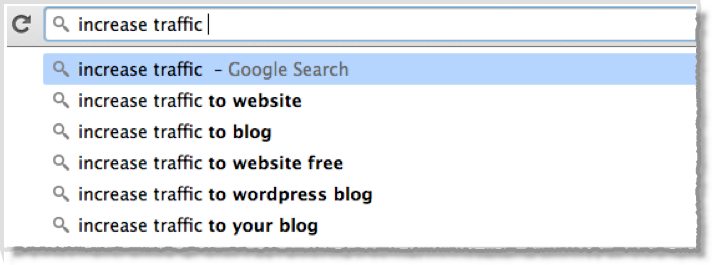
Here are a few examples of what happens when I begin to type our topics into Google:
As you can see here, I have typed ‘Increase traffic’ and Google has started to predict some keywords for us.
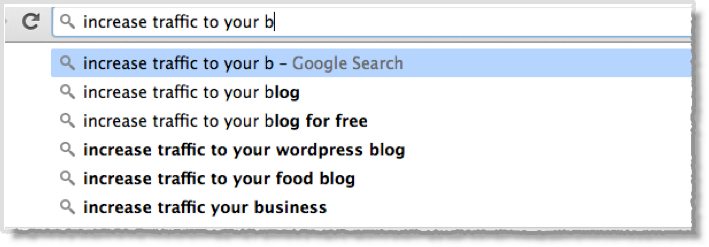
As I continue to type it becomes more specific…….
A couple of long tail keywords that look interesting here are:
‘Increase traffic to your blog for free’
‘Increase traffic to your WordPress blog’
Now there are hundreds of different combinations you could go at. You
could change the word ‘your’ to ‘my’, or you could put ‘How to’ at the
beginning!
Again, you can get a good idea of the long tail keywords that people are searching for!!
You should always target long tail keywords rather than 1 or 2 word keywords that are too generic.
Now that we have a few long tail keywords we can now see what kind of
traffic they get. There are a few different tools available that
predict the traffic that keywords get. You can use Google planner to see past data and search volumes.
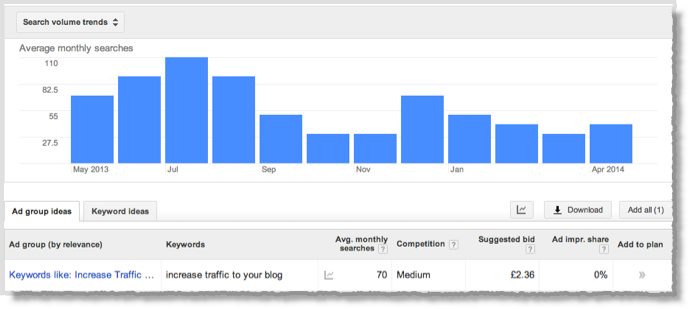
Here is an example. I have searched for the keyword ‘Increase traffic to your blog’
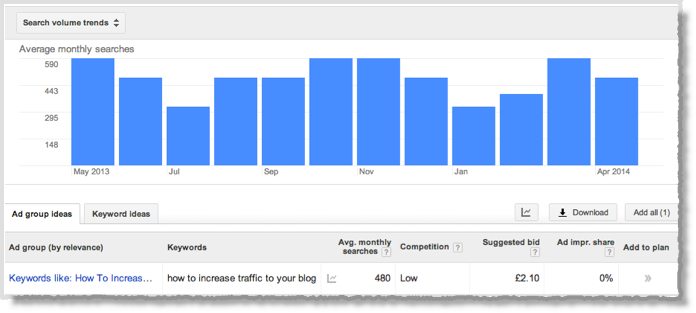
Not bad, but look what happens when I put the words ‘How to’ before this keyword.
The average monthly searches have just shot up to 480 from 70, yet the competition seems to be lower!!!
Now I only take information like this with a pinch of salt, but we
have certainly uncovered a nice keyword that we can target with our
article!!
Interestingly, using the word ‘my’ instead of ‘your’ only showed an average monthly search of 30!!!
More keyword ideas
There are plenty of free tools out there including http://ubersuggest.org/
Simply enter your keyword and the tool will give you a load of
suggestions!! I typed the keyword ‘increase blog traffic’ and it
produced 147 keyword suggestions.
So finding keywords is really quick and easy and best of all it’s free!
Now that you have your keywords you simply incorporate them into your
article, and now I’ll show you exactly how to optimise your post to
give you the best opportunity to grab top rankings and drive more
traffic to your blog!
Step 2. Optimize each blog post
Here are 7 key elements for optimizing each blog post prior to
publishing to give yourself the best opportunity to rank for the keyword
you have chosen.
Also I recommend that you target 2 long tail keywords for each post!
1. PAGE TITLE - Make sure you include your keyword or part of your keyword in the page title.
2. FIRST PARAGRAPH - Always include your keyword in the first or 2nd paragraph.
3. HEADINGS - Include your keyword in at least 1 of your headings.
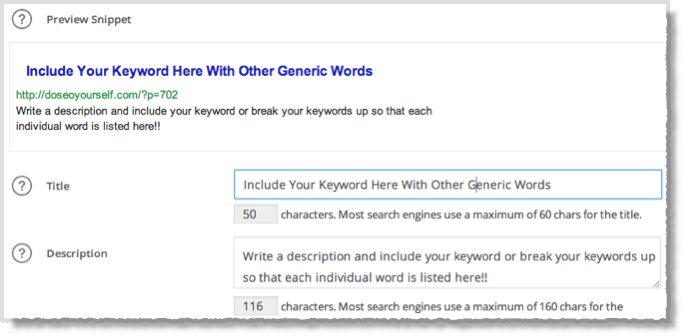
4. SEO TITLE & DESCRIPTION - If you use an SEO plugin such as All in one SEO or Yoast,
you can fill out the title and description section. Make sure to
include your keywords here as Google will use this to help identify what
your page is about. Here is an example of what it should look like.
5. BODY TEXT - It’s important that you don’t overdue it here.
Keyword stuffing is not good and may get your page penalised! Luckily we
have already written our article before we did the keyword research, so
you shouldn’t have any problems here!!
6. IMAGE ALT - Your posts should include a number of images,
but it’s important that you optimise these images correctly because
Google cannot read an image like we can. Therefore we have to tell
Google what the image is about. In the ALT text you should include your
keyword and variations of your keyword. Make sure you do this with at
least 1 image.
7. INTERLINK YOUR PAGES - This is something you should be
doing every time you publish a new post, and that is to interlink
between your blogs posts. Not only does this pass link juice between
your pages and let it flow through your site, it also makes it easier
and quicker for Google to index your pages quicker!!
Ok, now we have a fully optimised blog post for the keywords that we
have identified. Doing this alone will see your post shoot up the
rankings. But if your keyword is quite competitive then you still may
not be visible on page 1, and lets face it, if you want to increase
traffic to your blog, you really need to be on page one.
Step 3. Spy on your competitors
This is one of my favourite techniques and it’s something that I do
to GUARANTEE my blog posts get on page 1 of Google every time!!
At the minute, the only thing stopping us from grabbing top spot is
our competition, and the only reason they are ranking higher than us is
because they have more high authority links pointing to their post than
we do.
So the simple solution is – Match or Better the backlinks that the
sites at the top have. To do this we must create a list of the kind of
backlinks that we require. I like to use this simple formula when
assessing the quality of the competition!!
Add together the ‘authority’ figure and divide by the number of
backlinks. If there are more than 20 backlinks I just take the top 20!!
There are different tools you can use for this but I like to use Ahrefs.
So here is what we do……
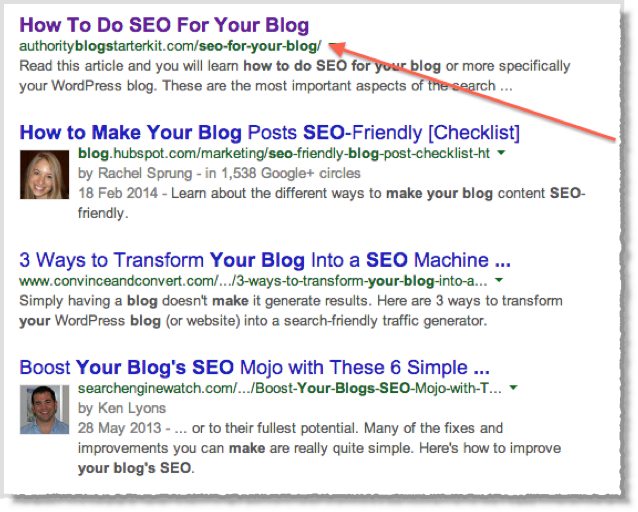
Type your keyword into Google:
Notice how the keyword is included in the title and description!!!
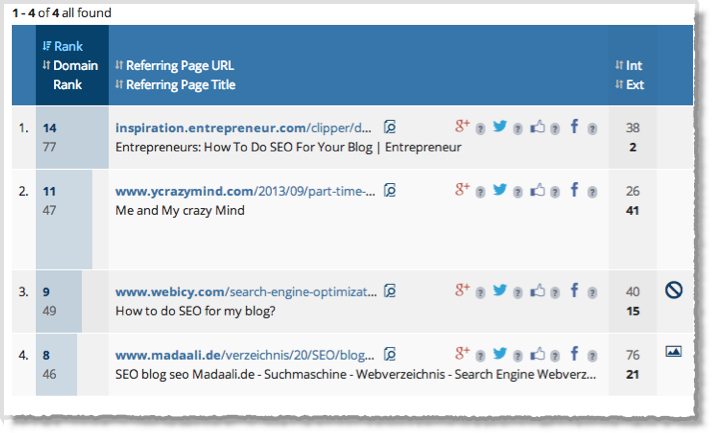
Copy/paste the number 1 ranked URL into Ahrefs. (It’s important that you get the full URL and not just the
domain).
Now you will see the backlinks in order of authority, as you can see. It is only showing 4 backlinks!!
So to rank well for this keyword probably wouldn’t take to much
effort. A few guest post links would do the trick. You can see that the
strongest link is from a site with a Domain Rank of 77. This is pretty
strong.
Using my formula of adding the rank and dividing by the number of
links, the average ‘rank’ figure is 36. So we need to beat this to give
ourselves of ranking for this keyword!!
Step 4. Build quality backlinks to boost your rankings
This is the stage that a lot of people totally mess up! And the
reason they do that is because they don’t know what they are doing, or
they listen to everybody else and get it completely wrong!
Let me tell you this. You do not need a ton of backlinks pointing to
your page or blog. In fact, you can do more harm than good by trying to
build as many different types of links as possible.
Just look at the example above. The URL has 4 back links and some good content.
Don’t waste your time and money on SEO agencies or dodgy Fiverr
services, they won’t work and more times than not, your rankings will
drop as you will get hit by a Google penalty.
So what exactly should you do to build quality Google safe links?
Simple……
You need NICHE RELATED, CONTEXTUAL LINKS.
Preferably from high authority sites.
Don’t waste your time on anything else when doing SEO on individual
posts. A few social shares are good, and I’ll come to that shortly, but
for now we are going to concentrate on getting enough quality links to
get us on the first page!
My 4 top tips for building quality backlinks include
- Guest blogging
- Private blog network links
- Outreach
- Social media
Let’s have a closer look at each one.
1. Guest blogging
Probably the best way to get high authority contextual links is by
writing a quality article for somebody else, you get the chance to link
back to your site. Matt Cutts recently said that Guest Posting was dead
and that it would no longer carry any value, as it would be classed as a
spammy way to build links.
Well I can tell you straight, this is a load of rubbish!! There is
no way that Google can distinguish between a guest post link and a
genuine contextual link to another site. If you provide good content and
relevant links then you will be completely fine!
So how do I get my guest posts published?
Getting your post published on a high authority site is not always
easy, so listen up because I’m going to show you how to do it!
- You must create a list of bloggers in your niche.
- You then need to build a relationship with the bloggers (email them,
thank them for their work, offer to help them, do them a favour)
- Now you can offer to write for them
By building a relationship first, you have just put yourself way
ahead of the average Jo that sends them an email asking to guest post.
High authority blogs get them all of the time, and to be honest, they
get quite fed up of it. So make sure you stand out and build a
relationship first.
I know this may sound like a lot of work, but remember; you only need
a couple of good guest post opportunities to rank your new blog post!
It’s definitely worth the time and effort because not only are you
getting a back link that carries authority, you are getting direct
traffic from your guest post as well as building your own brand!
2. Private blog network links
One of the best ways to get some high authority links is to use a
private blog network. Many top ranking sites in competitive niches use
PBN links. You can buy links from Private Blog Networks, but you are
running the risk of them being shut down!
Another option is to build your own private blog network. If you want
to learn how to build your own private blog network then this free guide at http://doseoyourself.com/build-your-own-private-blog-network-the-right-way/ is
helpful. Although I wouldn’t recommend doing this for the sake of
ranking one of your posts, it is a good idea to build one for the
benefit of your whole site and any sites you may make in the future.
Having the option to build high authority links at the drop of a hat is
golden!!
3. Outreach
Another method of getting links is to ask other bloggers to link to
your new post from one of their articles. Now you can’t go around just
asking random bloggers to link to you, as you won’t get anywhere. Like
before, we need to build a relationship with the bloggers first. You
then need to find articles on other blogs that you feel would link in
nicely with your new post.
Send an email to the blogger and mention how you latest post would
really benefit their readers. Tell them that if they kindly add a link
to your post, you will give them a mention on twitter or even link back
to them from one of your other pages!
4. Social media
As I mentioned earlier, social media can play a big part in building
backlinks. The more people that share your content, the more popular
your blog posts become and the more likely that other niche related
sites will link to you.
Here are a couple of procedures I follow with each new post
- Make sure to Tweet every time you publish a new post
- Mention other influential bloggers in your post and then mention
them when you tweet. Chances are they will re-tweet and your content
will get shared
- Use a plugin such as social locker. This allows you to exchange part of your content for a social share!!
- Post your link on other social platforms such as Facebook, Google+, Linkedin, Tumbler, Pinterest
If you don’t think that social media is that important, take a look at this post at http://www.jeffbullas.com/2014/01/17/20-social-media-facts-and-statistics-you-should-know-in-2014/ on Social media statistics!!
Wrapping it up
So there you have it, my 4-step guide to kick starting SEO for your
blog! If you want to get noticed and you want to increase traffic to
your blog then you need to put some time and effort into SEO. Here is a
quick summary of what you should be doing with each post you publish!
- Make sure you write quality content that offers value.
- Do your keyword research AFTER you have finished your article.
- Optimise your post to incorporate your keywords into your title, headings and first paragraph.
- Add your keywords into your Title and Meta description.
- Check your competitors’ backlinks.
- Go out and build a better back link profile than them.
- Use my techniques to get quality guest posts and high authority links.
- Watch your blog post rise up the search engine results pages and see your traffic increase.