Wednesday, 29 January 2014

How To Schedule Your Posts On Facebook

Have you ever wanted to schedule your Facebook posts hours, days, or even weeks in advance? While Facebook has offered the ability to schedule posts for years now, recent changes have made the process much easier. There are many reasons why you may want to schedule your posts ahead of time:
  • To have your page updated when you may be otherwise occupied. You will likely want to schedule your posts for days and times when your fans are most active, however you may not always be able to be at your computer during these times.
  • Scheduling your posts allows for consistent, reliable posting. Even with the best of intentions, it’s easy to forget to post, or for something to distract you or keep you from your computer.
  • It allows you to spread out your updates rather than posting them all in one fell swoop. You may have an hour now to post, but rather than post all 6 of your updates in a row, why not spread them out evenly over the entire day or week?

If you are ready to start scheduling your posts, follow the 3 simple (and I mean SIMPLE) steps below. And don’t forget to read through to the end of this post for some additional helpful tips for Facebook scheduling!

Step 1: Go to your page’s post update box.

Just as you normally would, go to your Facebook page and type in your update. As always, you can use a text-only update, a link, a photo or a video (offers and events work differently, and are beyond the scope of this post).

Below the input box, you will see a little clock icon; click on it to begin scheduling your post.


fb1 How to Schedule Your Posts on Facebook [New Information!]


Step 2: Enter in the date and time.


If you have used Facebook post scheduling in the past, here’s where you will notice something different, and oh-so-wonderful! While you used to have to go through a convoluted process of manually entering dates and times, Facebook now uses today’s date as the default, and an easy-to-use time field. To enter the time, simply start typing (e.g. 3:00) and it will give you some time options in a drop down box.


If you would like to schedule a post for a future date, simply click on the little calendar to select the date.

Please note that the time zone will by default be the one connected to your Facebook account. If you would like to schedule your post for another time zone, you will unfortunately need to do the calculations yourself and manually enter the appropriate time in your default zone.


fb2 How to Schedule Your Posts on Facebook [New Information!]


Step 3: Hit Schedule


It’s as simple as that! Hit schedule and your post is ready to go.


fb3 How to Schedule Your Posts on Facebook [New Information!]


A few additional comments:


Want to View, Edit or Delete a Scheduled Post?


It is possible to edit or delete a scheduled post. To view scheduled posts, visit your page’s Activity Log.  To access this, go to your Facebook page and click on ‘Edit Page’ at the top right hand side of your screen. From there, click ‘Use Activity Log’.


Voila! You will see a list of all the posts you have scheduled. From here you can edit or delete your posts.


fb4 How to Schedule Your Posts on Facebook [New Information!]


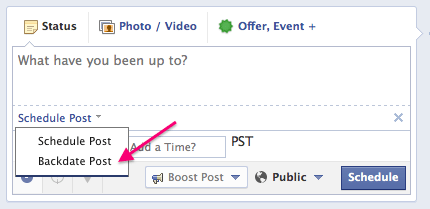
Want to Backdate a Post?

In the same way you might backdate a blog post to place it in chronological order, you can backdate your Facebook posts. You may want to use this feature to add in posts or photos from momentous or significant occasions – like the day your business opened or a time you were featured in a particular media publication.

Note that backdated posts will appear in your fans’ newsfeeds, however they will be placed in chronological order on your timeline – not on the date you actually post the update.

To backdate a post, simply click on the clock icon in your post update box, and then click on ‘Schedule Post’, and then ‘Backdate Post’.


Do you use Facebook scheduling for your posts? How about backdating? How do you use these features? Share with us below!

 http://kimgarst.com/how-to-schedule-your-posts-on-facebook

Wednesday, 22 January 2014

How to Use Pinterest to Drive Sales


Chances are, you're already well aware of Pinterest's popularity as a social networking platform. Since its launch in 2010, the site has amassed over 70 million users, who rely on the site to collect everything from recipes to style tips in beautiful, pictorial form. Still, popular or not, that age old social media question is still worth posting: is there any way for businesses to actually profit from the platform?


The answer is yes, yes, 100 times Harry & Sally restaurant scene yes. For starters, Pinterest users are simply more engaged than Facebook and Twitter users. In fact, several case studies have shown that Pinterest users specifically flock to the site to keep up with trends, get inspiration for what to buy, keep up with brands they like, get special offers, and keep track of things they like. These, of course, are all behaviors that transfer naturally into buying and brand loyalty. While this is somewhat of a draw for sites like Facebook and Twitter, marketers have to be far more careful on those sites to fit into the more social landscape. How much you can market on any given platform, after all, depends on how willing and ready consumers are to receive your message in that arena. On Pinterest, they're primed.


Not surprisingly, this has big implications for marketers and businesses, which can effectively use the platform to engage followers, offer coupons, and drive traffic between its Pinterest presence and online stores. What's more, the same benefits are available for big businesses as they are for small-time craftpreneurs looking to drive traffic to an Etsy store or another third party platform.

So, how can you use Pinterest to drive sales? Let’s take a look.


1. Create an Ecosystem of Boards


The great thing about Pinterest is that it allows you to have a diverse presence on the platform, rather than a single feed. By creating multiple boards, you’ll be giving both your marketing team and your followers several different frameworks within which they can engage more creatively with your brand. (And engagement, in the long term, drives sales through brand awareness and loyalty). Boards will of course vary based on the kind of business you're promoting, but a few good ideas include:

  • Lifestyle boards for different themes. This can really run the gamut. All Recipes, for example, has one board for healthy recipes, one for slow cooker recipes, and so forth. A clothing company might have one for A-Line fall skirts, or back to the office wear. The possibilities are really endless. 
  • Event boards. As spring fashion week unfolded, Elle followers could follow developing fashion trends as the brand pinned the latest fashions from its front row seat. An event board like this will make your followers feel like they're in the know, even from far away. 
  • Coupon boards. Coupon boards are the most direct way to drive sales through Pinterest. They're easy to create, too. Just design a coupon image like you would for any other campaign, post it to your coupon board with all relevant details, and have it link back to a page on your site where the coupon can be redeemed. Alternatively, just add a code to be entered at checkout. 
  • Contest boards. Travel companies have proven particularly adept at Pinterest contests, inviting followers to follow their boards and pin photos from their favourite dream destinations around the world in return for free hotel stays or airfare. However, contests can take many different forms, with the added benefit of being inherently shareable on other social media networks thanks to the visual nature of the form. Just be safe, to brush up on current contest regulations before launch, as the site has recently placed more restrictions. 
  • Sneak peeks. In today's social media landscape, customers expect their brands to feel personable and accessible. A Pinterest board that gives customers a sneak peek into how your product is made or even what life is like around the office is a great way to do just that. 
  • Customer boards. Last but not least, why not have a board dedicated solely to customer pins? This could be photos of customers using your products in creative ways, ideas for new products, or anything else that feels relevant to what you do.


2. Take Excellent Photos


Naturally, an image-heavy platform is only as good as the images you post to it. This means taking clear, high resolution shots in good lighting without any shadows or busy background. In fact, a recent study posted on Wired.com found in its analysis of this popular Paula Deen Pinterest photo found that good photos: avoid human faces, focusing only on the product; use multiple solid colours, most especially red; go for about 50% colour saturation; and are portrait rather than landscape style. Images that followed these criteria were shared at much higher levels than those that weren't.

Additionally, it's important to pack as much information into the image as possible without detracting from the aesthetics. This is best when done through visual cues, like showing the products or materials used or showing how the product can be applied in the real world. When that can't be achieved, a minimum of text can still be effective if artfully integrated.


3. Optimise Your Pinterest Presence


SEO is just as important on your Pinterest page as it is elsewhere, as there's not much use in having a Pinterest presence if no one can actually find you. To optimise your presence, make sure to integrate the same keywords you use across your social media and webpages into product descriptions and on your about page. It's also good practice to include links back to your other sites in your about page as well so that customers can easily follow you on whatever platforms they find most engaging. Of course, links are even more important in product descriptions, so followers can easily buy the product you're promoting.


4. Use Rich Pins


One of the newest offerings from the platform, rich pins are an incredibly effective way to give your followers a much deeper understanding of the products you feature on your Pinterest page, as well as ways that they can buy that product or become more deeply involved in your brand. The first kind of rich pin is called a product pin, which allows you to include a price for the product below the image, which changes as the price does. This is obviously the most directly connected to driving sales. However, you won't want to miss: place pins, which integrate a map and contact information onto your page; article pins, which help followers easily save your content marketing blogposts or any articles written about you; and recipe pins, which are obviously great for any company with a need for a recipe board, as they make it easier for followers to actually put together the recipes provided.


5. Promote Your Pins


Another great new feature on Pinterest is price alerts. With this feature, consumers will receive alerts every time the price of a product they've pinned changes. That can be a big motivator, especially when you've got sales going, but it's entirely dependent on the consumer having actually pinned something in the first place. All of the strategies we've discussed so far will work towards those ends, but there are a few other things you can do specifically to drive pinning. 

  • Pay for a promoted pin. This has yet to roll out, but when it does, the concept is presumed to be much like promoted tweets, with your promoted pin appearing higher and more prominently in search results. Of course, you'll want to save these for special moments, like when you really want people to know about a contest. 
  • Cross-promote. It's never a good idea to showcase your products in just one place. On your website, make sure to add a Pinterest button to every product listing or bit of content marketing. Likewise, don't be afraid to post links to your pins on your other social media sites, so that all of your followers across platforms know what you've got going on. 
  • Talk to your pinners. Pinterest users are engaged and motivated to buy (80% make a decision within three weeks of pinning). But that doesn't mean they can't do without a little nudging, especially within that critical period. Don't be afraid to reach out to pinners to thank them for sharing, or to offer them an incentive for pinning more or for buying sooner. Just like on other social media sites, pinners like companies that are responsive and that seem down to earth. 
  • Collaborate with other pinners. This is an especially effective technique for small businesses and solopreneurs, who can benefit from pinning and showcasing each other's stuff. Doing so means exposing your work to twice the audience, and more exposure means more pins and more customers.

The Takeaway

No matter how you slice it, Pinterest is a powerhouse when it comes to driving online sales. What kind of board will you make first? Let us know in the comments below.


http://www.socialmediafrontiers.com/2014/01/how-to-use-pinterest-to-drive-sales.html#.Ut-axrRFCM8

Wednesday, 1 January 2014

2013's Top Memes and Viral Videos


Ylvis in What Does The Fox Say


So 2013 a lot has happened online and offline, we've got a new Pope after Pope Benedict retired for the first time ever. But 2013 surely will be known as the year that marketeers didn't fill the pockets of the television execs but instead invested heavily in online advertising and had much success. Finally cracking the internet and getting videos shared and viewed across the world. Some people will question the ethics of this but what ever happens we had a lot of laughs on the way.

January Duke Street Hazard

Slipping over can be a painful and embarrassing thing to happen to us, however in January 2013 of this year a street in Norwich became an overnight hit. With the recent bad weather and the pavements being very icy, you'd be foolish not to try and record the outcome. Hence forth the Duke Street Hazard arrived. An 8 minute long video with a catchy dance number added to it has got over a million views. I'm sure it created a lot of laughter at many offices up and down the country.


February The Harlem Shake Arrived!

Cam from the land down under with 4 friends just mucking around and at its peak had 4,000 different versions of the craze being uploaded to YouTube every day. Although The Harlem Shake wasn't just a viral hit it changed the future of music. With the US chart company Billboard counting YouTube popularity in its listings. The song itself was a true viral hit with the original inspiring others to re create their own.


March The Lad Bomb

Invented by Chris Stark and his friends is a drink which is one part Jager the other being double vodka red bull. However this wasn't the viral hit. Christ from Radio 1 was sent down to go interview Mila Kunis about her latest film. This being Chris's very first interview with such a big star he is terribly nervous. But what results is something amazing Chris goes completely off topic giving Mila an insight into his laddish lifestyle and invites Mila to come watch the football with him and eat some chicken. It was like an awkward scene of someone trying to chat a women up at the bar but in this case was supposed to be an interview. But Mila found this hilarious and didn't want to talk about her film she wanted to learn more of the Lad Bomb and Sir Dosser. This is probably going to be the only time you see genuine interaction from a Hollywood superstar.


April The Biggest hit of the year

Not even David Attenborough could describe what is going on in this video but with over 90 million views and still counting 'how animals eat their food' is the hit of the year. Two friends some cardboard boxes cheap outfits and some plastic plates have created an amazingly funny video which has been shared across the whole world for everyone to enjoy and shows you don't have to spend a lot of money to make something go viral.


May The Social Media Savvy Astronaut 

Chris Hadfield was given this name by Forbes. but by tweeting and showing the world what his work was like working on the international space station is one way to get your name remembered by millions. But as a final sign off he sang David Bowie's Space Oddity from the station itself surely the first of a long line of music videos to appear from space. But heres to you Chris Hadfield for starting the trend.

June The Posh Burger

Chancellor George Osborne was working late one night preparing a speech and decided to order in a burger for himself to eat while working away at his tasks. While this was happening one of his aides took a snap and posted it to Twitter. This led to a huge backlash against Osborne as many people suggested this was a posh burger nothing of the greasy kind you would get a normal person eating after hours. This wasn't the end of the politicians plight into pictures of themselves while eating at their desk. Eric Pickles is a larger member of parliament, he brought many laughs on twitter when he tweeted himself eating a salad only a few days after the whole Osborne affair. Many people condemned this also has sly PR work as many people didn't believe Mr Pickles would be eating a salad.


July Sharknado

The picture says it all really. Sharknado, that's a compound word of shark and tornado - fit neatly into the "so bad, it's good" category of straight-to-TV movie. It was so popular though that a sequel was commissioned and fans on twitter were able to choose the name.

August Enter Twerking 

In August Miley Cyrus well and truely left her old image of Disney's Hannah Montana behind after her performance at the MTV VMA awards with Robin Thicke.

Enter a big foam hand a scantily dressed Miley Cyrus and Twerking became popular leaving most of the world with the mouths wide open over what they had just seen. But for Miley this was just the start and had everyone across the internet talking about her.

September Twerking Fail


This unfortunate video appeared in September of a girl trying to twerk upside down against a shut door but her friend opens the door sending her body crashing into the table and setting her legs on fire, where the video abruptly cuts. However many people have asked whether the video had been faked after the girl in the video was interviewed on television.

October The Fearless Rabbit

In a lifetime certain things will happen and you'll look back and tell your friends such an unbelievable story that they would never believe and your left saying you should have been there to see it. Well thanks to YouTube now this has all changed you can capture even the strangest events.

This fearless rabbit chased and ran along side a van in Scotland in the dead of night not showing any fear from the fact it could be killed instantly. This video goes on for 5 minutes and brings these unbelievable stories to life.

November Serge the Party Llama 


When you go down to your local and think of things that your going to see that night. A Llama doesn't come to mind but a group of friends in France made this possible taking Serge on a night out with them. They were live tweeting his every movements of the night and also was pictured across several hundred twitter accounts.

December How to lose your job in 30 minutes

The final star of 2013 is Justine Sacco who literally lost her job in 30 minutes.

Justine a PR executive in the US had just boarded a plane to South Africa. By the time she had landed, she had lost her job, following a worldwide wave of criticism and a hashtag #hasjustinelandedyet - that trended around the world. Its fair to say that Justine has apologised and hopefully 2014 will be a better year for herself.

http://www.socialmediafrontiers.com/2013/12/2013s-top-memes-and-viral-videos.html#more