Namecheap

Wednesday, 31 July 2013

eBook Profits 2013

eBook Profits 2013
eBook Profits in 2013 have been a topic of debate recently with technology powerhouse companies like Apple, Google & Amazon. If these massive companies can see the potential profits with eBooks then you should be able to do the same thing. There are many avenues to enter into the eBook market by writing your own, reselling others’ eBooks, obtaining Master Resale Rights, Private Label Rights, selling eBooks and even more. The bottom line is that you can make a great deal of money if you know how to start selling eBooks.
eBook Profits Starter’s Guide
eBooks are a great way to add some extra income to your portfolio. eBook sales have been increasing over the past few years and the best part is that ANYONE can start selling eBooks. The profit margins are tremendous but you have to know how to target the correct people. Not everyone who looks at your eBooks are going to buy every time. You have to convey useful information that entices the buyer to go through with a purchase.
The first step is to find out how you’re going to obtain the product you plan on selling. There are a few options here that involve different expenses and time involved.
1. Writing your own eBook – This is a great way to start if you cannot afford to buy any products. This will require more time and effort before you can begin the selling phase so you will not have an income right away. Here is a guide that can help you in writing and Publishing An eBook. 
2. Master Resell Rights (MRR) - With this option you can start selling eBooks immediately after you purchase your inventory, unless you know someone who is willing to give you some eBooks to start. Master Resell Rights eBooks are defined as after downloading that specific eBook, you have 100% complete ownership over reselling the eBook for any price you choose. You receive all profits from any sale you make with an MRR eBook.

3. Affiliate Selling - This is a bit different from the previous 2 options because here you do not have any ownership of the actual eBook that you’re selling. Using affiliate marketing you will not have to spend money for your starting products because they are given to you to sell. You will receive a certain percentage based on the sale. For example, if you’re selling eBooks for $20 per, you can receive any percentage of that. I would recommend only selling products that offer at least a 75% commission rate for your efforts. A great resource that can help guide you into finding the perfect products to sell can be found at Legit Online Jobs. 

Monday, 29 July 2013

FREE KEYWORD RESEARCH TOOL + GUIDE

Free Keyword Research Tool + Guide
In this blog post I’m revealing my secret “Five Minute Keyword Research” method. You can discover a more advanced method that I use for even better results here.
Finding profitable keywords does not need to be a total chore that takes hours and hours of time. Furthermore, you don’t need ANY expensive keyword research software (despite the protestations of all the so-called ‘gurus’ who are more than happy to make you part with your hard earned money for the ‘privilege’ of some garbage piece of software that never gets updated). In fact, you can find an almost endless stream of long-tail keywords for any niche using three software tools that won’t cost you a red cent.
Get your thinking cap on, because it is time to learn how to dominate keyword research and find profitable long-tails in mere minutes.
Why Long-Tail Keywords?
When it comes to keywords, for SEO purposes there are two main types; “short keywords” and “long-tails”. Using the weight loss niche as an example, a short keyword might be something like “lose weight”, whereas a long-tail keyword could be “lose weight naturally in seven days”. As a rule, any keyword (well, it should actually be called a key-phrase) with over four individual words can be seen as a long tail.
The reason for using long-tail keywords is actually very simple; it is much easier to rank in Google and other search engines to reap organic search traffic. Far more webpages are relevant to the keyword “lose weight” than exist for the keyword “lose weight naturally in seven days”.
With the right selection of long-tail keywords, it is actually possible to rank in Google without doing any link-building. This means you can build a massive network of sites that start to rank organically over time, without needing to dedicate valuable energies to the boring task of link building (nor do you need the expense of PPC or paid media traffic).
For example, my website Why Am I Lazy ranks number one on Google for that keyword, despite the fact that I have not done any link building for it beyond cursory mentions on some of my blogs, and a bit of social media promotion.
The secret behind this site (and many others that I run) is picking a good long tail keywords for which it is possible to rank “organically” without too much effort.
What Tools Do You Need?
Most Internet marketing gurus will try to convince you that you must spend hundreds of dollars on expensive keyword research software. However, this is simply not necessary. You can actually find all the long-tail keywords you would ever need with three easy pieces of software.
Google Keyword Tool
This is a very popular tool for Internet marketers of all descriptions, as it provides useful keyword ideas that can be turned into profitable campaigns. Although it was originally intended for use with Google Adwords, for the purposes of creating PPC campaigns, the Google Keyword Tool is also extremely useful for uncovering quality long-tail keywords for organic SEO. In particular, we will focus on using it to find search volumes and CPC (cost-per-click) results, in order to demonstrate how it is possible to build a quality Adsense site with nothing but long-tail keywords, content, and patience.
Ubersuggest
Ubersuggest (www.ubersuggest.org) is an extremely powerful tool for building up immense lists of kick-ass keywords to use in your campaigns. You are most likely familiar with Google Suggest, which is Google’s way of trying to predict what you want to search for, based on what other people have been searching – Ubersuggest merely scrapes this based on your own keyword input. The great thing about Ubersuggest is that it can produce massive lists of potential long-tail keywords in a very short space of time, which is fantastic for SEO keyword research.
Microsoft Excel (or any equivalent program)
You will also need Microsoft Excel or any equivalent spread sheet program. This will be used for sorting keywords and eliminating any duplicates.  You can use OpenOffice or LibreOffice as well; both are free and offer all the necessary features you will require.
Optional: Traffic Travis
Traffic Travis is an Internet marketer’s dream – it is a quality free software tool (although there is a vastly superior premium version available for just shy of $100) that enables you to check keyword lists for ranking difficulty, analyse your competition, and keep a track on how your sites are progressing in the search rankings.  There are a whole load of other useful features too, so you would be crazy not to download it for free.
I have been using Traffic Travis for a number of years now and find it extremely valuable for managing the SEO aspects of my websites. Creating a new project from a website is as easy as loading in your sitemap, entering your keywords, and then picking which search engines you would like to track your rankings in.
Click here to download your own copy of Traffic Travis. (See link at bottom of article). Please note that you need a Windows computer, or a Mac with some form of Windows emulation software.
The Five Minute Keyword Research Method
Now that we have got the pleasantries out of the way, it is time to focus on the actual method that you will be using to research your profitable keywords in killer time. I’m assuming that you have already picked a niche and have some potential products in mind that you would like to promote (if you’re affiliate marketing, that is). In case you are not yet at this stage, I recommend you download a free copy of my Super Affiliate Secrets report that will teach you exactly how to get started with a niche and picking products.
Let’s get started:
Using Ubersuggest to Build A Massive Keyword List
The first thing you are going to do is use Ubersuggest to build a large list of potential keywords. Basically, you should think of the results you get with Ubersuggest as your foundation keywords that will form the basis of your up-and-coming digital empire. For the purposes of this eBook, I’m using this motivation/self-help niche as an example, because my Why Am I Lazy site is based on the same thing.
To start with, you need to enter a seed keyword into the Ubersuggest search box, fill out the captcha, and then press “suggest”:
In case you’re confused, a seed keyword is a generic phrase that will get you started with your research. You can brainstorm these seed keywords very easily with a pen and a piece of paper; think of logical offshoot phrases of your niche topic. For example, seed keywords in the motivation/self-help niche could be things like “stop laziness” or “become more motivated”. It pays to have a list of at least ten seed keywords before you go any further.
Once you’ve entered your seed keyword and instructed Ubersuggest to commence the search, you will be presented with a vast array of results:
You will notice that all of these keywords are a variation on the seed keyword you entered before; that is because Ubersuggest takes your entry and then runs it through Google Suggest in order to come up with its results. The most exciting thing about this is that you know all these keywords actually have real human interest – otherwise they wouldn’t appear in the first place!
Now it’s time to download that first list of keywords, and then paste it into a text file (use Notepad or any similar program). You should then rinse and repeat this process with as many seed keywords as you can think of. Over time you will notice that you become much better at identifying seed keywords, even using the Ubersuggest results themselves for further inspiration.
Keep at this method with different seed keywords until you have at least 500 results in your notepad file. With experience you can complete the process in under twenty minutes.
Checking Search Volumes
Open up the Google Keyword Tool – you should register your Google account with Adwords (just click the sign in button at the top right of your screen) and then follow the prompts from there. Being signed in to the Google affords a range of benefits, most importantly the ability to enter more than 100 keywords at a time, and the option to see approximate CPCs for all of your keywords.
Once you’re signed in, select [exact match] keyword filtering on the left-hand side of the screen. In case you are not familiar with this term, exact matching ensures that the keyword tool only checks for the search volume of the keyword exactly as it appears. This means that the phrase “how to become more motivated” would only return search volume results if it was typed by a Google user exactly like that.
This is just too easy – copy and paste your entire list of keywords from that Notepad file into the Google tool, and then choose to search. Almost instantly you will be greeted with instant information about the search volumes of your keywords. Unless you are specifically building a local website, you can ignore the local search volumes and focus solely on the global search count.
All you need to do now is download these keywords in a CSV file and you are down with this stage of the process.
Optional – Check For CPC
If you are a fan of Google Adsense (or you would like to start making money with Adsense) then you will no doubt be familiar with cost-per-click/CPC figures, which are a rough estimate of how much each click would cost an advertiser for any given keyword. Although the actual formula used to determine your final earnings from an Adsense click is far more complex than merely looking at CPC figures, they can still give you a useful rough estimate of the potential value of any keyword.
If you want to learn more about Adsense, increasing your click through rates, picking the right keywords, and generally improving your earnings, then I highly recommend Pablo Vici’s Kindle eBook entitled Conquering Google Adsense. Click here to download it.
I won’t go much further into Adsense in this eBook, beyond saying that you can “trade off” the search volumes of your keywords versus their CPC scores, in order to find the best keywords for your campaigns and websites.
Picking The Best Keywords
Now we arrive at the final and perhaps most important part of the whole process; sorting your keywords to pick the best ones for ranking easily. Basically, you want to find keywords that are getting a reasonable number of searches per month (your definition of reasonable will vary depending on the amount of time you wish to put into your site). From there you can build content based on those keywords and slowly drip it out to your sites. Over time your search rankings will climb and your traffic will grow – how simple is that?
Conclusion
I hope you can see know why I call this the easiest keyword research method in the world. It is quite simply one of the most straightforward methods for discovering a lot of keywords to use on your site. The basic strategy is just to find quality long-tails to rank your site with (and from there convert that traffic into leads or sales) however, as I have shown you can also tailor this traffic specifically for selling affiliate products, or driving Adsense traffic.


Sunday, 28 July 2013

Seven Online Marketing Activities You Can Start Today

Marketing your small business online isn't all that tricky. Though there are plenty of things to learn if you're to get the best results from your efforts, I wouldn't advise anyone to sit around learning all there is to know about online marketing before jumping in.

First of all, I don't know any small business owners who have the time to do that. Second, it isn't necessary. Instead, jump in! Start now... You'll learn plenty along the way.
An important note: your online marketing efforts will reflect either positively or negatively on your business. Any business owner can start marketing online now, but do take care to put out content and messages that have quality and authenticity.
So, let's get down to it. Here are seven online marketing activities you can start today.
1. Blog
Click Here!

Blogging is a powerful content marketing activity for any size business. It can help position you as an expert in your industry, bring more traffic to your website, grow a loyal fan base, and generate buzz and interest in what you have to offer.
It does take a time commitment, but the return on investment is generally high.
If you already have a website built with the mega-popular WordPress software, setting up your blog will be very simple and essentially free. If you're not using a website service that allows you to add a blog to your website, you can host your blog independently of your business website and link to it. However, I highly recommend the all-in-one solution, since it helps enforce your overall brand unity.
Once you have your blog up and running, you can begin publishing helpful articles to attract your target market. You blog shouldn't be an advertising outlet, it should focus on delivering content that is helpful and engaging. You might feel like you're giving away some of your best ideas, but doing so will only increase your credibility and community.
2. Join Twitter
If you're not on Twitter already, now's the time to get started. It's simple to set up a profile for your business, choose some interesting people to follow, and begin sending your helpful, engaging tweets out to the world.
Here are some things to remember when using Twitter for business:
  • Don't "advertise" with Twitter. You can talk about your business and your products/services, but don't overdo it. Most of your tweets should involve sharing helpful information or interacting with your followers.

  • Stay updated. Don't set up your account, tweet a few times, and then let it sit there. Update a couple times a day if you can. It doesn't have to be time-intensive; simply share an interesting article you read, reply to someone's question, or retweet something useful.

  • Be personable. Use Twitter as a communication tool, not a broadcast tool. Sharing helpful articles and announcements is good, but don't stick to that format all the time. Ask questions, answer questions, start a conversation. Interaction is key.

  • Create a concise and compelling Twitter bio. Let people know, quickly, what you do and what you have to offer. Such a bio will help you attract quality followers.

3. Answer questions on LinkedIn
This is a simple activity you can do every morning, or twice a week, or whenever you choose, and it helps get your name and knowledge in front of peers and potential prospects. If you don't have a LinkedIn profile yet, you can create one for free. Then find—and join—LinkedIn groups related to your area of expertise.
You can search for questions that fellow group members have asked, and provide helpful answers; you can also ask questions if you want to get a specific conversation going. (Another way of doing that, aside from groups, is to use LinkedIn Polls.)
Remember to answer questions with genuinely helpful responses, not just an advertisement for your services. Give useful tips and suggestions, and even refer the questioner to your contact information to get in touch, if they wish.
Being helpful and demonstrating your knowledge will build credibility for your business, and it could earn you actual business leads and connections.
4. Be a guest author
Similar to sharing content on your own blog, you can write helpful articles for other blogs that your customers and prospects read.
Most blogs are actively seeking guest authors, and in return for your contribution you general receive an author bio with links to your website/blog and social media profiles.
Guest-blogging is a great way to gain exposure in your industry, reach a new audience, and boost the SEO power of your website (because of the incoming links).
As with each of the previous marketing activities I've talked about, it's important to keep your guest posts helpful and informative, not salesy. Most blogs won't publish articles that are promotional in nature, and you wouldn't gain the same long-term benefits even if they did.
Growing your online presence is about establishing your knowledge in a certain niche and growing a community of consumers who appreciate your advice and your brand.
5. Comment on blogs
Become a regular part of the conversation on other blogs in your industry. You'll make valuable connections and get your insight and thoughts in front of a new audience with minimal effort.
When commenting on blogs, always make sure you're adding something useful or thoughtful to the conversation. Don't pretend you read the article and copy someone else's comments. Find content you are genuinely interested in, and then add your opinion, thoughts, or compliments.
6. Start an email newsletter
Email marketing is still a powerful way to grow a business online, even in the midst of our Twitter-saturated world.
You can set up an account at one of many email marketing services and begin capturing emails on your website in a snap. I recommend checking out MailChimp and AWeber; both offer flexibility and affordable prices.
7. Be an expert source
A great way to demonstrate your expertise is to show up as an expert in someone else's article, blog, podcast, or video. This strategy can also grant you exposure to a completely new audience that you might not have otherwise been able to reach.
Bloggers, journalists, and media types are always looking for experts to interview. You can add you name and contact details to various directories, offer your expertise directly to someone of interest, or (my personal recommendation) sign up for a free account at HARO and reply to queries that interest you on a daily basis. You might not get quoted in every article you volunteer for, but you can score some great publicity for a few minutes of your time each day.
* * *
The seven online marketing ideas outlined here should give you a great place to start. I don't suggest trying to launch all of these activities at the same time. Instead, choose a few that best fit your business and personality, and then add on from there.

Friday, 26 July 2013

Is Driving Traffic With Social Media Driving You Mad?

Have you ever started driving traffic to your website or squeeze page and you just can't stay focused and always seem to end up being distracted by other things going on?
You are using social media to get visibility to your business but you can't stay focused on what you want to do?
In this article I am going to discuss the problems with social media and why it can drive you mad!
Driving traffic or driving you mad!
For me it is a huge distraction. This is a typical scenario:
  • I see a post and it is someone I know so I have to have a look and read it.
  • I see that one of my friends is online and I just have to say hi.
  • Someone sees I am online and they just have to say hi to me!
  • I see a great photo someone has uploaded and I just have to look at it.
  • Someone shares a joke and I just have to read it and have a laugh.
Do you get the picture? Does it sound familiar?
I guess that is why it is called 'social' - its sociable.
But if you want to use it to generate traffic to your business then you are in big trouble! Social media is killing some businesses - killing time.
If you are not focused and do not have the self discipline needed to remain on task then social media as a traffic source is a big no no for you.
Forget what you hear about it being the best traffic source out there. You probably hear that from people selling social media traffic products anyway!
The truth is that it is killing your time and ultimately killing your business if you continue to use it and get distracted.
Not only that, I received an email a few days ago where someone told me that they had lost their entire business because one social media company had banned their account.
If you are using social media for building relationships and communicating with prospects then make sure you also have a way to communicate with these people that you have control of - such as building an email list at the same time.
If you find that you spend more time reading other peoples updates rather than providing your own updates and adding value to others then social media is not the right traffic source for you.
Article Source: http://EzineArticles.com/7884056

Wednesday, 24 July 2013

How to Improve Email Deliverability

If one of your digital marketing tactics is email marketing then you understand that the most important aspect is actually getting your content to your subscribers. This is one of the most common questions from marketers. There are a myriad of things you can do to either help or hurt your deliverability. It’s important to understand both.
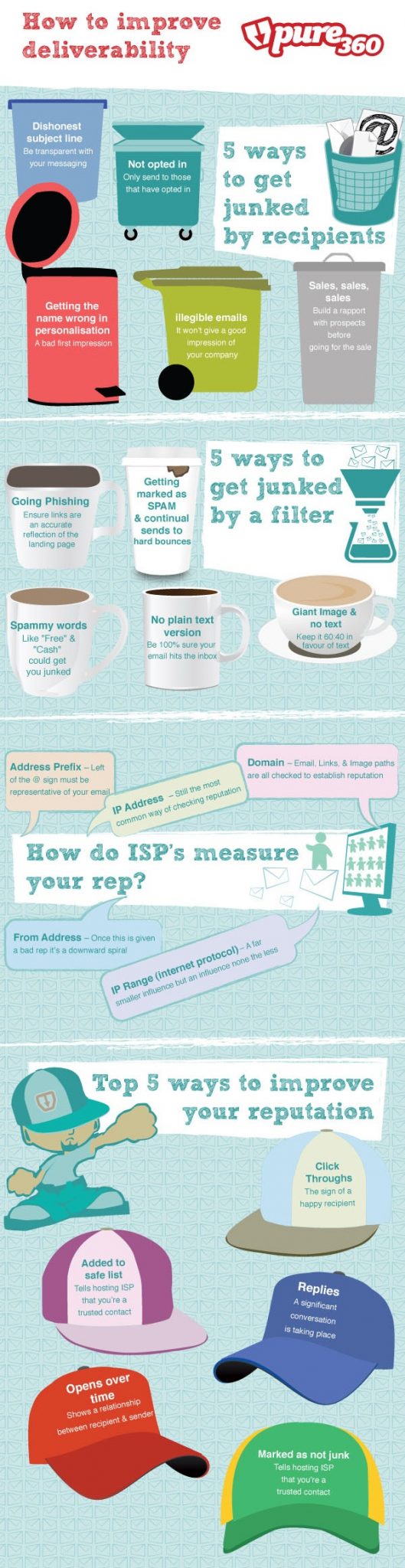
I recently discovered a simple, yet very helpful, infographic by Pure360. Pure360 is an email & SMS marketing provider based in the UK, who specialize in helping businesses get the best results from their campaigns.
Improve Email Deliverability Summary:
  • Be transparent in your subject lines and from address.
  • Only send to those that have opted in.
  • Have clean data, including personalization of their first name.
  • Align with sales to ensure your subscribers know the email is communicated and expected.
  • Avoid keywords commonly abused by spam.
  • Keep images down to a minimum both for a good user experience and junk filters.
  • Always have a plain text version of your email.
  • Be aware of who is using (and abusing?) your IP address reputation.
  • Keep your from address and domain name consistent.
  • Ensure links and image paths are from reputable domains.
  • Ask your subscribers to add you to their address books and safe senders lists.
  • Encourage your subscribers to click through the emails to content you’ve produced.
  • Frequently scrub your list of unengaged subscribers. If they never open then remove them.

How to Improve Deliverability Infographic

improving_email_deliverability_pure360

Monday, 22 July 2013

Social Media Marketing Is An Integrated Strategy, Not The Holy Grail!


There is a misconception out there that many so-called social media marketing GURUS try to publicize. It’s that social media marketing is the cure for all!

If your business has the Flu, then you should give it 2 social media pills, one in the morning and one before it goes to sleep. If it has an injury, then you should just apply some social media to the area in subject and magic will happen.

I got sick of some marketers saying that social media will fix any broken business, no matter where or how much broken it is! Didn’t YOU?

Social media marketing isn’t a standalone strategy that works by itself and produces magic. It should be an integrated part of your overall marketing strategy. You know why?

It’s simply because each marketing strategy has a role that must fill an important gap in every business’s strategy!

What do you know that social media is good for?

Direct sales?

Not really!

It’s great for building brand awareness and deepening your relationship with your prospects!

What blogs are good for you ask?


They’re good for positioning you as an expert in your industry as well as for driving eyeballs.

So where email marketing stands in all of this?


Email is how you convert those eyeballs into paying customers!
Let me give you a scenario here:

In order for you to build a highly profitable business, you need to go through this process:

1- You should build awareness for your products and services so your prospects can know that you exist. The best strategy to do that is via social media. In a previous post, I stated that social media is about discoverability and that’s exactly what your business needs if you’re just starting out.

2- After building that initial awareness for your product, you need to stay on top of your prospects’ minds. Having a prospect exposed to your products and services once isn’t going to get them taking action and buying it. It’s that repetitive, non-annoying exposure that entices them to check your stuff out!

3- What happens when prospects know about you?

Nothing!

That’s exactly where people get social media wrong. They think that having those comments on their Facebook page and retweets on their Twitter profile should get them all the sales they need.

People don’t buy from businesses they know, they buy from businesses they know, like and trust!

How do you build that likeability?


It’s through telling them stories that resonate with them through your blog. It’s through your responses via your blog, your social profiles and your replies from your newsletter (see how everything is integrated?).

And how do you build trust you may ask?


You build trust through the great content that you provide on your blog, other influencers’ blogs, through your email newsletter or your customers’ honest testimonials!

Even social platforms don’t have the same purpose for each business. Some are great for thought leadership (like Twitter and LinkedIn) while others are great for humanizing your brand and connecting with your prospects on a deeper and more personal level (Like Facebook and Instagram).

This is just a minor overview of how an integrated digital marketing strategy looks like. There are actually dozens of other pieces that should work along with the strategy, not to mention offline strategies as well. If one word or phrase in a landing page can change conversion drastically, how much do you think a missing piece in your strategy can cost your business?

How To Ensure That All Parts Work In Harmony?


In order for you to ensure that all the pieces work together in perfect synchrony, you need to:

I - Understand your audience


The most important thing that you should be focusing on the most is designing ways to understand your prospects. You know what comes with understanding?

You guessed that right. It’s POWER!

When you understand your prospects, you can then learn what platforms they prefer to use, what content they like on each platform, where do they follow people they now VS like VS Trust. You job then becomes:

2 - Optimize for each platform


People don’t communicate with businesses they just know, and businesses they really trust the same way. They also don’t expect the same treatment from both businesses!

If people invite you into their houses (email inbox), you better behave and provide them with highly valuable content that is expected from this medium. When you optimize each platform for its particular best use, the result will be a perfectly synchronized strategy.

3 - Cross-promote


By cross promoting, I mean mixing all the marketing strategies together so you get the maximum results.

For example, there are always people on social media who decide to join your newsletter from the first post you put out there. However, others might need some convincing first. When you cross promote, you’ll ensure that you’re not missing on those people who are willing to join your newsletter through social media or share your articles via their social profiles. To ensure that, you need to put social sharing buttons on your email newsletter as well as on your website, promote it on social media, promote it on your blog, promote your blog posts on your email newsletter…etc

Thursday, 18 July 2013

How To Make Your YouTube Video Go Viral

YouTubeYouTube videos have become such an ingrained part of our society. Everyone wants something that will go viral, whether they are just posting on the web for personal reasons, trying to bring attention to something important like a cause or event, or a business hoping to boost sales using the power of the internet. There are even university lectures dedicated to the topic, teaching a new generation of students how to capitalize on the value of viral content in any industry.
Does that mean in order to have a successful, viral video, you have to join a university course? No, though I guess it couldn’t hurt. What you need are a few tips to help you find success.
    • Maintain quality, in every way. If YouTube has taught us anything, it is that everyone has something to show us, but most of it isn’t worth watching. The number of horribly done videos on that site is staggering. From vlogs stroking the poster’s over-inflated ego, to grainy camera phone clips of people you don’t know doing something you can’t quite make out, there is a lot that will fail to catch the eye of the public. Your video has to be the optimal quality in everything from equipment (a good camera, mic and editing program are musts), to the content itself.
YouTube Marketing
    • Post what people want to see, not what you want them to see. There is a definite ego involved in the pursuit of viral content. You have to be certain that what you are creating is good enough to gain popularity on a massive, global scale. Which is fine, confidence is a good thing. But not being aware enough to the needs of your target audience, and instead thinking you know best, is not such a good thing. You should follow trends, try to be timely, and focus on what is going to be entertaining to a specific group of people. On that note, don’t aim to be for everyone. That never works.
    • Don’t buy your popularity. A lot of companies will pay an agency for views on their video. While this does increase your likelihood of being featured on the front page, or as a featured video, it doesn’t mean your video is viral. First of all, it is against YouTube’s terms and conditions to do this, so you run the risk of penalty. Second, a viral video is something that has been launched into the mainstream through force of people’s reaction. There is an emotional element that drives it forward, whether it sparks someone’s humor, their sentimentality, their pain or their interest. It means more than clicks, and just having a lot of views won’t make it any more shareable.
    • “I never sold, people just bought.” These are the words posted by Bob Wan Kim on a Quora answer about viral campaigns. He brings up an excellent point: you can’t take a viral video to the people; the people come to you. Because what drives the popularity is the emotional response of the viewer, you have to allow them to make the magic happen. Of course, initial exposure is fine (the usual social media posts, relying on subscribers for initial views, likes and comments, ect.) But Kim’s words bring up another point that might not be quite as popular:
Upworthy
  • It is a lot to do with chance. That’s right folks, in the end the only thing you can do is up your chances of being seen and enjoyed. Almost every viral video out there got that way by chance, often at complete random. For every viral video there is, you will find thousands that were just as good – or better – that never took off. Why is this the case? Because what people like isn’t about charts and statistics, but about the gut. Sometimes there will be one thing that just hits them right with the perfect gut shot, and they will respond with enough passion to drive your video into infamy. There is no set formula to make this happen. If you would like to read more, click the link below:

Tuesday, 16 July 2013

Should Facebook Tell Users Who Has Seen Their Posts?

image
Last week, an article by Buzzfeed’s Charlie Warzel started an interesting debate. The question: should Facebook show users how many of their friends see their posts, as well as how many likes and comments these posts get? 

Motivated by a Stanford University study entitled “Quantifying the Invisible Audience in Social Networks”, which revealed that Facebook users were “reaching 35% of their friends with each post and 61% of their friends over the course of a month”, Warzel  opined that it might be beneficial to users if they had access to their posts’ reach stats, just as page manager’s and advertisers do. 

He also theorised why Facebook didn’t reveal these stats, based on two passages from the Stanford University study which speculated as to why the 220,000 users involved in the study thought that a lower percentage of their friends were seeing their posts that the actual 61%. The first passage:

Saturday, 13 July 2013

5 Secret Ways To Get A 100% Increase in Email Open, & Click Through Rates

OK, let’s get those emails opened first, then we can go for the jugular, and get those KILLER click through rates..

How To Double Your Email Open & Click Through Rates – Almost Immediately

click through rates
#Tip 1. Keep subject lines short. Check your daily emails, do any really stand out?. The chances are, the ones that reallly stand out are the short ones. Subject lines with less than 41 characters have been proven to get more opens..

#Tip 2. Solve a Problem. Imagine if your email arrived with not only a short subject line but also it had a PROMISE. People have all sorts of problems, if your subject line indicates that the answer to a specific problem lies within, if it’s a common problem, then more people will open, RIGHT?.

So, what Niche are you in?. Let’s say that you are in the weight loss niche and your list was very targeted. If your subject line got straight to the point of the problem, “Lose Weight NOW!” People would be pretty keen to open this email, don’t you think?. Keep it simple, but get to the root of their problem with a promise to not only help, but to SOLVE their problem. Use a punchy, short subject line.

Be Entertaining – Easily Improve Email Open & Click Through Rates


email list
#Tip 3. Entertain them. People love to be entertained. You would be surprised at just how boring most subject lines are, it won’t take a lot to be “one up” by providing a very short, witty subject line. Once you have their attention, be even more entertaining within the email to get the clicks. Here’s an example.


Send them an email with something like “You SUCK” in the subject line.. Now you are probably thinking they will unsubscribe, however most people are curious, this funny subject line will get plenty of people curious enough to open the email. Now here’s the interesting part.

Once they open the email, the copy starts like this. “This is what I was told, the first time I tried writing emails”.. You see, you can be entertaining in an email and get people to enjoy the thought of what’s coming next.

#Tip 4. Appeal to people’s feelings. This is a wonderful way to get people to open emails. Do you know what the most opened email subject line is?. Go on, have a guess. It’s (according to Aweber) ”You Are Not Alone”. Do you know why?.

It’s because people in general have strong emotional feelings. And one of those main feelings is the need to “fit in” and be a part of something. Most people work better as a team, the thought of being alone casts very negative, frightening thoughts in many people’s minds.

Not only does this headline appeal to people’s feelings, it also answers our previous requirement about solving a person’s problem, the problem of being alone. So use emotion to get emails opened.

Here are some more “emotional” subject lines. “Never Be Broke Again“. “You Really Are Beautiful” & “This Made Me Smile”.

#Tip 5. This is my final tip but it is very, very important. This is about getting your clickable calls to ACTION, clicked. Let’s be honest, you can have the best subject lines ever, but if people open the email and don’t ever click on the links, then what’s the point?. The ultimate goal of the email is to get people to take action and check out your offer, RIGHT?.


So, here is a way that many top marketers (such as Richard Brunson) double, and even triple their click through rates. They simply use the great subject line that they created to get people to open the email in the first place, as the clickable call to action inside. This is very SIMPLE but can be very effective. Here’s why I think this works so well. They are opening the email on the strength of your super cool subject line in the first place, right?.
Well, it makes sense that “Click Here” and other lame calls to action are not going to ” cut it” as well as your well thought out subject lines. This makes perfect sense. Are you more likely to click on something like “100% Confident” or something lame like “Click Here”.


Tuesday, 9 July 2013

Auto Responder


Auto Responder

One of the more current developments on the email marketing front is the use of auto responders, or automated emails, that happen in a set sequence after a user's email address is captured. Typically the end goal of an auto responder email series is converting that user to a purchaser or customer. In this section, we'll introduce you to what an auto responder is, how to use them, the pros and cons, and some basic best practices for auto responder. Auto responders offer unique benefits in that they can produce results with a limited amount of effort on your part after the initial build out of the program. However, auto responders also present some challenges and best practices that should be considered when determining the role of an auto responder in your email marketing mix.

What is an Auto Responder and How Does it Work?

An auto responder is exactly what it sounds like – it is an automated sequence of emails that are triggered when a user signs up for an email list or provides an email address to your company. Typically, the process works like this.
Step One: A user submits an email address and receives a welcome email (most likely after a confirmation opt-in email).
Step Two: Usually one day after the customer signs up for the email list and receives the welcome email, the first of a series of "auto responders" is sent. This first email contains either the information or offer (or both) that the subscriber was interested in.
Step Three: Following that, an average of ten to nineteen emails are then automatically sent to the subscriber, most often with several days between each email send. The further the sequence gets, the longer the space between emails is. For example, within the first three or four auto responder emails, there may only be a day or two between each email send.However, as you get into the latter emails, it is common to leave a week between email sends so as not to encourage the subscriber to become frustrated and mark you as spam or unsubscribe from future mailings.

How Do You Develop an Auto Responder Program?

The first thing to do, of course, is consider whether you want to include auto responders in your marketing mix. You'll need to be sure to find an email marketing provider that supports auto-responder functionality (not all of them do, though Comm100 does support auto-responder functionality). Then, when considering developing an auto responder program, you'll want to consider all of the following points:
  • How many emails should be sent?
  • What should be the time frame between sends?
  • How should you balance useful content with solicitations for sales or offers?
  • How do you minimize unsubscribe requests and spam complaints?

Of course, all of the other concerns of email marketing, such as template design, spam rating scores and subject lines apply. But the four concerns listed items above are unique to auto responder email programs. Let's briefly cover each in turn.

How many auto-responder emails should be sent? It is possible that the answer to this question will be determined by the email marketing service provider that you choose. Some email marketing service providers will only allow you to send a maximum of ten auto responder in a sequence. This is typically done to reduce spam complaints and preserve the IP that the email marketing provider is using. Most studies have shown that the ideal number for an auto-responder program will be between 12 and 15 emails. Ten is often not quite enough to convert a user, but more than fifteen increases opt-outs and spam complaints as subscribers who haven't converted then begin to become frustrated. Ultimately, the number of emails that you should send should be based on your content, its engagement level and the amount of time needed to convey it.
What should be the time frame between sends? At the beginning, you want to ensure that you do not take too long between sends. Your subscribers have just signed up and are enthusiastic about receiving your communication, so take advantage of that enthusiasm.While once daily is too frequent, you can begin by spacing your emails out with only a day in between. After that, extend the time between to three days. As you get to the tail end of your auto responder, meaning that you are getting to the least engaged customers who have not converted and may mark you as spam or opt-out of the email, begin to stretch things out by five days or even a week. Many email marketing service providers will allow you to also mark days of the week that you don't want your auto responder to send, so you may want to eliminate weekend email sends of auto responders. Email open rates are lower on weekends.
How should you balance useful content with solicitations for sales or offers? One of the greatest risks of an auto-responder program is having users become frustrated with hard-sales attempts and subsequently marking your email as spam, opting-out, or simply not opening future emails. All of the aforementioned activities can lower your quality score with email service providers and make it harder for your email sends to get into the inbox. Therefore, it's very important that your auto-responders actually contain useful information. While it's acceptable to include a sales offer along with useful information in each email, it is not advisable for you to make a sales-only email any more frequently than every fifth email in the series in order to protect your email sender reputation.
How do you minimize unsubscribe requests and spam complaints for your auto-responder program? The best way to minimize the risk of unsubscribe requests, spam complaints and non-opened emails with your auto responder program is the same way to minimize those risks with all email marketing. Provide useful, engaging content and good offers that your subscribers will care about. You can also use the best practices for managing unsubscribe requests, opt outs and spam complaints that we'll discuss later in this book and which include: prominent and easy-to-find placement of the unsubscribe link, proper opt-out and opt-in messages and asking users to "white list" you in your initial email.
Auto responders are essentially just like any other form of email marketing, but because they are not as carefully monitored and not personalized to specific list segments, they can pose greater risks and yield lower returns if not properly thought through in the developmental phase.

What is the Typical Content of an Auto Responder?

Email Auto ResponderAn auto responder is generally more similar in content to a newsletter than it is to a direct sales email, though it combines many of the elements of both. The content can vary wildly though based on your industry segment and what you've promised subscribers. The most common type of of auto responder content will be tips or advice, but you can also do 
great things with recipes, serial fiction pieces, inspirational quotes and a
variety of other topics. Essentially, you are looking for content that will engage users over a period of time while also providing a platform to encourage sales of your product or service or visits to your website.

Auto Responder Pros and Cons

Auto responder email programs often seem as though they may be all upside because they require very little maintenance. However, when determining if you want to invest your resources into an auto-responder program, there are both pros and cons that you should consider.

Auto Responder Email Pros

The following are the pro-points of sending email auto responder:
  • After the initial time and resources required in order to build out your auto responder program, you will have an ongoing communications channel with your customers that can happen with little or no maintenance from you.
  • An engaging, compelling auto responder program can generate not only sales but also brand awareness and user referrals
  • If your auto responder program is successful at converting subscribers to customers, you can operate at a very high return-on-investment as convincing a user to sign up for a free email program is much easier that acquiring an initial paying customer
  • Auto responders are a great solution for small businesses with extremely limited resources for email marketing and content generation

Auto Responder Email Cons

The following are the con-points of sending email auto responder:
  • Unlike traditional email marketing, email auto responders cannot easily be segmented to a single portion of your list (such as cat food buyers versus dog food buyers). Auto-responders by nature are generalized and will therefore convert at a lower percentage than will targeted, traditional email marketing campaigns.
  • Auto responder campaigns can put the sender reputation of your email program at risk as auto responder programs tend to have higher opt-out, unopened and spam complaint numbers. These user actions can make it more difficult for even your non-auto responder emails to make it into the inbox.
  • The initial build out of an auto responder campaign can be labor intensive, requiring content for multiple emails all at once and several weeks of monitoring in order to determine if there are "problem" areas in your timing or content before you are able to allow the program to run automated on its own.


In summary, auto responders present a great opportunity if you have limited time and resources to create email marketing campaigns. However, because they are less targeted, they may also be less effective and can put your email sender reputation at risk if they do not provide subscribers with engaging, useful content.

Auto Responders and the Types of Email Marketing

When thinking about the five types of email marketing described previously, auto responders are almost exclusively used for customer acquisition email marketing. Your existing customers may respond well to an auto-responder campaign, but chances are high that the best place in your marketing mix for auto-responders is when trying to acquire new customers.

Auto Responder Best Practices

In Section 5 of this book, we will cover email best practices in great detail. However, here are five key best practices for auto responders that should be practiced.
1. Always Include the Auto Responder Name in the Subject Line: Because you are sending multiple emails spaced out over multiple days, you always want to include the name of the auto responder program that your subscriber signed up for in the subject line so that they recognize you in the inbox.
2. Be Sure to Have Subscribers White List You: Because auto responders run a higher risk of unsubscribe requests and spam complaints, be sure to ask users to add you to their contact list or address book in the first welcome email that they receive to help negate the chances that you will end up in their spam or junk folder.
3. Do Not Overdo Offers:While the ultimate goal of your auto-responder program is to generate sales or revenue, too many offers can result in subscribers fleeing from your list early in the auto responder sequence. Present offers contextually and don't create auto-responders that look and feel like repeated direct sales emails.
4. Make Links Clear and Visible & Use Text Links: Make sure that all links to your product purchasing pages are clear and visible. When possible, default to blue, underlined links for easy user recognition. Though in web design it is often unadvisable to use the words "click here" in a link, in email design it typically is more effective to use the words "click here." Make sure that your links are text links and not image-based links as images may not appear in all emails.
5. Use Personalization Fields: While always important in email marketing, because an auto-responder list can not be easily segmented, be sure to use the features of your email marketing program, such as those at Comm100, that allow you to personalize fields within your auto responder email with the subscriber's first name, handle, user name or other submitted information.
Auto responders present an excellent opportunity to create email marketing results with minimal effort after the initial build out. However, the key to success is to think through the process during the build out and to monitor the program carefully for the first several months in order to optimize it. We'll discuss auto responders throughout the remainder of this book when talking about email design, implementation, tracking and optimization.