


Monday, 30 December 2013

Friday, 27 December 2013
12 Most Wise Ways to Use Twitter
Twitter started in 2007 and has grown into a massive social platform. Whether you’re a new user or a seasoned tweeter, these questions can help get your Twitter account in shape. Beware of social media “experts” who tell you that you’re using Twitter or social media wrong. Don’t let bossy platitudes scare you off from having a great Twitter experience that fits your needs. Your goal should be to create your own Twitter style and presence — seek to be original and create something that is really you. This is your Twitter account. As Tim Gunn says, “make it work.”
I want to share some best practices for you to incorporate into your Twitter activity. These are things that I use on a daily basis that have helped me connect with others and grow my social media following as well as my company’s and other accounts that I manage. These are meant to be suggestions for you to use to build your own strong Twitter presence.
1. Is your profile photo a good representation and resolution?
If you are an individual, you should have a photo for your profile. People connect with other people, not logos.
If you’re representing a brand or company, of course you’ll have a logo. Bring in some human element to your Twitter account by listing the name of who tweets or using the tweeter’s initials with a carrot like this ^pf to show that there’s a person behind the brand.
2. Are you maximizing your bio with links?
You can put a link in the bio text and the spot provided for a website.
3. Is your bio interesting enough for people to hit follow?
I know it’s tough to write something great in 120 characters but you can do it! I would avoid using too many hashtags in your bio since they aren’t very personal. Include a few keywords naturally into your text that represent who you are. Writer? Cupcake baker? Book reviewer? These are terms that people may search for on Twitter and find you if you have them in your bio.
4. Are you tweeting on a regular basis?
Look at Twitter as part of your social media garden. If you aren’t watering and feeding your Twitter account, it will wither and die. A common complaint new people have about social media is that it doesn’t work when the problem is that they aren’t active on social media and it’s their own accounts that have died on the vine. Social media is buzzing along daily, you need to take the time to be active to make it work for you.
5. Are you tweeting in a smart way by spacing your tweets out?
Use Buffer to create a Twitter schedule. Buffer is a website that allows you to add your social media content and schedule for certain times during the day instead of tweeting five or ten times in a row when you have fifteen minutes to go on Twitter and then nothing for the rest of the day. By using Buffer, you can create a well-balanced Twitter stream as well as view analytics on past Twitter activity.
Buffer “analyzed a million Tweets to find out when most clicks and retweets are happening. We found that between 8am and 8pm, a daily set of well spaced out Tweets can give you up to 200% more clicks on Tweets.
So, next to being smart with timing, three key things triggered more retweets for our users:
- A higher frequency of tweets: Posting 5-10/day will gradually drive more retweets for your account.
- A higher consistency of tweets: If you can get into a routine of posting great content tweets every day, retweet rate also shot up.
- A great variety of destinations: Try to post to different sources and not just your own blog, to see better results.”
6. Are you tweeting at the right times?
Use SocialBro to create a “best times to tweet report” and send this to Buffer. Also, you can schedule tweets at a certain time in Buffer and Twitter.

7. Are you responding to your mentions?
No brainer, right? But are you? If you are going to be on Twitter in small chunks of time throughout the day, you can respond to tweets that you’ve received and schedule the responses to go out in intervals instead of a big batch, this makes for a nice stream of tweets for people that look to see what you’ve tweeted lately.
8. Are you tweeting images with some of your tweets?
Tweets with images received 150% more retweets! An image ratio of 2:1 works best for the images on Twitter for the full image to show on the tweet. I’m testing that out at 876 x 438 pixels. See the tweet below — looks great, right?

9. Find interesting content to share that is relevant for your industry
Social media is all about what you share and you want this to represent you but not only you. You’ll want to share 80% or more of your content on Twitter from other people. So if you tweet 10 links today, they should not all be about your blog, book, or company. Sprinkle in a few things about what you do and who you are.
Check out 12 Most Useful Sources for Good Stuff to Post
10. Are your tweets clever enough to grab someone’s attention on fast-paced Twitter?
Mix up your Twitter feed with replies to others and new tweets sharing interesting information and mentions to people who you’d like to speak with. Ideally, you’ll have a mix of tweets with links, tweets with photos and links, and conversational tweets with others.
Strive not to have all links or all tweets saying “thanks for the retweet” or “please buy my book.”
11. Are you embedding your tweets into blog posts to bring attention back to your Twitter account?
A simple tweet could spark a blog post for you and bringing the original tweet or collection of tweets to your blog is interesting and social media savvy. See #9.
12. Are you using Twitter lists to keep your time on Twitter efficient?
Creating lists helps you find the people and content that you want quickly.
Read more: HOW TO: Use Twitter Lists
I hope you found a few ideas to refresh your Twitter feed and boost your time on Twitter. It’s a fantastic place to connect with smart people in your industry or just to have a quick conversation.
How do you like to use Twitter? Read more here:
Saturday, 21 December 2013
Tuesday, 17 December 2013
Photos in direct messages and swipe between timelines

Every day, people come to Twitter to find out what’s happening in the world and talk about it. Today, we’re updating our mobile apps to make this even easier.
Now you can send and receive photos via direct messages and swipe back and forth between timelines.Tweet
Direct messages: Now with photos
For the first time, you can share and view photos via direct message (DM) on your mobile phone. We’ve also introduced a new tab in the navigation bar that makes it easy to access DMs –– they’re just one tap away from wherever you are on Twitter. You can also view photos in DMs on twitter.com.

Swipe to discover what’s happening
Now you can swipe from your Home timeline to the Discover timeline to find trends, popular Tweets and new accounts tailored for you, and then swipe to your Activity timeline to see Tweets and accounts that are popular among people you follow.
There are a bunch of other great updates in this release. For example, on Twitter for iOS, new in-app notifications show you when people send you a DM or favorite, retweet and reply to your Tweets. And on Twitter for Android, you can easily turn on mobile notifications for specific users by tapping the star on their profile.
Download Twitter for Android or Twitter for iPhone to check out these new features, and keep an eye on @twittermobile for more tips and updates.
https://blog.twitter.com/2013/photos-in-direct-messages-and-swipe-between-timelines
Monday, 16 December 2013
Thursday, 12 December 2013
The Top 7 Online Marketing Trends That Will Dominate 2014

The Internet has drastically altered the way in which information is shared, and has had a profound impact on marketing. Over the past few years, there has been more of a shift toward inbound techniques, while many outbound tactics have become antiquated. More businesses are finding success publishing original content rather than embedding advertisements within external content, because of the additional benefits these tactics offer, such as branding and audience growth.
With these trends in mind, let’s discuss my predictions for the top online marketing trends of 2014.
1. Content Marketing Will be Bigger Than Ever
One of the main ways that companies are establishing authority and gaining trust with consumers is by consistently creating valuable content through a variety of channels. This typically involves relevant industry information that provides insight or entertainment to an audience. Doing so allows a company to steadily build rapport with its demographic and develop a loyal following. According to the Content Marketing Institute, the top B2B content marketing strategies are social media, articles on a business’s website, eNewsletters, case studies, videos and articles on other websites.
By using one or more of these channels, businesses are able to build a positive reputation within their industry. This trend suggests that marketing to the masses through techniques like television ads and radio ads are becoming less effective. Instead, it’s better to concentrate on inbound marketing, by producing valuable, engaging content designed for a specific audience. For help designing your content marketing strategy, see my articles “11 Places to Find Awesome Content Marketing Ideas,” and “How to Build a Kickass Content Strategy.”
2. Social Media Marketing Will Require More Diversity
Just a few years ago, businesses were limited with regard to the social media networks they could implement into their marketing campaigns, with the biggies including Facebook, LinkedIn and Twitter. Now, it seems like new social media sites are appearing all the time. While some never really get off the ground, others like Pinterest, Google+, Tumblr and Instagram have surged in popularity and have provided businesses with a plethora of new options that allow them to produce engaging content in a variety of media forms and build their audiences across more channels than ever before.
Consequently, it has become common for businesses to branch out and experiment with multiple networks with the aim of reaching the maximum amount of consumers. This diversification seems to prove fruitful for many companies because it often builds brand equity by making it easier for consumers to recognize a particular brand. For help figuring out which social media networks are right for your business, see my article “How to Determine Which Social Media Network Fits Your Business.”
3. Image-Centric Content Will Rule
As consumers are hit with an increasing number of advertisements, it’s becoming more important to make content easily and quickly digestible. If you look at the social media sites I mentioned previously that are on the rise, three of the four have a common characteristic…they place an emphasis on images. The rapid rise to success of Buzzfeed and Pinterest are testaments to the power and viral potential of image-based content.
Successful blog posts that receive the most social shares also usually have a common characteristic: they pepper in some well-placed pictures to break content up and emphasize certain points. Another example is infographics, which combine images with a minimal amount of text to explain a topic and provide statistical information or data from research studies.
While I doubt that traditional text-based content will ever completely go out of style, it’s pretty clear that incorporating images is beneficial to a marketing campaign.
For more information about using Image-based social media networks in your online marketing initiative, I recommend the following articles:
- How to Use Pinterest in Your Online Marketing Initiative
- Visual Micro-Sharing Platforms: The Next Big Time in Social Media Marketing?
- The Power of Images in Social Media Marketing
4. Less Will be More
One notable trend is the apparent shift in consumer preference regarding simplistic marketing messages instead of in-depth messages. When you think about some of the top brands in the world like Apple and Google, they clearly value simplicity. A large part of Pinterest’s appeal is its clean, uncluttered, and minimalist aesthetic.
With many consumers feeling burned out by a constant barrage of information and advertisements that scream “look at me”, some of the most innovative marketers are going the opposite direction. The’re now making efforts to tone-down their campaign messages and not overwhelm consumers with hype.
Perhaps an article by Forbes said it best: “there is a sense that from the hyper-connectivity of our highly-digitized lives to the bright, flashy, complicated sensory input we’re fed everyday, there is no way to continue at this pace. As a result, 2013 is likely to be a year where the most successful marketing strategies will be ones that are not only simple in nature, but promote goods and services that serve to simplify the consumer’s life, or even just their customer experience.”
5. Mobile-Friendly Content Will Be Necessary

Due to the widespread (and quickly growing) use of smartphones and tablets, it’s necessary for companies to create content that’s accessible to mobile users. According to Forbes, “87% of connected devices sales by 2017 will be tablets and smartphones.” Whether it’s creating an alternate mobile version of a website or utilizing responsive web design, it’s important to provide a positive experience to users that are browsing via a mobile device.
Otherwise, it’s easy to lose customers to competitors who have adapted to this trend. As the shift from traditional PCs and laptops to mobile devices continues, businesses that aren’t onboard are likely to suffer.
6. Ad Retargeting Will Grow in Effectiveness
This is a marketing strategy that has really caught on recently. In a nutshell, it works by utilizing browser cookies to track the websites that users visit. Once they leave a certain site, the products or services they viewed will be shown to them again in advertisements across different websites.
It’s fairly obvious as to why this technique can be so effective. With only two percent of web traffic converting on the first visit, ad retargeting works to increase the overall conversion rate by reminding consumers of the product or service they viewed. This keeps the brand and the product at the top of the consumer’s mind. There are even psychological studies that have shown that simple exposure to brand names and logos creates familiarity, which builds trust and makes consumers more likely to make a purchase.
Even if there’s no immediate purchase, this can really pay off in the long run. Due to the success that many marketers have had with ad retargeting, there’s a good chance that it will become more mainstream in 2014.
7. SEO and Social Signals Will Become Even More Intertwined
Although social signals still don’t typically carry the same weight as traditional inbound links, it’s pretty undeniable that they play a role in organic search rankings these days. After all, they’re one of the three pillars of SEO. Since the goal of Google and other search engines is to provide users with the most relevant and highest quality content possible, it makes sense why they would factor in the number of social shares that a blog post, article or product page receives.
The more people that are sharing a piece of content, the higher quality it’s likely to be, and therefore its position should increase within the search engine results pages. It’s no coincidence that the top-ranking search results tends to have lots of social shares, while those ranked lower have fewer.
Besides this, social shares can serve as a stamp of approval (ie, a trust signal) for visitors landing on a page. If they see that it has hundreds or thousands of shares, it’s likely that there’s something of value. That’s a big reason why so many businesses are installing social share plugins and encouraging consumers to share as much as possible.
While it’s difficult to predict algorithms will evolve in the future, there’s a reasonable chance that social shares will match or even outweigh traditional inbound links by the end of 2014. For more information on how SEO and social media are becoming intertwined, see my article “How to Integrate Social MediaWith Your SEO Campaign.”
Conclusion
There you have it, my predictions for the top seven online marketing trends of 2014. Did I miss anything? What do you think about my predictions? Leave a comment and let me know!
Saturday, 7 December 2013
Internet-Free Twitter Service Coming to International Markets

Twitter will soon be available to some international mobile users without Internet access,according to Reuters.
Twitter is partnering with U2opia, a Singapore-based mobile applications provider, to bring aspects of its Twitter service to users on phones that don't have Internet capabilities. Users will need to type in a short code and will then have access to trending topics on Twitter from their respective areas.
A Twitter spokesperson confirmed the partnership to Mashable but did not comment on how many international users will have access to the new service. According to Reuters, users will only have access to trending topics, meaning the majority of tweets will not be viewable. It does not appear users will be able to send tweets using U2opia's application.
Facebook has a similar partnership with U2opia, as does Google Talk. Fonetwish, the company's product that allows users to access Facebook (and soon Twitter) without the Internet, only works with text-based messages, meaning pictures and videos won't be viewable. U2opia claims that more than half a million users from around the world access Facebook each month without Internet.
U2opia did not immediately respond to Mashable's request for comment.
Twitter has more than 218 million users worldwide, almost 80% of which reside outside the United States. Much like Facebook plans to add its next billion users from emerging markets like South America and Asia, Twitter hopes to do the same.
In Twitter's S-1, which was filed ahead of its IPO in early November, the company listed a handful of foreign countries as targets for increased user growth. Markets like Argentina and South Africa were highlighted as areas where user growth should, and most likely will, eclipse growth from the United States. Making even parts of the service available to users with older phones is a step toward accomplishing that.
The new Internet-free version of Twitter will be available in Q1 of 2014, according to Reuters. Read more here:
http://mashable.com/2013/12/06/internet-free-twitter/
Thursday, 5 December 2013
Tuesday, 3 December 2013
Friday, 29 November 2013
5 Steps to Double Your Productivity, Decrease Stress and Get Crap Done!
Ok, so today I’m going to answer the #1 question I have been asked over the course of my lifetime… seriously. {I keep stats on stuff like this, pathetic, I know!}
How in the world do you get SO much done!?!
Years ago when people first started asking me, I figured it was just a polite way for tehm to add some warm fuzzy love to my daily bucket of life. They wanted me to feel better about myself, right?
They were looking out for my well being and found a roundabout way to give me, what I considered, a compliment. So I shrugged them off and generally responded with a brief awkward answer like, “I don’t really get that much done… or I don’t know what you mean.” {Awkward!}
I never intended my awkward, brief response as a means of self-aggrandizement. It was simply a moment of utter insecurity. I mean, could I really get so much done that someone else would take note and think I was doing something right!?!
Nah, not me!
Well, I was, interestingly enough, mostly wrong.
Over the years I have continued to get that question above all others. So today I’m making peace with my awkward answer and for any of you looking for a system to double your productivity, decrease your stress and get crap done – here’s mine for the taking:
Before I start – this is a BEAST of a post. BUT DON’T LEAVE IT! Read it. Digest it. Embrace it. You will be very glad you did. Everyday this week I will follow up with specific simple assignments and tools that I use to really add kick to the daily calendar of life. You CAN get it all done AND not be stressed out about it either. Now back to the post . . .
You MUST Know: there is ABSOLUTELY Nothing Special About Me – Anyone Can Do This
The System I Use
Step 1:
Step 2:
Step 3:
Step 4:
Step 5:
How in the world do you get SO much done!?!
Years ago when people first started asking me, I figured it was just a polite way for tehm to add some warm fuzzy love to my daily bucket of life. They wanted me to feel better about myself, right?
They were looking out for my well being and found a roundabout way to give me, what I considered, a compliment. So I shrugged them off and generally responded with a brief awkward answer like, “I don’t really get that much done… or I don’t know what you mean.” {Awkward!}
I never intended my awkward, brief response as a means of self-aggrandizement. It was simply a moment of utter insecurity. I mean, could I really get so much done that someone else would take note and think I was doing something right!?!
Nah, not me!
Well, I was, interestingly enough, mostly wrong.
Over the years I have continued to get that question above all others. So today I’m making peace with my awkward answer and for any of you looking for a system to double your productivity, decrease your stress and get crap done – here’s mine for the taking:
Before I start – this is a BEAST of a post. BUT DON’T LEAVE IT! Read it. Digest it. Embrace it. You will be very glad you did. Everyday this week I will follow up with specific simple assignments and tools that I use to really add kick to the daily calendar of life. You CAN get it all done AND not be stressed out about it either. Now back to the post . . .
You MUST Know: there is ABSOLUTELY Nothing Special About Me – Anyone Can Do This
YOU don’t have to change – you’ll just adjust a few of your habits. There isn’t anything I do daily that every single person in the world isn’t capable of doing BETTER in some way, shape or form. Seriously. There is nothing about you as a human being that needs to change to get more done. Your personality, your characteristics and your talents will only add character to the way you do things when you do get more done.
So remember, this isn’t a lesson in changing YOU for who you are. It’s just a simple shift in habit. Anyone can do it AND conquer it by the time they finish reading this article too! So let’s get movin’…
So remember, this isn’t a lesson in changing YOU for who you are. It’s just a simple shift in habit. Anyone can do it AND conquer it by the time they finish reading this article too! So let’s get movin’…
The System I Use
1) This is about GOOD, BETTER, BEST
YOU: What in the world do you mean by good, better, best?
ME: Why thank you for asking! I’ll tell you right now.
Everything we do in life can be compartmentalized into three categories: Good, Better and Best. (Notice there isn’t a “BAD” category!?! That’s because we never inherently make time to do things that are bad – I mean, unless your, well, we won’t go there. ANYway…) Good, better, best are the three compartments I use every single day to determine what I do, when I do it and how it gets done. Don’t get overwhelmed. Stick with me. This is simple sauce – seriously.
NOTE: This excercise should take 5 – 7 minutes every night and will INFINITELY increase your ability to get crap done and feel good about it.
I have a little black composition book. I like physically writing my good, better, best list out, there is just something about paper and pencil that’s therapeutic. Whatever you want to use, be it Evernote, Notepad, Word or the old-skool pen and paper like me, every night before you go to bed get out your ‘notepad.’ And here is what you do.
YOU: What in the world do you mean by good, better, best?
ME: Why thank you for asking! I’ll tell you right now.
Everything we do in life can be compartmentalized into three categories: Good, Better and Best. (Notice there isn’t a “BAD” category!?! That’s because we never inherently make time to do things that are bad – I mean, unless your, well, we won’t go there. ANYway…) Good, better, best are the three compartments I use every single day to determine what I do, when I do it and how it gets done. Don’t get overwhelmed. Stick with me. This is simple sauce – seriously.
NOTE: This excercise should take 5 – 7 minutes every night and will INFINITELY increase your ability to get crap done and feel good about it.
I have a little black composition book. I like physically writing my good, better, best list out, there is just something about paper and pencil that’s therapeutic. Whatever you want to use, be it Evernote, Notepad, Word or the old-skool pen and paper like me, every night before you go to bed get out your ‘notepad.’ And here is what you do.
Step 1:
a) Write down EVERYTHING you want to get done the following day
b) Write down EVERYTHING you need to get done the following day
c) Write down EVERYTHING you would like to do the following day
I mean write everything, eating, driving, activities, cooking etc… ALL OF IT. Whatever you are generally responsible for doing any given day for you, your family and your business. AFTER you write everything down, I mean PURGE it all onto your designated notepad, then it’s time to start organizing.
b) Write down EVERYTHING you need to get done the following day
c) Write down EVERYTHING you would like to do the following day
I mean write everything, eating, driving, activities, cooking etc… ALL OF IT. Whatever you are generally responsible for doing any given day for you, your family and your business. AFTER you write everything down, I mean PURGE it all onto your designated notepad, then it’s time to start organizing.
Step 2:
Assign every single item on your notepad to a category: (G) for Good, (B) for Better, (S) for Best. Just simply write a G, B or S by each acitivity you wrote on the paper. Don’t think about this. Don’t waste time deliberating over which category things belong in, just write the first letter that comes to mind and categorize your activities fast!
Now, let’s be honest, everything CAN’T be BEST. You have to be straight with yourself. I can’t tell you what’s best and what’s good or better. You are the only one who knows that. Don’t worry, it’ll take a few days to get the hang of what activities belong in each category. The idea here isn’t to put everything in the BEST category and be determined to get it done. No, the idea is to categorize things in the order of importance. For me, a TV show is at the bottom of my GOOD list, because I simply cannot justify the return – or in other words lack of return that I get on my invested time watching a TV show. For you or someone else, that may be very different.
You are the only one who can begin to categorize the order of importance for each of your activities.
Now, let’s be honest, everything CAN’T be BEST. You have to be straight with yourself. I can’t tell you what’s best and what’s good or better. You are the only one who knows that. Don’t worry, it’ll take a few days to get the hang of what activities belong in each category. The idea here isn’t to put everything in the BEST category and be determined to get it done. No, the idea is to categorize things in the order of importance. For me, a TV show is at the bottom of my GOOD list, because I simply cannot justify the return – or in other words lack of return that I get on my invested time watching a TV show. For you or someone else, that may be very different.
You are the only one who can begin to categorize the order of importance for each of your activities.
Step 3:
Now you have your list of activities AND they are categorized. On a fresh sheet of paper, make a list of everything you just assigned to the BEST (S) list. To the side of each activity, write HOW MUCH TIME you need to get the task completed. For example if making dinner is on your BEST (S) list and it usually takes you 30 minutes to make dinner then this is what it might look like on your clean sheet of paper:
Cook dinner (S) 30 minutes
Only do this for the items in your BEST (S) category.
Cook dinner (S) 30 minutes
Only do this for the items in your BEST (S) category.
Step 4:
Once you have a list of everything in your best (S) column and the time that each activity will take, start prioritizing, 1 to infinity, the activities on that list by order of importance. You see where I’m going with this, right?
By the side of each of those activities, assign it a corresponding number in order of importance. For example, if cooking dinner is number 4, where 1 is the MOST important (uber high priority in my house, just after prayers, breakfast and lunch….) then this is what it would look like on your new piece of paper.
4) Cook dinner (S) 30 minutes
When you finish listing the activities by order of importance, then you can add up the time it takes for each of them. This will help you know if you have time in your day to do some of the things from your next list down – the better (B) list and the good (G) list.
NOTE: I schedule out about 16 hours of activities everyday - I usually run great on 6 or 6.5 hours of sleep - and I ALWAYS leave at least one or two hours a day unscheduled.
This helps me deal with any emergent needs or additional time on a certain activity that I hadn’t planned for. That’s where I alleviate the stress. I deliberately plan a cushion for myself. And then of course, if by some crazy chance, I don’t need the cushion, I can do a few things that I just feel like doing at that moment. It’s kind of like my treat time
This may seem a little over the top to you, but I’m telling you, if you want to get crap done and feel good about it – this is the way to do it!!
Another little hint, there are things that I know I can multi-task – take advantage of that. When I’m in the car between activities for my daughter or just between activities and I have 10 or 15 minutes, I stick stuff in there: phone calls, answer emails and texts, all the things that don’t require a lot of brain power and can be done quickly. Multi-task where you can, but NEVER double up activities that require your full attention.
Also, I don’t typically assign tasks to certain times of the day. Unless of course it’s taking my daughter to school or an activity that has a certain start and finish time. The rest of my activities I simply do when I feel geared to do them. I have a good idea of how much time they are going to take so I just put them in throughout the day where they fit. If something gets moved around from 8 a.m. to 10 a.m. it’s OK! Don’t fixate on the time of day that you do things, just focus on the time it takes and getting it done at the best time of day.
Doing this, I have found, also reduces the stressed feeling of being ‘behind schedule’ all day long.
By the side of each of those activities, assign it a corresponding number in order of importance. For example, if cooking dinner is number 4, where 1 is the MOST important (uber high priority in my house, just after prayers, breakfast and lunch….) then this is what it would look like on your new piece of paper.
4) Cook dinner (S) 30 minutes
When you finish listing the activities by order of importance, then you can add up the time it takes for each of them. This will help you know if you have time in your day to do some of the things from your next list down – the better (B) list and the good (G) list.
NOTE: I schedule out about 16 hours of activities everyday - I usually run great on 6 or 6.5 hours of sleep - and I ALWAYS leave at least one or two hours a day unscheduled.
This helps me deal with any emergent needs or additional time on a certain activity that I hadn’t planned for. That’s where I alleviate the stress. I deliberately plan a cushion for myself. And then of course, if by some crazy chance, I don’t need the cushion, I can do a few things that I just feel like doing at that moment. It’s kind of like my treat time
This may seem a little over the top to you, but I’m telling you, if you want to get crap done and feel good about it – this is the way to do it!!
Another little hint, there are things that I know I can multi-task – take advantage of that. When I’m in the car between activities for my daughter or just between activities and I have 10 or 15 minutes, I stick stuff in there: phone calls, answer emails and texts, all the things that don’t require a lot of brain power and can be done quickly. Multi-task where you can, but NEVER double up activities that require your full attention.
Also, I don’t typically assign tasks to certain times of the day. Unless of course it’s taking my daughter to school or an activity that has a certain start and finish time. The rest of my activities I simply do when I feel geared to do them. I have a good idea of how much time they are going to take so I just put them in throughout the day where they fit. If something gets moved around from 8 a.m. to 10 a.m. it’s OK! Don’t fixate on the time of day that you do things, just focus on the time it takes and getting it done at the best time of day.
Doing this, I have found, also reduces the stressed feeling of being ‘behind schedule’ all day long.
Step 5:
Now that your list is done, you’ve scheduled your 14 – 16 hours of activities for tomorrow, leave it on the nightstand or somewhere you can reach it first thing in the morning and take it with you everywhere you go tomorrow. If it’s not on your list – you can’t do it. (Unless of course it’s an emergency!)
Voila! You’re done. That, my friends, is the secret to getting crap done!
But what about all the stuff on my Good and Better list!?! And what about all the things on my Best list that I wasn’t able to get to because of time?
DON’T STRESS!!
I just gave you a system to double your productivity and decrease stress to get crap done. Now trust me on this one and just stick to it. If you really can’t stand the unknown or HAVE to know the long-term benefits, then let me tell you.
THIS IS MY SECRET:
I am obsessed with getting crap done. That’s it. This system will gear you up to being obsessed with actually getting stuff DONE not just WISHING YOU COULD DO MORE! I just taught you how to prime yourself for getting more done in a day than you ever imagined. Now, unfortunately, I can’t come knock down your door and force you to do it. I can only guarantee you that if you will do it – you will be AMAZED at what happens.
You see, getting crap done is a VERY addictive behavior. When you experience even a single day of this system in motion, you’ll be hooked. It’s automatic. And the more you implement the system on a daily basis – the more you continue to get done. Your capacity for doing will increase exponentially. And not only are you getting twice as much done, you are getting things done that really matter!
That’s what alleviates the stress. You get it done, and you get the things done that really matter. It’s natural adrenaline. (The second question people ask me most often: “Does someone plug you in at night!?!”) I get a lot done and because of that I have more energy. No one has to plug me in at night, my energy is a natural consequence of kicking my to-do list’s butt!
But that’s a formula for another day.
For now, just start doing these five steps everyday. Check in with your list often.
The only caution I have: Don’t let your list become your priority. Remember, your list is there to facilitate your getting done the BEST things for you to do. It’s not a place to harbor every thought act or intention. That’s on your brainstorm sheet back with the things that are categorized as good, better and best.
Your list is only made up of the BEST things on that brainstorm sheet that you have time for in any given day.
In my list, there isn’t time for a lot of good things, like TV shows, movies, surfing the Internet etc. But I feel energized and empowered to do more everyday because I’m doing what’s best for me, my family and my business. That’s what gives me the capacity to get stuff done, and I suppose that’s the reason that so many people regularly ask me how I do it.
So now you know. It’s no secret, just a time proven system of five steps that take me about 5 – 7 minutes every night to get through. It makes a difference. It will change your life. You will get more done and you will be maximizing the time you have everyday to dedicate to you, your family and your business.
http://hobbytohot.com/how-to-live-a-more-productive-life/
Voila! You’re done. That, my friends, is the secret to getting crap done!
But what about all the stuff on my Good and Better list!?! And what about all the things on my Best list that I wasn’t able to get to because of time?
DON’T STRESS!!
I just gave you a system to double your productivity and decrease stress to get crap done. Now trust me on this one and just stick to it. If you really can’t stand the unknown or HAVE to know the long-term benefits, then let me tell you.
THIS IS MY SECRET:
I am obsessed with getting crap done. That’s it. This system will gear you up to being obsessed with actually getting stuff DONE not just WISHING YOU COULD DO MORE! I just taught you how to prime yourself for getting more done in a day than you ever imagined. Now, unfortunately, I can’t come knock down your door and force you to do it. I can only guarantee you that if you will do it – you will be AMAZED at what happens.
You see, getting crap done is a VERY addictive behavior. When you experience even a single day of this system in motion, you’ll be hooked. It’s automatic. And the more you implement the system on a daily basis – the more you continue to get done. Your capacity for doing will increase exponentially. And not only are you getting twice as much done, you are getting things done that really matter!
That’s what alleviates the stress. You get it done, and you get the things done that really matter. It’s natural adrenaline. (The second question people ask me most often: “Does someone plug you in at night!?!”) I get a lot done and because of that I have more energy. No one has to plug me in at night, my energy is a natural consequence of kicking my to-do list’s butt!
But that’s a formula for another day.
For now, just start doing these five steps everyday. Check in with your list often.
The only caution I have: Don’t let your list become your priority. Remember, your list is there to facilitate your getting done the BEST things for you to do. It’s not a place to harbor every thought act or intention. That’s on your brainstorm sheet back with the things that are categorized as good, better and best.
Your list is only made up of the BEST things on that brainstorm sheet that you have time for in any given day.
In my list, there isn’t time for a lot of good things, like TV shows, movies, surfing the Internet etc. But I feel energized and empowered to do more everyday because I’m doing what’s best for me, my family and my business. That’s what gives me the capacity to get stuff done, and I suppose that’s the reason that so many people regularly ask me how I do it.
So now you know. It’s no secret, just a time proven system of five steps that take me about 5 – 7 minutes every night to get through. It makes a difference. It will change your life. You will get more done and you will be maximizing the time you have everyday to dedicate to you, your family and your business.
http://hobbytohot.com/how-to-live-a-more-productive-life/
Sunday, 24 November 2013
Wednesday, 20 November 2013
IS SOCIAL MEDIA REALLY A REVOLUTION????
5 years ago Google dismissed the starting of Facebook as a fad that would eventually pass; however, unlike its competitors, such as Bebo and Myspace, Facebook has thrived and gone from strength to strength, with Twitter quickly following it, as well. However, this is far from starting a revolution at this point, or is it? Many people are sceptical on whether social media does work – or even – which is the best way to use it.
But the social platform goes a lot further than just Facebook and Twitter, you have Google+, YouTube and Pinterest being the latest social platform to get the public fuelling their online addiction. Pinterest is a social bookmarking site where users collect and share pictures of their favourite hobbies, interests and events and at the moment is the faster growing social site.
YouTube is also the second most used search engine on the internet, even though in essence it’s just a massive online video library. So what kind of things will the public be searching for on YouTube, you may ask. Well, everything and anything, there is nearly an answer for everything on there. I use YouTube for recipes when cooking, walkthroughs when I’m stuck on video games and, as of yesterday, YouTube taught me how to tie a tie. Research also shows that a consumer is more likely to trust another consumer’s recommendation over advertising. So this is where blogging and consumer reviews have started to play a big part in major brands sales revenue.
You must have seen the Google adverts that have been on recently; mainly, the advert about the Cambridge Bag Company. If you haven’t here it is.
In essence is showing how brands are now beginning to use social media as a major marketing tool. As the lady in the advert only uses her original idea, she is able to transform her dreams into reality. Just with the help of some useful social platforms.
So is every brand using social media to connect with its customers? Research suggests that 95% B2C brands are using different social platforms as a marketing tool but perhaps they are not all using them effectively. The 3 biggest social sites in the UK, Facebook, Twitter and Linkedin suggesting that social media is effective in B2B markets as well. But for the moment I will stick to B2C markets and come back to B2B in a later blog.
Coca-Cola is the most popular online brand on Facebook with over 41 million likes, and for the first time in history the iconic Christmas Coca-Cola advert was released on Facebook and Youtube before being televised, suggesting Coca-Cola know where they will reach a larger audience. However, other brands are taking this step further; fashion labels H&M and ASOS now allow people to buy clothes via their Facebook page, which allows them to reach a further audience once you’ve purchased an item. An automatic feed will come up on your wall notifying all your friends what have you purchased so they can discuss it.
Network marketing is another trend which has been largely used as well, with companies such as Arbonne benefitting solely on self-employed people’s word of mouth. Basically how it works is a consumer will buy stock from their agent at a discounted rate and then tell their friends about it and hopefully sell them some of their stock, and this cycle is then repeated and repeated, reaching a larger and larger audience each time, with word of mouth creating a snowball effect. This also shows the increase in consumers not trusting advertising and trusting a friend’s word about it. So networking goes hand in hand with social media as consumers will be contacting other consumers not just face to face but online as well, whether it will be on Facebook or Skype, the word gets out there.
So still thinking there is no revolution, social media is the most effective way to connect with your customer, but it can also make or break you, as well. For example, many businesses that provide a service find keeping their customers updated about offers and progress of their business is a good way to stay in touch as well as receive feedback on how they can improve a customer’s experience. However, social media can have a major negative impact on your business, as well. For example, when a customer had a bad experience in your store with customer service or when they purchased a product they don’t feel is up to their standards, this is going to be broadcasted over lots of different social platforms and you could end up with a disaster, with customers boycotting your store or your product.
Don’t think that what happens in reality cannot impact your business; different social campaigns have also ended in disaster. The most recent example would be Starbucks #spreadthecheer campaign which ran on Twitter. The aim of the campaign was to get Starbucks Twitter peeps to suggest how they would spread the festive cheer this Christmas. They were so positive this campaign was going to be a huge success, they even hired a giant screen and put it the natural history museum so the public could see people’s different views. Sadly Starbucks recent tax evasion scandal diminished any festive cheer they were to achieve as many people used this as a chance to tweet their frustration and anger towards the recent saga. Read more here:
Sunday, 17 November 2013
Thursday, 14 November 2013
Sunday, 10 November 2013
Sunday, 3 November 2013
Thursday, 31 October 2013
Sunday, 27 October 2013
Are You Getting All You Could be From Google Plus?

Despite the fact that it's the fastest-growing social networking site around – and the one that might have the biggest potential going forward because of the support it gets from the world's most popular search engine – a lot of business owners, executives, and marketers just don't understand Google+ (also known as Google Plus or G+) as well as they would like to. In fact, many are a lot less familiar with Google+, and its features, than they are social sites like Facebook and Twitter that could have, arguably, less online marketing power.
In one sense, this is only natural. Google+ is still the newest of these sites, and its features and buzzwords change more rapidly than the others do. Still, if you're serious about generating leads from your business website, there isn't any excuse for failing to put together a comprehensive social media marketing plan, Google+ included.
With that in mind, here are some great tips for making the most of your Google+ profile:
Fill in the blanks.
This is good advice for any social media platform, but especially one that's growing as quickly as Google+ is. Make sure you've filled out all the important sections, with a current photo and searchable keywords to match.
Make the most of your hovercard.
This is the "snapshot" people will see about you and your work when they mouse over your identity. For that reason it should have a quick, compelling bio matched with a professional, inviting photo. This might be your one and only chance to get someone to follow you, so put your best virtual foot forward.
The best Google+ profiles aren't the ones that read like bland corporate descriptions. Instead, they have all of the basic facts, but also hint at a bit of expertise, and maybe even a little bit of passion. Post the kind of profile that would make others want to meet you, not just one that shares the basics.
Make your Google+ page easy to find.
Your website, blog post, and other forms of content should all have links and invitations that point to your Google+ page. Over time, the right people will figure out exactly where to find you.
Let your ideas come full circle.
Circles are a great forum for sharing thoughts and ideas. Don't just join circles relevant to your business or industry, invite others that you would like to connect with to participate in them, too.
Know the contacts you're trying to meet.
We've written a lot about marketing personas lately, but it's worth bringing them up again with relation to Google+. When you know what kinds of customers you want to meet, you can put together your content and updates in a way that appeals to them.
Join relevant discussions and hangouts.
As with LinkedIn, a lot of the real action on Google+ doesn't take place near your profile, but in relevant discussion groups and hangouts. Join these and be active, but concentrate on sharing ideas rather than marketing pitches – if people want to know more about your work, they'll connect with you and ask.
As your Google+ following grows, you can use your profile to promote blog posts, content, and offers from your website. Just be sure you don't go overboard and blanket your contacts with solicitations.
In essence, the best way to use Google+ is the same way you would any other social media platform. But, before you can do that, you have to understand how things like circles, hovercards, and hangouts work, which takes a little bit of time and effort.
If you feel like you can't make the time to master Google+ and make it part of your online strategy, just remember that more and more of your potential customers are flocking to the site… and if they aren't finding you there, you can be sure they're running into some of your competitors.
Sunday, 20 October 2013
How To Create A YouTube Channel
If you learned that two video game geeks from England have made more than $6 million off their low-budget YouTube channel, you might be wondering how to create a YouTube channel. There are plenty of reasons other than earning money from YouTube to make your own YouTube channel – it’s also a great way to establish yourself in the film and video field, you can become a recognized subject matter expert on your topic of choice, while a new business or worthy charitable cause can use a YouTube channel to create gobs of free publicity. Setting up a basic YouTube channel is quite simple. If you want to create a YouTube channel that really grabs viewers’ attention, you can create your own YouTube channel art, make a customized page layout, or create a preview video that gives viewers a taste of what makes your YouTube video channel so awesome.
The way YouTube is set up these days, you are required to create a channel if you want to upload a video to YouTube or leave comments on another YouTube video. In fact, you might already have a YouTube channel. If your name or nickname displays under the YouTube icon on the left side of the screen when you visit the YouTube home page, your channel has already been created. If your name does not display, you might not have a YouTube channel – but creating one is easy and takes only a few minutes.
10 STEPS TO CREATE A YOUTUBE CHANNEL
Before you get started creating a YouTube channel take a minute to pick the name you want to use for your channel. Now that Google owns YouTube, maintaining your privacy on the platform is not particularly easy. If you have privacy concerns, you may not want to use your real name. Changing your display name is time-consuming – and technically, you cannot change your name on YouTube. Instead, you must change your Google identity, which requires having a Google+ profile. It is actually easier to create a YouTube channel than to change your name on a YouTube channel!
Now that you’ve picked a channel name, here’s how you can create a YouTube channel. Visit YouTube.com on your web browser, and then complete the following steps:
1. Click the blue Sign In button on the top right of your screen. The YouTube sign in page will appear.
2. If you have a Gmail account, sign right in with your Gmail username and password (and then skip to No.
9 on this list). If you don’t have a Gmail account, click the red Create an Account button at the top
right. The Create a new Google Account screen will appear.
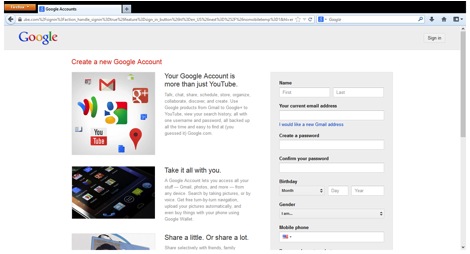
3. Fill in the Name, Your current email address, and all the fields on the right side of the screen.
Unfortunately, each of these fields is mandatory for creating a channel.
4. Check the box at the bottom of the page to agree to the Google Terms of Service.
5. Click the blue Next Step button at the bottom of the page. The Verify Your Email Address screen will
appear.
6. Click the blue Verify Now button. The Your Profile setup page will appear. (You may be asked to
respond to an email or text message before the page appears.)

7. You can Add Profile Photo at your convenience. To continue, click the blue Next Step button. A
Welcome screen will appear.
8. Click the blue Back to YouTube button. You will be redirected back to YouTube.

9. In the top right corner of you screen, you will see your name, a photo icon and a small triangle. Click the
small triangle. A set of YouTube and Google Account options will appear below.
10. Under the YouTube options click the My Channel link. Congratulations, your new YouTube channel
will appear!
Once you create a YouTube Channel, you’ll notice that you’ll be able to keep track of all your video activity, including videos that you’ve liked or music playlists you’ve saved.
HOW TO CREATE CHANNEL ART FOR YOUTUBE
You’ll notice an unattractive gray area at the top of your YouTube channel page. You can turn this unattractive gray area into a catchy and alluring image. Uploading an image is easy – just click the Add Channel Art button in the center of the screen, drag an image into that field and click the Select button.
The part that’s not easy is getting your channel art to look good across multiple computers, tablets and smartphones. Each of these platforms displays your channel art images differently. YouTube does offer a handy set of YouTube channel art tips that explains the differences between these displays, and how to best format your image to satisfy these requirements. If you want to make sure there won’t be any formatting issues across multiple screens, create a 2560 x 1440 px image that fits into the YouTube art template that can be found on the YouTube tips page. Then drag and drop that image into the gray bar on your YouTube channel. If you’re not feeling so inspired, you can find some great sample channel art and templates at YourTubeTheme.com and MyTubeDesign.com. Read more here:
http://www.real.com/resources/create-youtube-channel/
Sunday, 13 October 2013
Sunday, 6 October 2013
Sunday, 29 September 2013
How To Motivate Yourself and Improve Focus, Organization and Productivity to Reach Your Goals

At one time or another, not to say all the time, we are faced with a task whose outcome promises to yield many rewards, but whose execution is, to say the least, prone to procrastination. So if the project's payout is attractive enough, what can we do to overcome the laziness that slows us down?
Let us first agree on one basic premise: everyone’s definition of success is different, both quantitatively and qualitatively. Due to the subjective nature of success, the truly self-motivated will often redefine success over time, setting new goals based on the milestones reached and especially the checkpoints missed. If our drive to success takes us down the path of one of humanity’s most abused metaphors - a long and winding tunnel sporting a brightly lit exit - then our motivation is similar to a GPS navigation tool’s ability to retrace the most efficient route every time we take a not-so-brightly-lit exit out of the tunnel, or in this case, out of a project.
Put more simply, motivation is what allows us not to lose focus while remaining pragmatic. In that sense it will forever nurture its relationship of interdependency with one’s definition of success, whereby one is useless without the other and whereby Les Brown is right in stating that “Wanting something is not enough. You must hunger for it. Your motivation must be absolutely compelling in order to overcome the obstacles that will invariably come your way”.
At the end of the day, motivation is a straightforward chess game with one unusual twist: one faces off against oneself. As one should do ahead of every strategy game, we have identified the steps that will allow you to keep focus, retrace the most efficient route after every missed exit as well as pick and win your battles on the exciting road to victory.
Consciously realize that you can't escape or outrun the task.
When people have undesirable work they need to complete, their minds sometimes persuade them subconsciously that if they wait just long enough, they won't actually have to do what they've been dreading. It's as though there's a shred of hope secretly at work; if I don't take out the trash, start this business or work on my class paper, some external event might eventually require me not to go follow through. It could start raining, so I’ll take the trash out in the morning; a competing business might implement my idea, so it might be too risky to invest time and money; and a classmate might have already written a portion of my paper, so why do double the work.
Unfortunately, these are just fantasies. Tasks or goals never get any easier with procrastination; they accumulate and become more stressful as time pressure increases. You must realize that you can't outrun anything and should adopt a “now is the best time” mindset instead.
Always give yourself a prize for beginning the task and a prize for finishing it.
Personal favorites of mine are to promise myself a reward, such as a Chai Latte, before I start writing an article or post, and to promise myself a 15-minute break from work every hour I spend focused and committed to finishing my writing. Use whatever prizes you enjoy most, and whatever is inexpensive and mostly likely to motivate you. These promises should be guaranteed and set in stone, because if you don't actually reward yourself when you promise yourself you will, you will be less motivated by the Prize Promise the next time you have a big task to do.
Break it down into micro-steps that are easy to do.
Let's face it: nothing is more terrifying than having a huge task looming in front of you that will take a hundred hours to complete. An easy way to combat this is to break it down into accomplishable micro-steps. How tiny does the micro-step have to be? So insanely tiny that it would be ridiculous to your brain not to do it.
For example, resolve to spend 1 minute writing your PhD dissertation’s thesis. Promise yourself you won't write the whole dissertation today - you'll just write an outline, and you'll only spend 20 minutes maximum on it. Your mind will be deceived into being productive. For most people, once you get into the rhythm of your work, you can easily spend 2 hours focused on accomplishing more than what you originally set out to do.
Make the task more pleasant in creative ways.
When someone is unmotivated, they understand the benefit of doing something but fear the emotional unpleasantness it entails. Through past conditioning, your lazy side has categorized your responsibilities as “bad”, “tedious” or “horrible”. An easy way to combat this innate categorization is to make the unpleasant task a source of genuine enjoyment with the addition of a little creativity. For example, you know you're supposed to eat your greens. You know you're supposed to exercise. But it's not fun, and it’s that initial “getting up and going to the gym” that prevents you from working out.
So use Pavlovian conditioning and watch it work its magic. Try listening to your favorite music on your iPod while you go jogging, or switch to an exercise routine that you actually enjoy, such as Zumba, yoga, or swimming, instead of forcing yourself to do something you think you hate.
If you always do your homework in a cold, dark corner of the library, pick a coffee-shop that has a nice atmosphere and your favorite cookies you could look forward to. And instead of forcing yourself to stomach a bitter spinach salad every day, try making a cucumber smoothie with cucumbers, frozen pineapple chunks, and coconut milk - it will have just as many nutrients as the spinach salad, but taste leagues sweeter.
Soon enough, your friends will wonder why you've lost 20 pounds and your skin is glowing, and you'll realize you've suddenly been eating a lot more veggies than you used to. This end result will combine positive reinforcement to encourage you to continue your good habits.
Sunday, 22 September 2013
Sunday, 15 September 2013
Sunday, 8 September 2013
Sunday, 1 September 2013
Sunday, 25 August 2013
Monday, 19 August 2013
Saturday, 17 August 2013
Thursday, 15 August 2013
How to Make a Marketing Video: A Beginner's Guide
When people talk about inbound marketing, most agree that in theory, video is a great tool to attract new visitors, connect and engage with your leads, and delight your loyal customers ... but most marketers would say actually doing video is a whole other ball game.
Why are we so afraid of doing video? Most of us get paralyzed by the "no time, too hard" fallacy. We convince ourselves that we need fancy camera equipment and editing software to make video work ... and there is no way that is happening with our current budget. Plus, we're trying to juggle a ton of other marketing activities, so video seems like a luxury we can't afford.
But video doesn't have to be hard or time consuming. If done right, video can be made quickly and easily -- all while supercharging your engagement and click-through rates. Plus, video is easy to digest and it lets you inject personality into your message. When it’s genuine, video can make people smile and laugh, and this makes them more likely to share your message with their friends.
So, it's time for all of us to get over our fears of video. To help explain why video is so crucial to your inbound marketing and give you tips for getting started with video today, my team at Wistia teamed up with our friends at HubSpot to film the video below. (Kind of meta, right?) This video will be the first in a series about how to use video in your inbound marketing -- so stay tuned for more posts in the series.
After you're done watching the video, check out the "Quick Wins" below -- five quick actions items that will help you get your very first video out the door. Who knows ... this time next week, you could have your very first video up! So let's dive right in:
Ready to start creating videos? Here are 5 quick wins you can knock off your to-do list today:
1) Define your audience.
Before you start to script or shoot anything, establish who you want to reach. Are you trying to attract certain buyer personas? New visitors or returning leads? Or are you trying to engage your evangelists, who may never buy your products at all? Knowing who you create videos for is crucial to your success down the road.
2) Define your goal -- and limit yourself to one!
Decide whether you’re trying to bring the audience you defined in Step #1 into the top of your funnel, engage with them in the middle of your funnel, or close them at the bottom of your funnel -- and then create your videos to help accomplish that goal.
3) Pick a topic that has done well in a different content format and turn it into a video.
Repurpose content that you've already created, like a blog post or presentation, and turn the main ideas into a one- or two-page script. Then, practice reading it out loud. As you read, look for places that don’t sound right coming out of your mouth and edit them to sound more conversational. Share the script with others and edit some more.
4) Record yourself reading your script.
Use a webcam, iPhone, or whatever tools you already have -- most people will forgive production quality if you have great content.
5) Embed your video on your blog, website, or share the link on your social networks.
Use your analytics and get feedback from your target audience to find out what people liked and what they found confusing. Then, you can use your metrics and feedback to make your next video even better.
Realistically, you could achieve these five wins in a couple days if you remember not to sweat the details. Just get your first video out into the wild -- then iterate in future videos. You'll be a video pro in no time!
Subscribe to:
Comments (Atom)